

Failed payments and the grace period
What happens when FieldQuo cannot charge your card: seven days of read-only access, two emails, a banner, and how to get everything back in about a minute.
ਇਹ ਲੇਖ ਫ਼ਿਲਹਾਲ ਅੰਗਰੇਜ਼ੀ, ਫ਼ਰਾਂਸੀਸੀ ਅਤੇ ਸਪੈਨਿਸ਼ ਵਿੱਚ ਉਪਲਬਧ ਹੈ। ਤੁਸੀਂ ਅੰਗਰੇਜ਼ੀ ਸੰਸਕਰਣ ਪੜ੍ਹ ਰਹੇ ਹੋ। Français · Español
A card fails for dull reasons — it expired, the bank put a fraud hold on it, the limit was reached. When that happens on your FieldQuo subscription, nothing is deleted and nobody is thrown out. The account goes read-only for 7 days: everyone can still open every quote, invoice, client and photo, but nobody can create or send anything new. Update the card and everything comes back the moment the payment goes through.
This article is the whole of that seven-day window: what you see on the screen, which emails FieldQuo sends and when, how to fix the card, and what happens if the seven days run out.
Overview
Your subscription is billed by Stripe on your plan's cadence. When a charge fails, Stripe tells FieldQuo, the plan's status becomes Overdue, and a clock starts on that day. For 7 days the account is read-only. On the eighth day it locks: the only screen anyone can open is Account & Billing, plus Help. Paying restores full access at once, whichever day it is.
The clock starts on the first failed charge and does not restart if a later attempt fails too. If Stripe eventually gives up and ends the subscription, the account is treated as cancelled instead, which has its own, longer window — see Cancel your subscription.
Read-only is enforced on the server, not by hiding buttons. Any attempt to save, send or create during the window is refused with a message that says how many days are left and that nothing has been deleted.
What you see during the window
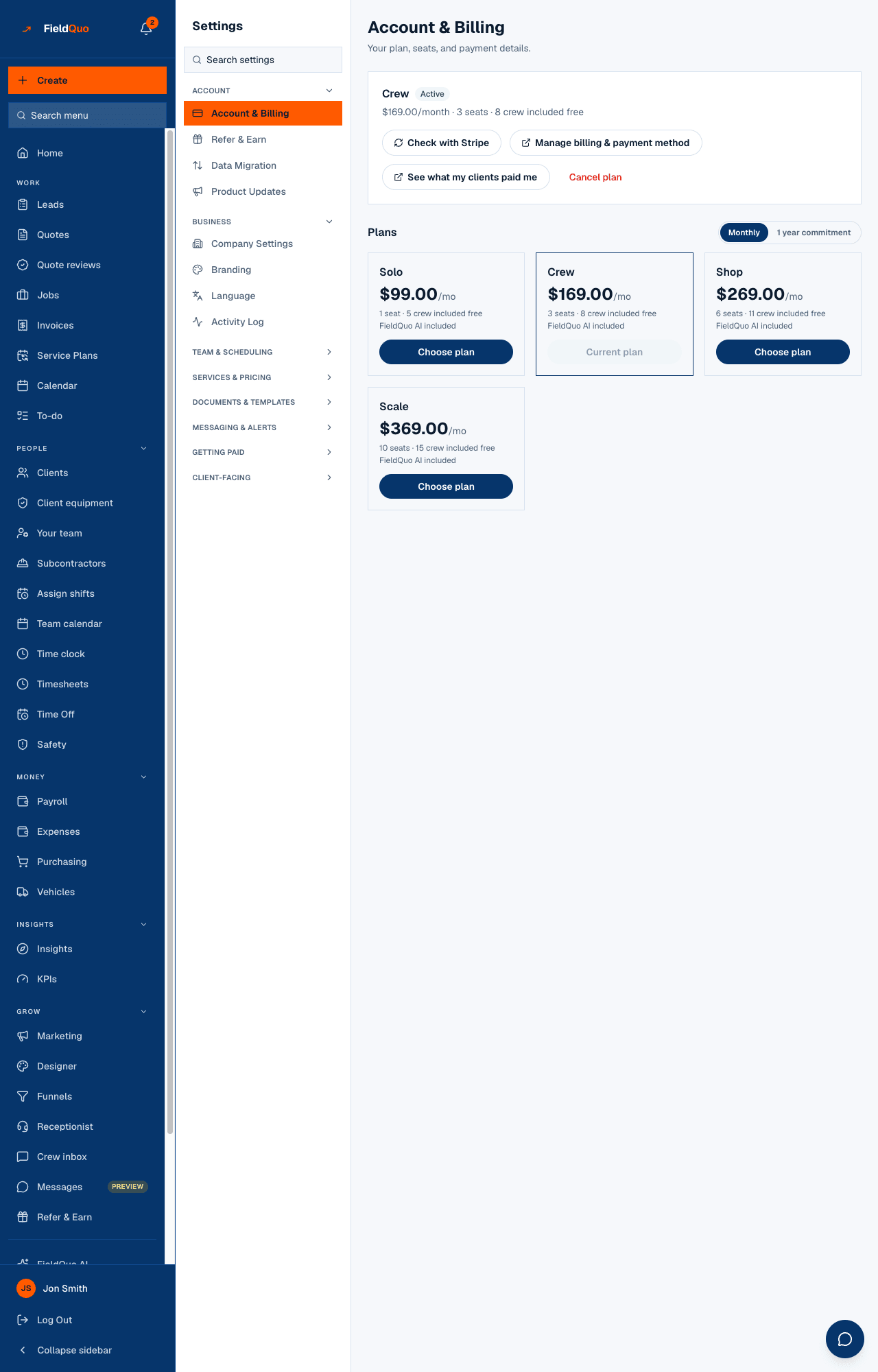
- On Account & Billing — the plan card's status badge reads Overdue in red, next to the plan name.
- A banner across the top of every screen — amber while there are more than two days left, red when there are two days or fewer, reading that the payment did not go through and how many days remain, with an Update card link. Everyone on the team sees it, not just the owner.
- Two emails from FieldQuo — one the day the window opens, saying the card could not be charged, that the account is read-only and that nothing has been deleted; and one reminder when two days or fewer remain, naming the exact date the account locks. There is no daily nag in between, and both are sent in English.
- After the seventh day — a full-page notice that the account is locked, with an Update my card button. It says, in its own words, that nothing has been deleted.
How to update the card
- Open Settings → Account & Billing (the same screen as Plan in the main sidebar). Only an owner or administrator can open it.
- Press Manage billing & payment method. Stripe's billing portal opens on FieldQuo's behalf; add the new card or fix the old one there.
- Come back. FieldQuo asks Stripe what changed the moment you return and updates the plan card. If the badge still reads Overdue, press Check with Stripe a little later — Stripe collects the outstanding payment on its own schedule once a working card is on file.
- When the payment succeeds the status returns to Active, the banner disappears, and the seven-day clock is cleared — a later problem gets a fresh seven days, not the leftover of this one.
Fixing the card takes about a minute and can be done from a phone. If you cannot pay right now, the Help link still works in the locked state — write to us rather than waiting for the clock to run out.
The timeline
| When | What happens |
|---|---|
| The charge fails | Status becomes Overdue. The account is read-only from that moment. The clock starts. |
| The same day, or the next morning | The first email goes out — the daily check runs once a day, so it can arrive up to a day after the failure. |
| Two days or fewer left | The banner turns red and the one reminder email is sent, naming the lock date. |
| Day 8 | The account locks. Reads stop too; Account & Billing and Help stay open. |
| Any day the payment succeeds | Full access returns immediately. Nothing was deleted at any point. |
Who can see it, and who can fix it
The banner and the read-only state apply to everyone in the company — an estimator cannot send a quote during the window any more than the owner can. Fixing it is owner-and-administrator only, because the payment method belongs to the company: the Manage billing & payment method button and the Account & Billing row are hidden from every other level, and the server refuses them the same way. The emails go to the company email address, or the owner's when there is none.
ਅਕਸਰ ਪੁੱਛੇ ਜਾਂਦੇ ਸਵਾਲ
Is my data deleted if the seven days run out?
No. A locked account is inaccessible, not erased. Quotes, invoices, clients, jobs and photos stay exactly where they are, and paying restores them instantly.
Can my clients still pay me during the window?
Yes. Their quote links, portal and invoice pay pages are public pages with no billing gate, and their payments still reach your own Stripe account. What you cannot do is send, edit or chase anything until the card is fixed.
Why did the first email arrive the day after the card failed?
The check that sends it runs once a day. The account went read-only the moment the charge failed; the email caught up on the next run.
ਕੀ ਇਹ ਮਦਦਗਾਰ ਸੀ?