

Book a visit for a client
The two forms — Add visit on a job, and New Appointment on the calendar — step by step, with what each field does and who may fill it in.
ਇਹ ਲੇਖ ਫ਼ਿਲਹਾਲ ਅੰਗਰੇਜ਼ੀ, ਫ਼ਰਾਂਸੀਸੀ ਅਤੇ ਸਪੈਨਿਸ਼ ਵਿੱਚ ਉਪਲਬਧ ਹੈ। ਤੁਸੀਂ ਅੰਗਰੇਜ਼ੀ ਸੰਸਕਰਣ ਪੜ੍ਹ ਰਹੇ ਹੋ। Français · Español
There are two ways to put a client on the calendar yourself, and the difference is whether a job exists. If it does, book a visit on the job: it carries the crew's checklist and photos, and it is what makes the job appear in the crew member's list. If there is no job yet — a first look, a callback — book an appointment from the calendar.
A third way needs nothing from you: the client books a slot on your booking page, and it lands on the calendar on its own.
Overview
Both forms ask for the same core — when, and who is going — and differ in what surrounds it. The visit form adds notes for the crew and a checklist; the appointment form adds the site address and the supervisor tick. Neither asks for a price: nothing about money is decided when a visit is booked.
How to book a visit on a job
- Open the job and press Add visit in the Visits card, or Schedule a visit in the purple banner on a job that still needs a date.
- Under When, pick the date and time. It is required.
- Under Who is going, pick a team member or leave Not assigned yet. An unassigned visit can be claimed and completed by anyone.
- Add Notes for the crew — “Gate code, where to park, who to ask for”. They show on the visit on the job page.
- Tick This is a return to fix or check something from earlier on this job if that is what it is; it then asks Why are you going back? and counts toward your rework/callback rate unless the reason is “not our fault”.
- Under Checklist, tick one or more of Your checklists or the Starter lists for your trades — the crew gets its own tickable copy — then press Schedule visit.
Booking a visit on a job in Needs a date moves the job to Scheduled on its own, and puts the assignee in the job's chat room — see A chat room for every job.
How to book an appointment
- Open Calendar and press New Appointment.
- Type the Client name. FieldQuo looks for an existing client with that exact name and uses them; otherwise it creates a new client with that name, which needs client-editing access.
- Pick Date & time.
- Type the Location — the site address. A callback has none.
- Tick Requires a senior supervisor on site when only an owner, administrator or supervisor may take it. Left unassigned, the appointment shows as Supervisor required until a supervisor is put on it.
- Under Assign to, pick a person or leave Unassigned, then press Create Appointment.
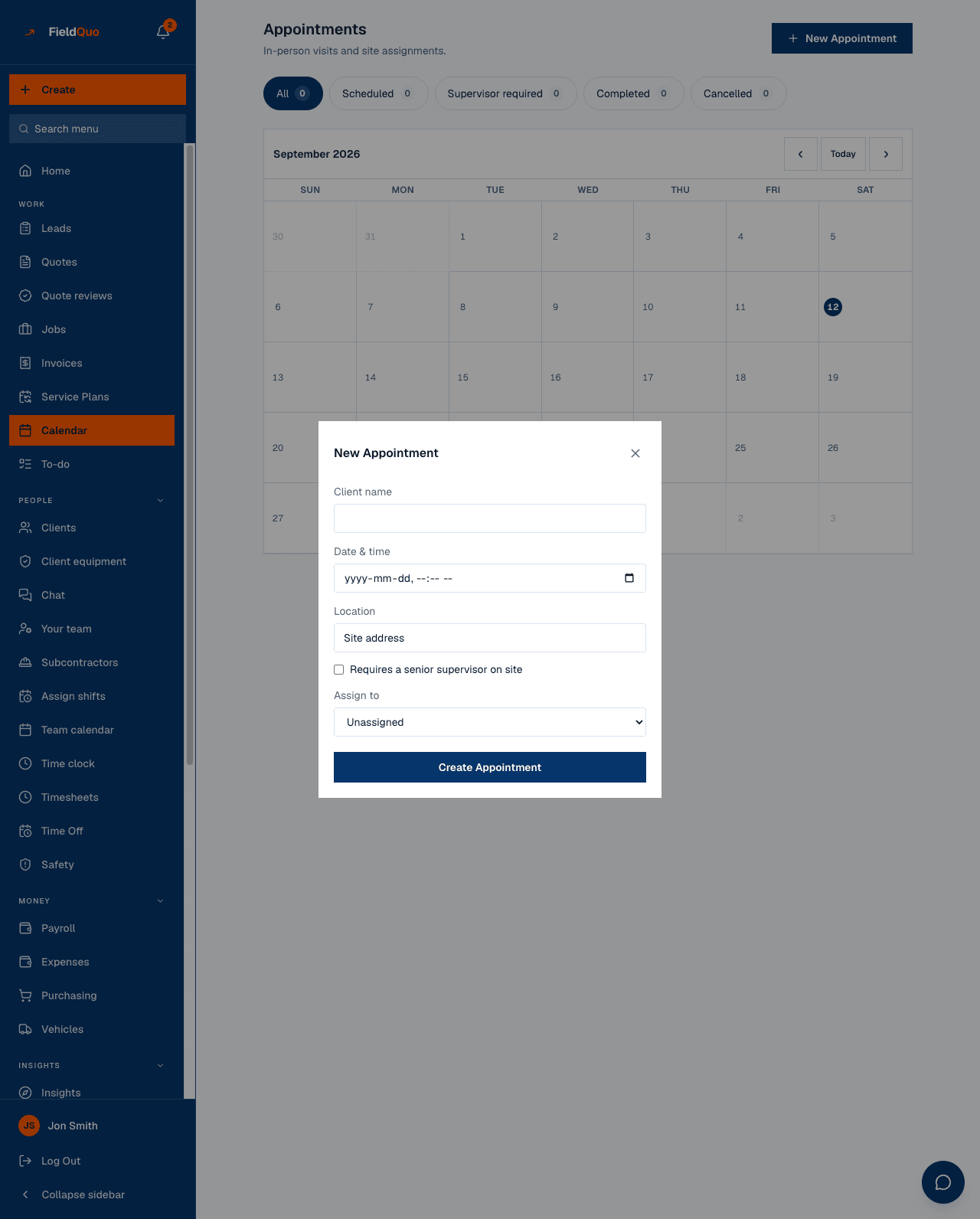
This form creates an appointment, not a job. It sends the client nothing at the moment of booking; the appointment reminder text, if you have turned it on, goes out before the time — see Appointment reminders.
Or let the client book
Your booking page offers the event types you set up under Settings → Booking Page, only at times you can actually reach, and takes a visit fee when the event type has one. A confirmed booking becomes an appointment on the calendar, assigned to the person whose calendar it is; the client gets a confirmation email with a link to move or cancel it themselves.
Share the booking link or embed the calendar on your own site — see Embed booking and quote forms on any site and Booking fees and visit deposits.
Who can book what
- A visit on a job: anyone who can open the job — including Crew on their own jobs — for themselves or unassigned. Putting somebody else's name on it needs an owner, administrator or supervisor.
- An appointment: every level can create one for themselves or unassigned; assigning it to another person needs an owner, administrator or supervisor.
- A new client from the appointment form: Estimator and above. Crew read No client named … is on file, and your access level doesn't allow you to add one.
- A supervisor-required appointment can only be assigned to an owner, administrator or supervisor — see Visits that need a supervisor.
ਅਕਸਰ ਪੁੱਛੇ ਜਾਂਦੇ ਸਵਾਲ
Can I book two visits on one job?
Yes — as many as the job needs. The Visits card counts them (“1 of 3 complete”) and each has its own date, person and checklist.
Does booking a visit tell the client?
No. Nothing is sent when a visit is booked. The client hears from you when the crew presses On my way, and either kind can get a reminder text if reminders are on. Moving or cancelling one later does offer to email the client.
Why is there no duration on the visit?
A visit has a start and no end. Only a booking made through the booking page carries an end time, which is why the drive-between-stops verdict on the calendar is only given after a booking.
ਕੀ ਇਹ ਮਦਦਗਾਰ ਸੀ?