

The dashboard: what is waiting on you
Home opens with what needs a person today, then this month's revenue, four tiles, and the detail underneath — each figure shown only when it is known.
Sa ngayon, available ang artikulong ito sa Ingles, Pranses at Espanyol. Binabasa mo ang bersyong Ingles. Français · Español
Dashboard — Here's what's happening with your business. The page answers one question first — what is waiting on you today — then shows the money figure, four supporting tiles, and everything else below a line called The detail.
A figure that is not known is not shown. A member without the see-prices switch gets no revenue tile rather than a tile reading zero, because “$0 this month” is a statement about the business, not a blank.
Overview
Every number on the page comes from the same sources as the Invoices and Quotes lists — nothing is computed twice. The three buttons under the tiles are + New quote, View Clients and Schedule Appointment; the first one appears only for someone who may create quotes.
Waiting on you
The first block, above everything, holds the only content on the page that is waiting on the reader. It renders itself away when there is nothing, so a quiet company is not accused of a backlog.
- Overdue invoices, by client and amount, up to five, each with N days past due and a Chase payment button that emails the client a payment request there and then. More than five shows N more overdue, linking to Invoices.
- N waiting for you to approve the price — instant estimates that need a person before they can be sent. Opens Quote reviews.
- N from your receptionist — nothing done yet — calls the phone receptionist took that nobody has acted on. Opens Receptionist.
- The next appointment the receptionist booked, if there is one. Opens Calendar.
An invoice with no due date is not overdue and never appears here. The block says what is late, not what is owed.
Revenue this month, and the four tiles
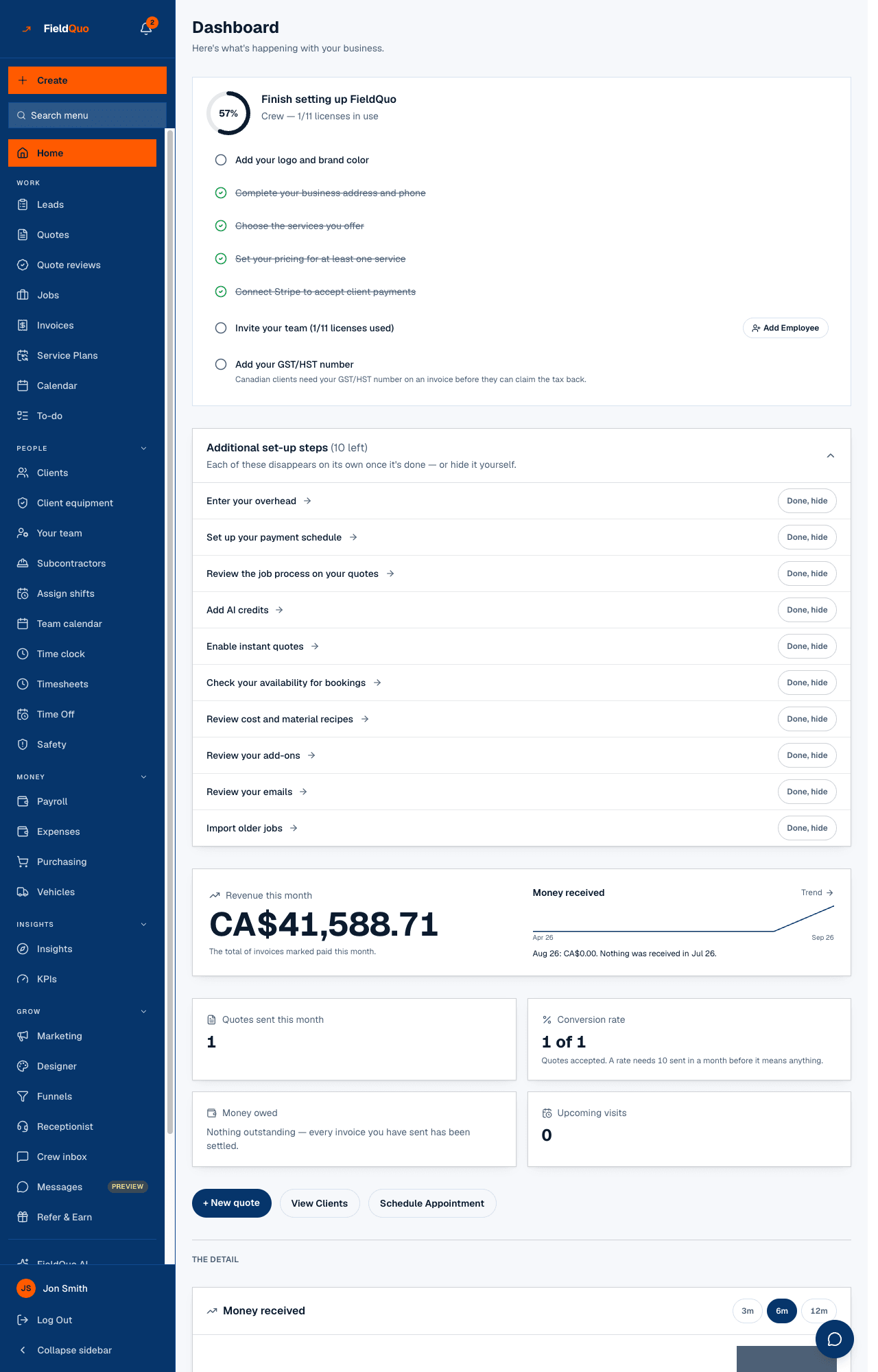
Revenue this month is the total of invoices marked paid this month; the sparkline beside it draws the money that actually landed, month by month, and the Trend link opens that chart. A sentence under it compares the last two complete months — never a part-month against a whole one.
| Tile | What it counts |
|---|---|
| Quotes sent this month | Quotes created this month that have gone out — sent, and since accepted or declined — with how many more or fewer than last month. |
| Conversion rate | % of sent quotes clients accepted, shown as “accepted of sent”. |
| Money owed | Every unpaid invoice's balance, and how much of that is past due. |
| Upcoming visits | Visits ahead on the calendar. |
A conversion rate needs 10 quotes sent in the month before it is printed. Below that the tile shows the counts only — 50% off two quotes is a number you would act on and should not.
The detail
- Money received — a bar chart of payments by the month they were received, switchable between 3, 6 and 12 months. The caption says it is a different measure from the revenue tile.
- Money owed — the receivables ladder: not yet due, 1–30, 31–60, 61–90 and 90+ days, then each owed invoice with its contact, its last chase, and a Chase payment button. A line says whether an automatic overdue reminder is set up, with Set one up or Change it.
- Revenue goal — a yearly target and whether you are ahead of or behind pace. Owners and administrators set it. The revenue goal.
- Bookings held for a visit fee that has not landed, and a Data migration notice when FieldQuo has quoted a migration for you.
- Recent Quotes and Upcoming Appointments, each with View all.
The two set-up cards — Finish setting up FieldQuo and Additional set-up steps — sit between the first block and the revenue figure until they are done. See Your first day.
Who sees what
Revenue, quotes sent, conversion and money owed need the See prices switch; a crew member sees Upcoming visits and their own appointments. Chase payment needs edit access to invoices. The revenue goal can be set by owners and administrators; everyone else with prices sees it. Everything else on the page follows the same rules as the list it links to. See The dashboard in detail.
Mga madalas itanong
Why does Revenue this month not match Money received?
They answer different questions. The tile totals invoices marked paid this month; the chart counts payments by the month they arrived. A December invoice paid in January is in January's bar.
Why is there no percentage on my conversion tile?
Fewer than 10 quotes were sent this month. The counts are shown instead; the percentage appears once the sample is big enough to mean something.
Why is a tile missing altogether?
The figure is not known — either your access level does not include prices, or the request failed and a Retry is offered above the tiles. Nothing is ever shown as zero in its place.
Nakatulong ba ito?