

Connecting Stripe and getting verified
Settings → Payments, step by step: Connect with Stripe, what the page shows while Stripe checks your details, and what Active, Paused and Held mean for your money.
Sa ngayon, available ang artikulong ito sa Ingles, Pranses at Espanyol. Binabasa mo ang bersyong Ingles. Français · Español
Online payments run through a Stripe account held in your company's name. Settings → Payments creates it, sends you to Stripe's own secure pages to fill it in, and then tells you — in plain words — whether Stripe is taking cards for you yet and whether it is paying out to your bank. FieldQuo never sees or stores your bank details; that information goes directly to Stripe.
Overview
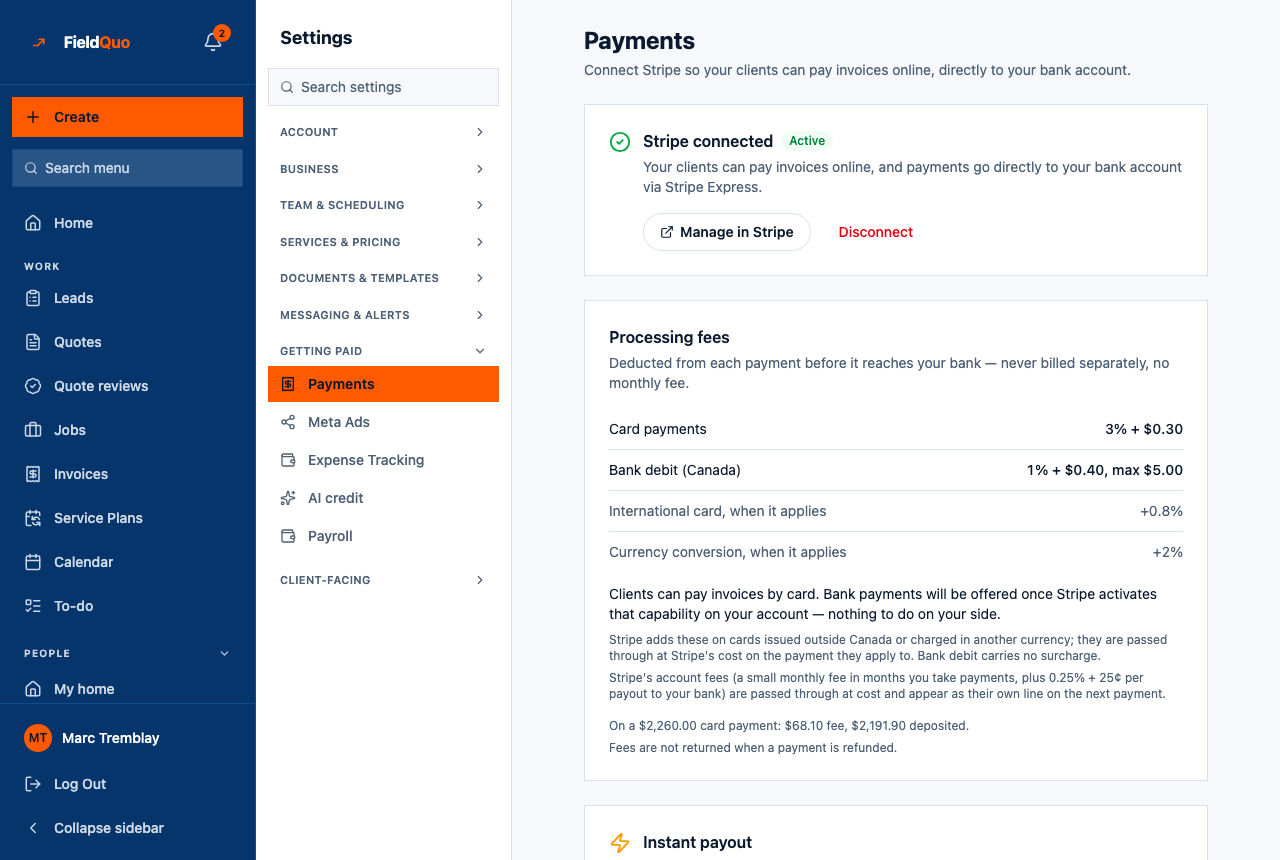
The page heading reads Payments — Connect Stripe so your clients can pay invoices online, directly to your bank account. The first card is the connection itself, in one of four states: not connected, in progress, under review, or Stripe connected · Active. Below it sit the Processing fees card, the Instant payout card, Your Stripe account and the Offer pay-over-time (Affirm) switch.
How to connect
- Open Settings → Payments. The card reads Not connected yet — Stripe handles the actual payment processing — you'll enter your bank details on Stripe's own secure page, not here.
- Press Connect with Stripe. FieldQuo creates an Express account for your company and sends you to Stripe's onboarding.
- Fill in what Stripe asks for — business details, identity, a bank account for payouts — and accept Stripe's terms. See What Stripe asks for, and why.
- You return to Settings → Payments, which re-reads the account from Stripe. If you left partway, the card reads Stripe still needs a few things and lists them, with Finish Setup and I've already done this.
- Once everything is in, the card reads Stripe is reviewing your details with Check again. When Stripe switches charges on, it becomes Stripe connected · Active and every invoice email gains a Pay online button.
Taking payments and being paid are two switches
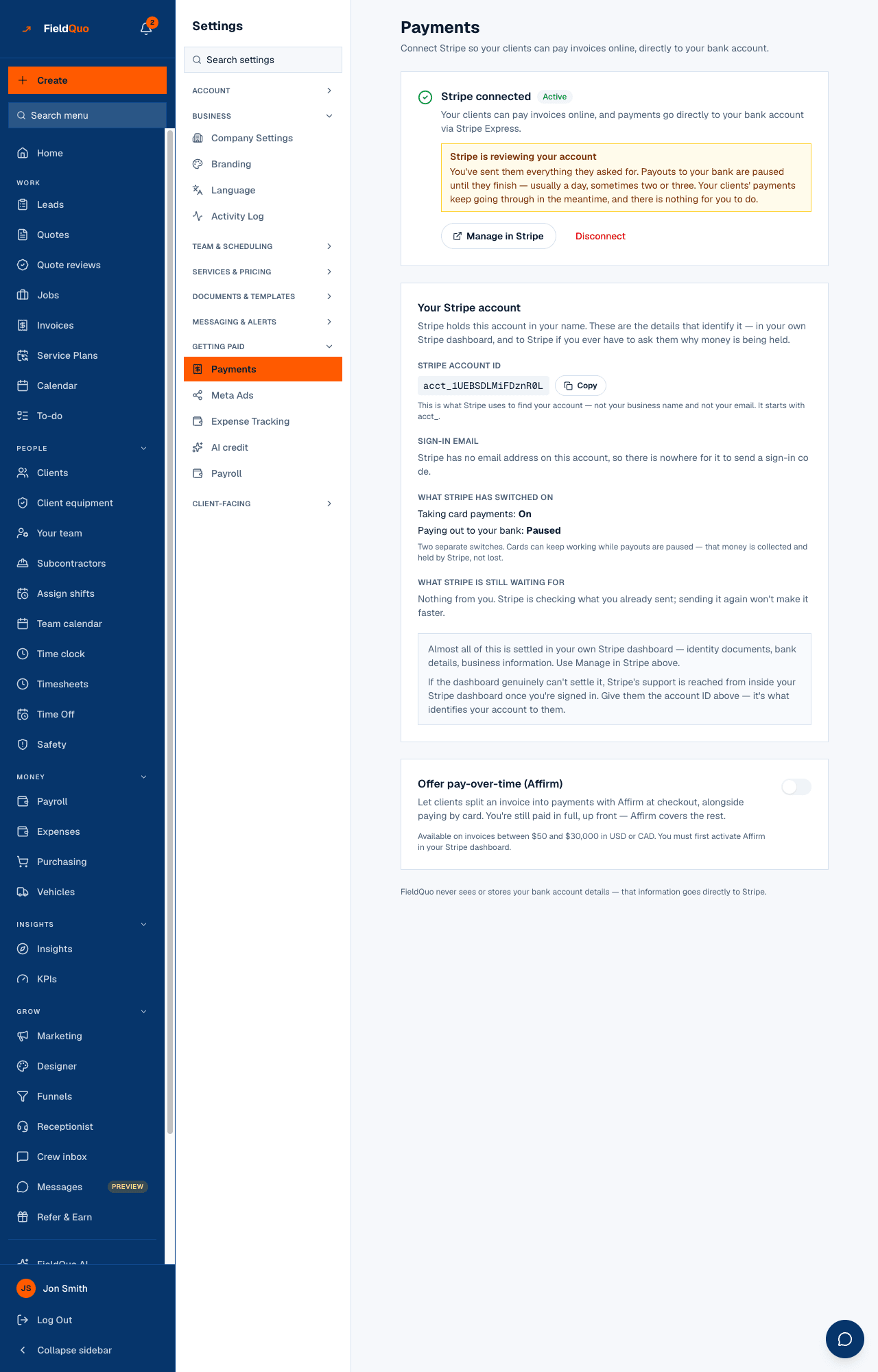
Your Stripe account shows What Stripe has switched on: Taking card payments: On/Off and Paying out to your bank: On/Paused. They are separate. Stripe can keep accepting your clients' cards while payouts are paused — the money is collected and held by Stripe, not lost.
| What the page says | What is happening | What to do |
|---|---|---|
| Stripe is reviewing your account | You sent everything; Stripe is checking it. Payouts are paused, usually a day, sometimes two or three. Clients' payments keep going through. | Nothing. Sending documents again will not make it faster. |
| Stripe is holding your money | Charges are on but payouts are off because Stripe still needs something from you. Stripe's reason: is printed underneath in plain words. | Press Manage in Stripe and finish what it asks for. See Payouts held or under review. |
| Stripe still needs a few things | Onboarding is unfinished; charges are off, so no Pay button yet. | Finish Setup, or I've already done this if you completed it on Stripe's side and FieldQuo has not caught up. |
The other controls on the page
- Manage in Stripe opens your Express dashboard in a new tab: payouts, documents, bank details, support. Stripe emails a sign-in code to the Sign-in email shown on the page.
- Copy beside the Stripe account ID (it starts with acct_) — what Stripe uses to find your account when you contact them. Shown to the owner only.
- Disconnect unlinks Stripe from FieldQuo: clients cannot pay online until you reconnect. It does not delete or close your Stripe account and changes nothing about your past payout history.
- Offer pay-over-time (Affirm) lets clients split an invoice at checkout while you are paid in full up front. Available on invoices between $50 and $30,000 in USD or CAD. Switching it on asks Stripe to enable Affirm on your account — there is nothing to set up in Stripe — and the line under the switch shows Stripe's answer. See Pay-over-time financing.
- Processing fees and Instant payout are explained in Payment processing fees and payouts and Instant payouts.
Who can see it
Settings → Payments is for the owner and administrators only — the row is hidden from everyone else and the routes behind it refuse them. The account ID and sign-in email are narrower still: the owner only, because they are the pair of values that let someone tell Stripe “this account is mine”.
Mga madalas itanong
How long does verification take?
Usually minutes, occasionally a day or two. The page says Stripe is reviewing your details while it happens; Check again re-reads the account.
I already have a Stripe account. Can I use it?
Not today. FieldQuo creates an Express account for the company and links that one; there is no way to attach an existing account.
Clients are paying but nothing reaches my bank.
Look at Paying out to your bank on this page. Paused with a review notice means wait; Paused with Stripe is holding your money means open Manage in Stripe and finish what it lists.
Nakatulong ba ito?