

Quote types and takeoffs
Settings → Services & Pricing: the quote types you turn on, the four ways a type prices — takeoff, unit grid, tiers or questions — the rate card behind each, and custom types.
Sa ngayon, available ang artikulong ito sa Ingles, Pranses at Espanyol. Binabasa mo ang bersyong Ingles. Français · Español
A quote type is what a service tile in the builder stands for: a kind of work, the questions it asks, and the rate card it prices from. Settings → Services & Pricing is where you turn types on and off, set the rates, and write what the quote says about each one. The tiles on New Quote are exactly the types that are on here.
Some types price from a takeoff — a structured form that measures the job and writes the lines for you. Others price per unit, from a menu of tiers, or from a short set of questions and a flat rate.
Overview
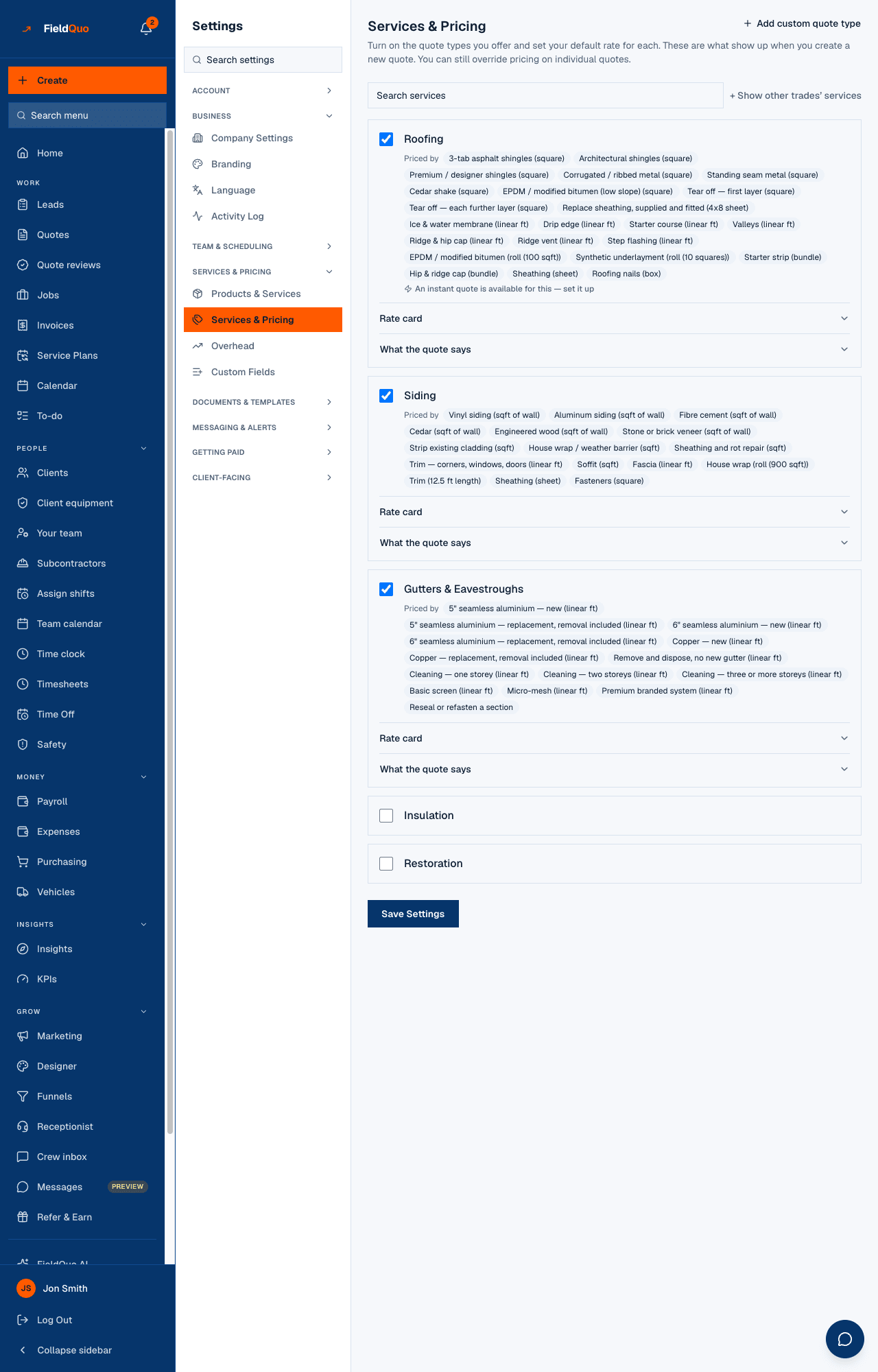
The screen reads Services & Pricing — Turn on the quote types you offer and set your default rate for each. These are what show up when you create a new quote. You can still override pricing on individual quotes. It lists the types for the industries you picked at signup; + Show other trades' services opens the whole catalogue of about seventy.
Rates never leave this screen. The public quote form offers your enabled services and their questions, never a price; that rule is fixed.
What is on the screen
One card per quote type:
- A checkbox — on means the type has a tile in the builder and appears on your public quote form.
- Priced by — chips naming what the type charges by (3-tab asphalt shingles (square), Per door, Vinyl siding (sqft of wall)). A type quoted from a supplier's invoice has no per-unit basis and shows none.
- Rate card — a collapsible grid of your rates for the main scope, with Reset to defaults. A customised chip shows when any rate is yours rather than the default.
- What the quote says — the wording the client reads for this trade: What this service is, What's included, How the job runs. Leave a field empty to keep inheriting FieldQuo's default.
- Homeowners can get an instant price for this or An instant quote is available for this — set it up — the trade's instant estimate, linking to Settings → Instant Quotes.
- For a type with no rate card: a Rate box and a per unit, plus Add standard items to Products & Services where the trade ships a standard set of extras.
The four ways a type prices
| How it prices | Which types | What you fill in on the quote |
|---|---|---|
| Takeoff — a measured form that writes the lines | Interior and exterior painting, flooring, stairs, countertops, roofing, siding, gutters, insulation, paving, driveway sealing, garage doors, snow removal, home inspection | Areas, surfaces, squares, linear feet, the items on the job. Each becomes a line with its measure in the description, priced from the rate card. |
| Unit grid — per door, per drawer front, with complexity | Cabinet refinishing, cabinet refacing | Counts and the door material; the complexity picked on the quote moves the rate. |
| Tiers — a menu of packages | Junk removal (Load Size), auto detailing, chimney sweep | One tier; its price is the line. |
| Questions and a rate — the intake fields and a flat or per-unit rate | Every other type, and every custom type | The type's questions, then lines you add by hand or from the price book. |
Sixteen trades carry a full rate card; the rest have a single Rate per unit. Whatever the method, the result is the same kind of line — a description and an amount — and the client-facing page, email and PDF read only those. Production rates, formulas and sell rates stay on your side.
How to turn a type on and set its rates
- Open Settings → Services & Pricing. Use Search services or + Show other trades' services to find the type.
- Tick its checkbox.
- Open Rate card and type your rates over the defaults. Every trade ships with FieldQuo's defaults so a new company can quote on day one; a rate you type wins over the default from then on.
- Open What the quote says if you want your own wording for what the service is, what is included and how the job runs.
- Press Save Settings. The tile appears on New Quote and the service on your public quote form.
Changing a rate changes future quotes only. A saved quote keeps the prices it was written with — its lines were frozen at save so a client's copy never reprices under them.
Custom quote types
For work none of the built-in types describes, + Add custom quote type creates your own. It says: Name it, then pick which fields it should ask for on a quote — chosen from fields already used across FieldQuo's other quote types, so it works the same way in the quote builder right away.
- Press + Add custom quote type and type a name, for example Closet Organization.
- Tick the fields it should ask — search the library with Search fields... — or tick none: No fields selected is fine too — it'll behave like a flat rate item with no extra form.
- Press Create quote type. It appears in the list with a Custom badge, a Rate box and a per unit.
- Tick it on and Save Settings.
A custom type can carry its own What the quote says wording and its own price-book items, exactly like a built-in one.
What the quote says
Under each enabled type, What the quote says holds the three paragraphs the client reads about that trade, in the language the quote is written in:
- What this service is — one paragraph describing the scope.
- What's included — a list of lines, with Add line and Remove line.
- How the job runs — named steps with a timeline and a sentence each, with Add step and Remove step.
Who can see it
The row is shown to members with the See prices switch — Estimator and above. Saving the settings and creating a custom type are owner-and-administrator actions; anyone else gets Only owners/admins can change settings from the server.
Turning a type off removes it from the builder and from your public quote form at once. Quotes already written with it are untouched.
Mga madalas itanong
Do I have to fill in the whole rate card?
No. Every field has a default, and only the ones you type over change. The customised chip tells you which cards carry your own numbers.
Can a client see my rates?
Never. The public form returns services and questions only; the takeoff, the formula and the rate card are not sent to any client-facing page.
What is the difference between a rate card and Products & Services?
The rate card prices the main scope of a trade — per door, per square, per foot — and writes the core lines. Products & Services holds one-off extras you drop on any quote. See Lines from your price book.
Why does my trade have no Rate card?
Only sixteen trades ship a full card. The others take one Rate per unit here and price their lines by hand or from the price book.
Nakatulong ba ito?