

Deposits on quotes
A deposit is a line in your payment terms that prints on every quote as a percentage card — and, with a payment schedule switched on, an invoice request that goes out by itself the moment the client approves.
Dieser Artikel ist vorerst auf Englisch, Französisch und Spanisch verfügbar. Sie lesen die englische Fassung. Français · Español
A homeowner who has just approved a job expects to be asked for a deposit; a contractor who has to remember to ask for one often does not. FieldQuo prints your deposit on the quote so the client agrees to it when they sign, and — if you switch the payment schedule on — requests it automatically on approval.
Two settings do this, and they live one above the other on Settings → Company Settings. The first only prints. The second prints and bills.
Overview
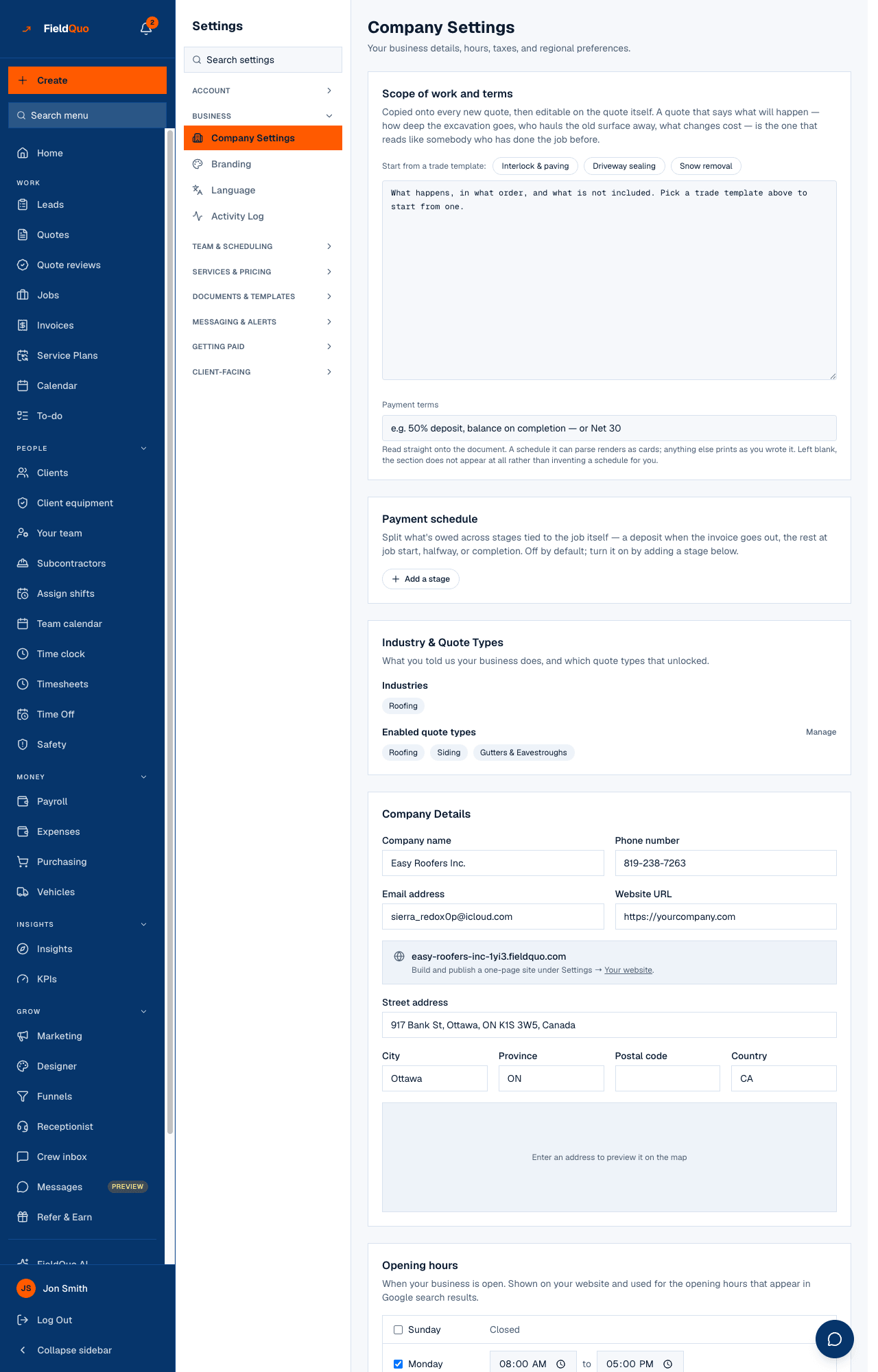
Under Scope of work and terms, the Payment terms box is free text read straight onto the document: “50% deposit, balance on completion — or Net 30”. Text FieldQuo can read as a schedule — two or more percentages adding up to about 100 — prints as cards on the approval page and the PDF; anything else prints as you wrote it; left blank, the section does not appear at all rather than inventing a schedule for you.
A deposit on a quote is not the visit fee a client pays when booking an appointment. That fee is taken on the booking page and credited against the invoice later — see Booking fees and visit deposits.
The two ways to set it
| Setting | What the client sees | What happens on approval |
|---|---|---|
| Payment terms (free text) | Your words, or percentage cards if the text reads as a schedule, on the approval page and the PDF. | A job and one draft invoice for the full approved total. Nothing is requested until you send the invoice. |
| Payment schedule (stages) | The same percentage cards, generated from the stages so the document always matches what bills. | The Deposit stage is emailed to the client at once as a request for exactly its share, with a pay link capped to that amount. Later stages fire on the job's dates. |
How to set up a deposit that bills itself
- Open Settings → Company Settings and find Payment schedule — “Off by default; turn it on by adding a stage below.”
- Press Add a stage. Set When to Deposit — when the invoice is created and sent, name it, and give it its Percent.
- Add the rest — Job start, Halfway through the job, Job end (completion) — until Total reads 100%. The save refuses anything else: “Stages must add up to exactly 100% before they can be saved.”
- Press Save schedule. The Payment terms text above is rewritten from the stages and locks, so the document and the billing can never disagree.
- To go back to free text, press Turn off — go back to free text. Jobs already running keep the stages they were given.
A stage's share is worked out from the approved total, extras included, and the deposit email carries a pay link only when Stripe is connected with charges enabled. Without Stripe the request still goes out; the client pays by whatever method you record by hand.
What happens on approval
- The job is created and a single draft invoice is raised for the approved total — one invoice per job, requested in stages, never one invoice per stage.
- Each stage becomes a row on the job with its percentage, its amount and its trigger. The deposit needs no date, so it fires immediately: an email to the client, in the quote's language, asking for that stage's amount and linking to their portal.
- The invoice is marked Sent by that first request. Stages tied to job start, halfway and completion wait for the job's dates and are recomputed when those dates move.
- A stage at 0% is waived rather than emailed — a $0 request is worse than none.
Who can set it
Settings → Company Settings, including payment terms and the schedule, needs someone who can manage the team: Dispatcher, Manager, administrators and the owner. The stage rows on a job are visible to anyone who can see that job's invoice.
Häufige Fragen
Can I ask for a deposit before the client approves?
Not from the quote. The deposit request is triggered by approval, because that is when the client has agreed to the amount. To hold a visit slot with money up front, use the booking page's visit fee instead.
Why does my quote show no payment section?
Payment terms is blank. FieldQuo prints nothing rather than inventing a schedule. Type your terms — or add a stage — under Settings → Company Settings.
The client approved and no deposit email went out.
Check three things: the schedule is on with a Deposit stage; the client has an email address; and the invoice was raised (a quote entered as a past job raises none). The stage row on the job says whether it is pending or requested, and a pending deposit is retried.
War das hilfreich?