

Activity Log
The company's audit trail: who did what and when — quotes sent, payments recorded, hours approved, access changed — read-only, newest first, for the owner and administrators.
Dieser Artikel ist vorerst auf Englisch, Französisch und Spanisch verfügbar. Sie lesen die englische Fassung. Français · Español
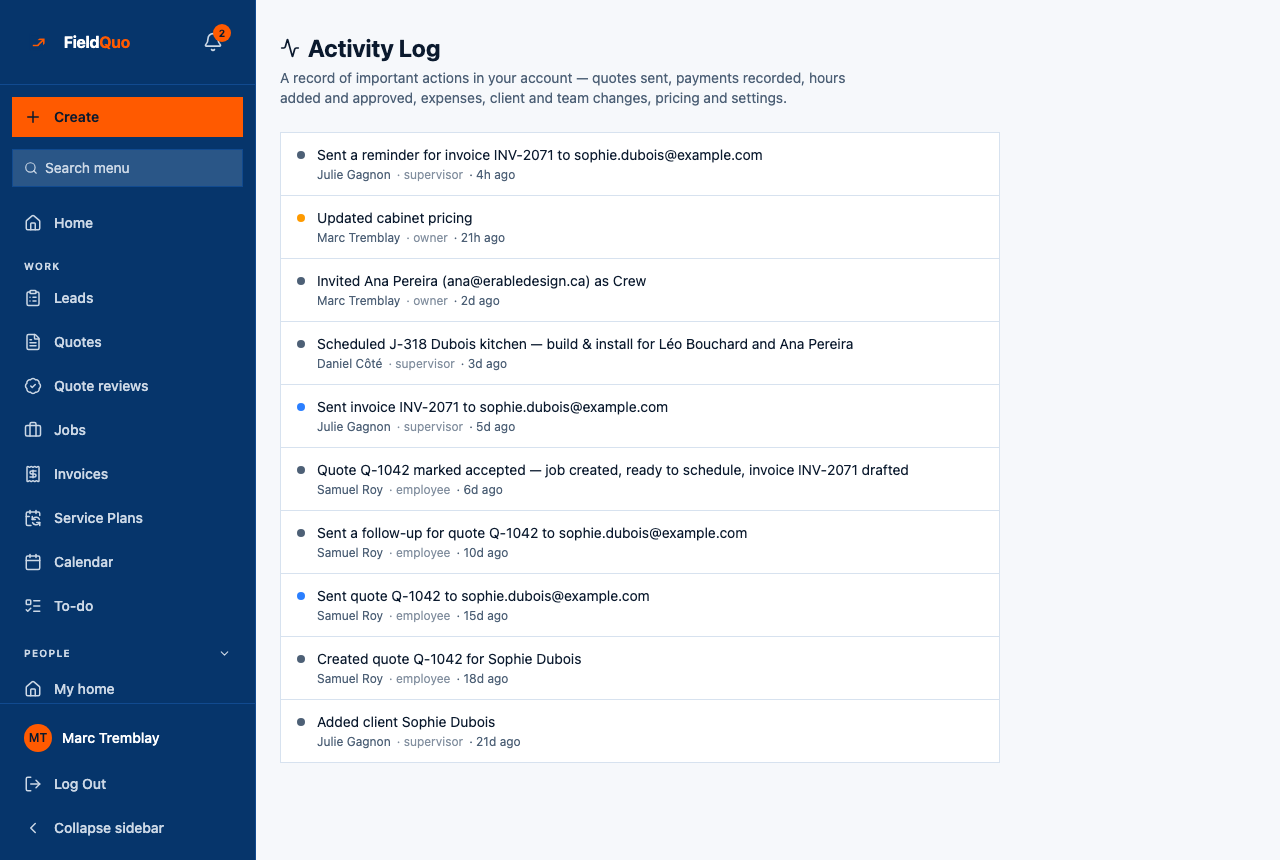
The Activity Log sits in the Business group and answers the question “who changed this?”. Every entry is a sentence written at the moment the action happened, with the person's name, their role and how long ago. It is a record to consult when something looks wrong, not a dashboard.
It is read-only by design and owner-and-administrator only, because it shows actions across every user — payments, pay-rate changes, who deactivated whom.
Overview
The heading reads Activity Log — A record of important actions in your account — quotes sent, payments recorded, hours added and approved, expenses, client and team changes, pricing and settings. That list is a promise the page can keep: each of those families writes an entry. What is *not* on the page is as important — no filter, no search, no export, and no way to edit or delete an entry, because a log that can be retouched is not a log.
What is on the screen
A single list, newest first, of the most recent 100 entries. Each row shows:
- A coloured dot — red for a deletion or a deactivated member, green for a payment, blue for something sent, amber for a settings change or a self-approved time entry, grey for everything else.
- The sentence — “Added client Jane Smith”, “Duplicated quote Q-1041 as Q-1058”.
- Who, role and when — the actor's name (or Someone for a system action), their role, and a relative time such as “4 min. ago”, switching to a date after 30 days.
- support session — an amber marker on any action taken during a FieldQuo support session, so nothing done on your behalf is mistaken for one of your own.
What is recorded
| Family | Examples |
|---|---|
| Quotes and leads | Quote created, sent, duplicated, approved by a reviewer; lead converted |
| Invoices and money | Invoice sent, chased, paid; visit fee credited |
| Jobs and time | Job completed or deleted; a time entry approved — flagged when someone approved their own |
| People | Member invited, access changed, deactivated; a leave policy retired |
| Clients | Client added, updated, deleted |
| Settings and connections | Pricing updated; WhatsApp or a crew texting line connected; billing cancelled |
Reading it in your language
The sentence is stored in English at the moment of the action. Newer entries also carry a catalogue key, and those are shown in your interface language; older ones show exactly what was written at the time. A mixed list is the honest picture of the company's history rather than a retouched one.
The log translates forward, never backward. An entry from March says what it said in March.
Looking for a specific change? The list is the last 100 entries with no search box, so use your browser's find (Ctrl+F or ⌘F) on the page.
Who can see it
The owner and administrators only. The row is not drawn for a Manager, Dispatcher, Estimator or Crew member, and the page answers Only an owner or admin can view the activity log. to anyone else who reaches its address. A FieldQuo support session can read it, and its own actions are stamped as such.
Häufige Fragen
Can I delete an entry?
No. Nothing on the page edits or removes an entry, and there is no route that would. That is what makes it an audit trail.
Why is an old entry in English while the new ones are in French?
Older entries were stored as a plain sentence and are shown verbatim. Entries written since the log learned to carry a translation key render in your language.
How far back does it go?
The page shows the most recent 100 entries. Nothing is pruned behind it, but older entries are not paged on screen today.
War das hilfreich?