

Connecting Stripe and getting verified
Settings → Payments, step by step: Connect with Stripe, what the page shows while Stripe checks your details, and what Active, Paused and Held mean for your money.
Online payments run through a Stripe account held in your company's name. Settings → Payments creates it, sends you to Stripe's own secure pages to fill it in, and then tells you — in plain words — whether Stripe is taking cards for you yet and whether it is paying out to your bank. FieldQuo never sees or stores your bank details; that information goes directly to Stripe.
Overview
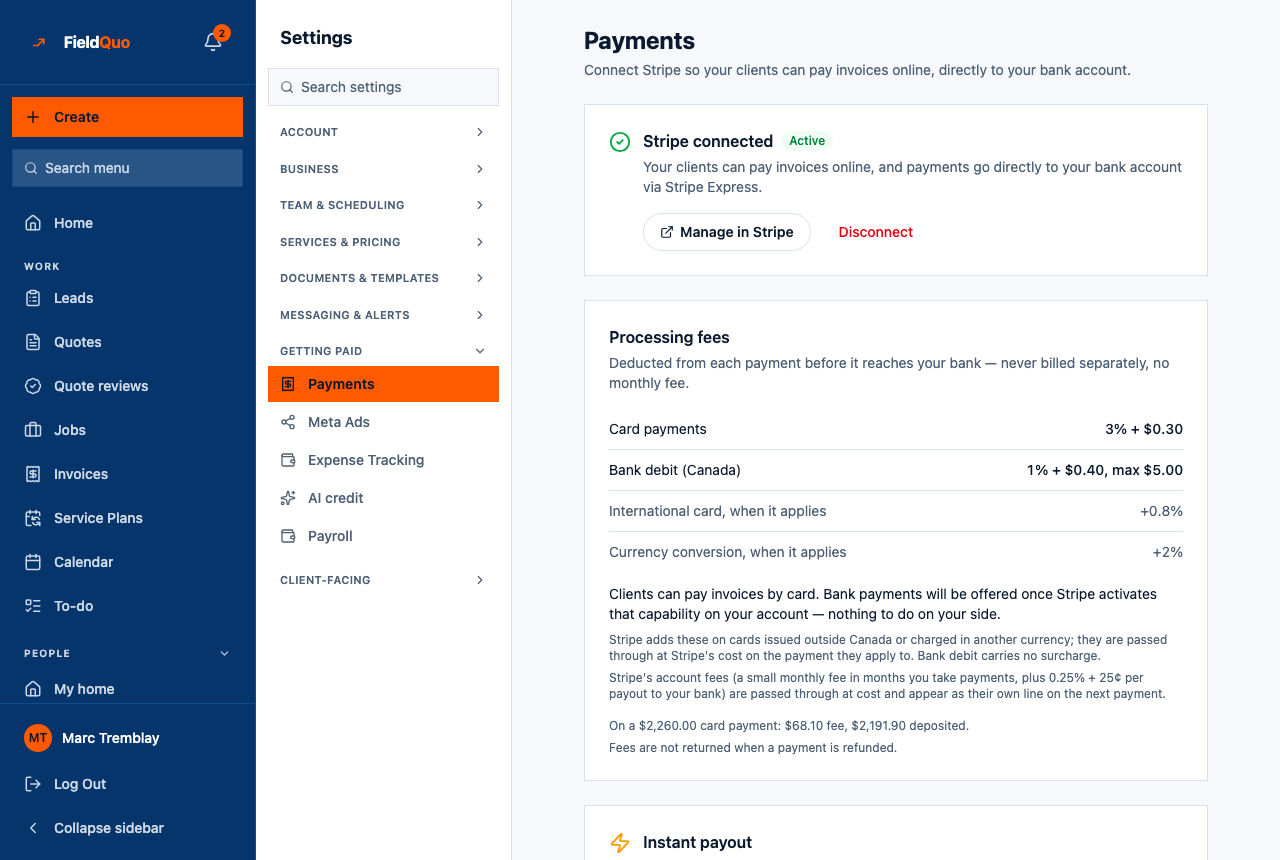
The page heading reads Payments — Connect Stripe so your clients can pay invoices online, directly to your bank account. The first card is the connection itself, in one of four states: not connected, in progress, under review, or Stripe connected · Active. Below it sit the Processing fees card, the Instant payout card, Your Stripe account and the Offer pay-over-time (Affirm) switch.
How to connect
- Open Settings → Payments. The card reads Not connected yet — Stripe handles the actual payment processing — you'll enter your bank details on Stripe's own secure page, not here.
- Press Connect with Stripe. FieldQuo creates an Express account for your company and sends you to Stripe's onboarding.
- Fill in what Stripe asks for — business details, identity, a bank account for payouts — and accept Stripe's terms. See What Stripe asks for, and why.
- You return to Settings → Payments, which re-reads the account from Stripe. If you left partway, the card reads Stripe still needs a few things and lists them, with Finish Setup and I've already done this.
- Once everything is in, the card reads Stripe is reviewing your details with Check again. When Stripe switches charges on, it becomes Stripe connected · Active and every invoice email gains a Pay online button.
Taking payments and being paid are two switches
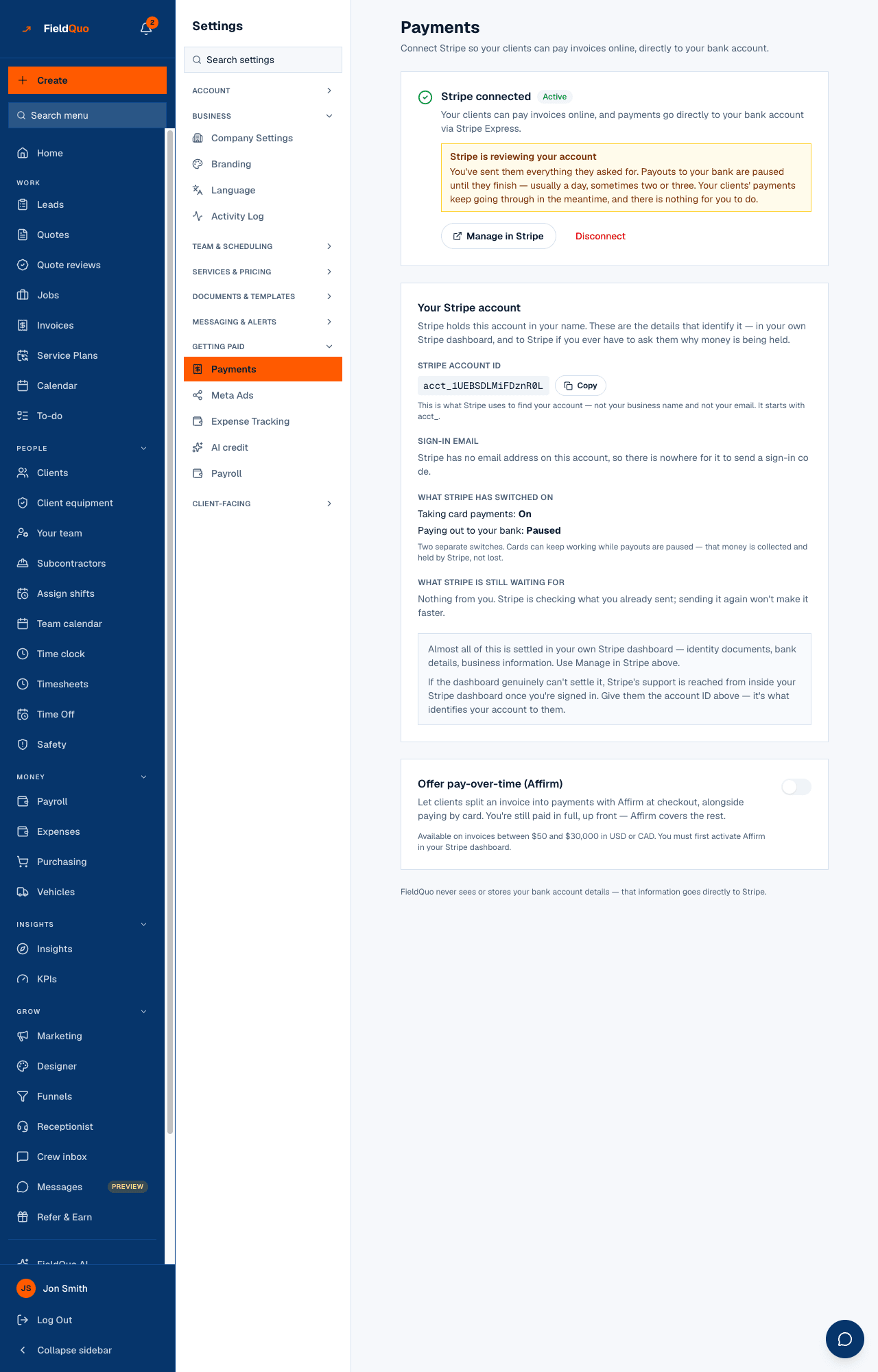
Your Stripe account shows What Stripe has switched on: Taking card payments: On/Off and Paying out to your bank: On/Paused. They are separate. Stripe can keep accepting your clients' cards while payouts are paused — the money is collected and held by Stripe, not lost.
| What the page says | What is happening | What to do |
|---|---|---|
| Stripe is reviewing your account | You sent everything; Stripe is checking it. Payouts are paused, usually a day, sometimes two or three. Clients' payments keep going through. | Nothing. Sending documents again will not make it faster. |
| Stripe is holding your money | Charges are on but payouts are off because Stripe still needs something from you. Stripe's reason: is printed underneath in plain words. | Press Manage in Stripe and finish what it asks for. See Payouts held or under review. |
| Stripe still needs a few things | Onboarding is unfinished; charges are off, so no Pay button yet. | Finish Setup, or I've already done this if you completed it on Stripe's side and FieldQuo has not caught up. |
The other controls on the page
- Manage in Stripe opens your Express dashboard in a new tab: payouts, documents, bank details, support. Stripe emails a sign-in code to the Sign-in email shown on the page.
- Copy beside the Stripe account ID (it starts with acct_) — what Stripe uses to find your account when you contact them. Shown to the owner only.
- Disconnect unlinks Stripe from FieldQuo: clients cannot pay online until you reconnect. It does not delete or close your Stripe account and changes nothing about your past payout history.
- Offer pay-over-time (Affirm) lets clients split an invoice at checkout while you are paid in full up front. Available on invoices between $50 and $30,000 in USD or CAD. Switching it on asks Stripe to enable Affirm on your account — there is nothing to set up in Stripe — and the line under the switch shows Stripe's answer. See Pay-over-time financing.
- Processing fees and Instant payout are explained in Payment processing fees and payouts and Instant payouts.
Who can see it
Settings → Payments is for the owner and administrators only — the row is hidden from everyone else and the routes behind it refuse them. The account ID and sign-in email are narrower still: the owner only, because they are the pair of values that let someone tell Stripe “this account is mine”.
Frequently asked questions
How long does verification take?
Usually minutes, occasionally a day or two. The page says Stripe is reviewing your details while it happens; Check again re-reads the account.
I already have a Stripe account. Can I use it?
Not today. FieldQuo creates an Express account for the company and links that one; there is no way to attach an existing account.
Clients are paying but nothing reaches my bank.
Look at Paying out to your bank on this page. Paused with a review notice means wait; Paused with Stripe is holding your money means open Manage in Stripe and finish what it lists.
Was this helpful?