

Embed booking and quote forms on any site
Paste one snippet into the website you already have to show your booking calendar, quote form, instant estimate, reviews or a funnel — no FieldQuo branding, and the box sizes itself.
Per ora questo articolo è disponibile in inglese, francese e spagnolo. Stai leggendo la versione inglese. Français · Español
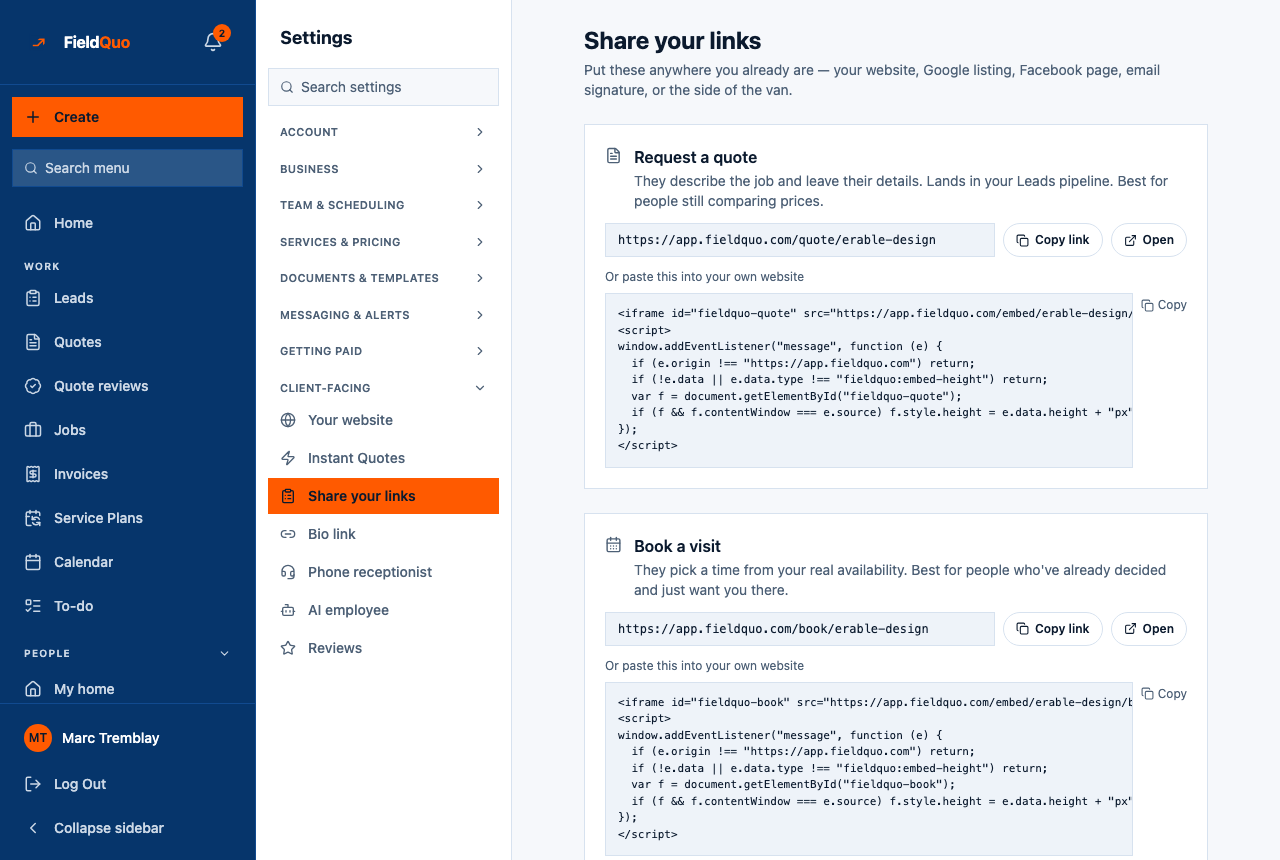
An established contractor is not going to throw away a website that ranks. What they will do is paste a box into it so that “book a visit” and “request a quote” stop being a phone number and start being a row in the pipeline. FieldQuo hands out that box as a snippet you copy from Settings → Share your links (and, for reviews, from Settings → Reviews and the website builder's Fine-tune panel).
Overview
Each snippet is an iframe pointing at an embed page plus a few lines of script. The embed page runs the same flow as the public page — the same booking calendar, the same quote form — with no FieldQuo chrome and your company name in the tab. The script is the half that makes it usable: the box reports its own height, so a visitor who completes a booking sees the confirmation instead of a clipped frame. Keep the script with the iframe; without it the box still works but scrolls inside a fixed height.
The five widgets
| Widget | Where the snippet is | Starting height |
|---|---|---|
| Book a visit | Settings → Share your links | 640 px |
| Request a quote | Settings → Share your links | 640 px |
| Instant estimate | Settings → Share your links | 560 px |
| Client reviews | Settings → Reviews, and Settings → Your website → Fine-tune | 220 px — and it renders nothing at all until you have an approved review |
| A funnel | Settings → Share your links (one per published funnel), and the funnel's own page | 520 px |
The starting height is what the box measures before the script has resized it, and what a site whose editor strips scripts is left with — which is why none of them is zero.
How to paste a snippet
- Open Settings → Share your links and find the card you want.
- Under Or paste this into your own website, press Copy.
- In your site's editor, add an HTML or “custom code” block where the form should appear, and paste. Both the iframe and the script must land on the page.
- Publish your site and open the page on a phone. Complete a test booking or request; it appears on your Leads board or calendar like any other.
How the embedded box behaves
- Your brand, not ours. The page inside the box carries your logo and colour; its tab title is your company name; nothing says FieldQuo.
- Not indexed. Embed pages are marked not to be indexed, so your own page keeps the search traffic rather than competing with a chrome-less copy of itself.
- Paying inside a frame. A booking that takes a visit fee sends the visitor to Stripe Checkout, which refuses to load inside another site's frame. FieldQuo moves the whole tab to the checkout and also shows a link the visitor can tap if the browser blocked the automatic move.
- Two boxes on one page is fine — two funnels, or reviews beside a quote form. Each snippet resizes only its own box.
- Reviews shrink to nothing when there is nothing approved, so the reviews snippet is safe to put in place before your first review arrives.
The snippet carries the FieldQuo address it was copied from and your company's short name. Copy it fresh from the screen rather than retyping it; a snippet with a typo in the address shows an empty box with no error.
Domande frequenti
Does it work on Wix, Squarespace, WordPress and the rest?
Anywhere that lets you paste an HTML block. Some hosted builders strip the script; the box then keeps its starting height and scrolls inside, which still works.
Can I embed the whole FieldQuo site?
No, and you do not need to — the site is a page of its own at your address. The embeds are for the parts that do a job: booking, quoting, estimating, reviews, funnels.
Will an embedded booking respect my availability and fees?
Yes. It is the same booking flow as your booking page, reading the same event types, buffer, arrival windows and visit fees.
È stato utile?