

Time off policies
The kinds of time off your team can take and how each balance builds up — fixed days, per pay period, or vacation pay as a percentage — plus the manual year-end carry-over.
ਇਹ ਲੇਖ ਫ਼ਿਲਹਾਲ ਅੰਗਰੇਜ਼ੀ, ਫ਼ਰਾਂਸੀਸੀ ਅਤੇ ਸਪੈਨਿਸ਼ ਵਿੱਚ ਉਪਲਬਧ ਹੈ। ਤੁਸੀਂ ਅੰਗਰੇਜ਼ੀ ਸੰਸਕਰਣ ਪੜ੍ਹ ਰਹੇ ਹੋ। Français · Español
A policy is one kind of time off — Vacation, Sick, Personal, Unpaid, Other — with a rule for how much of it a person earns and whether a manager has to approve a request. Policies live on Settings → Time Off Policies; the requests and balances they produce live on the Time Off screen, where staff ask and managers approve. See Time off requests.
FieldQuo tracks what you configure. It does not decide what you owe: the note at the bottom of the screen says statutory minimums vary by province, state and length of service, and the starter sets say plainly what year their figures come from.
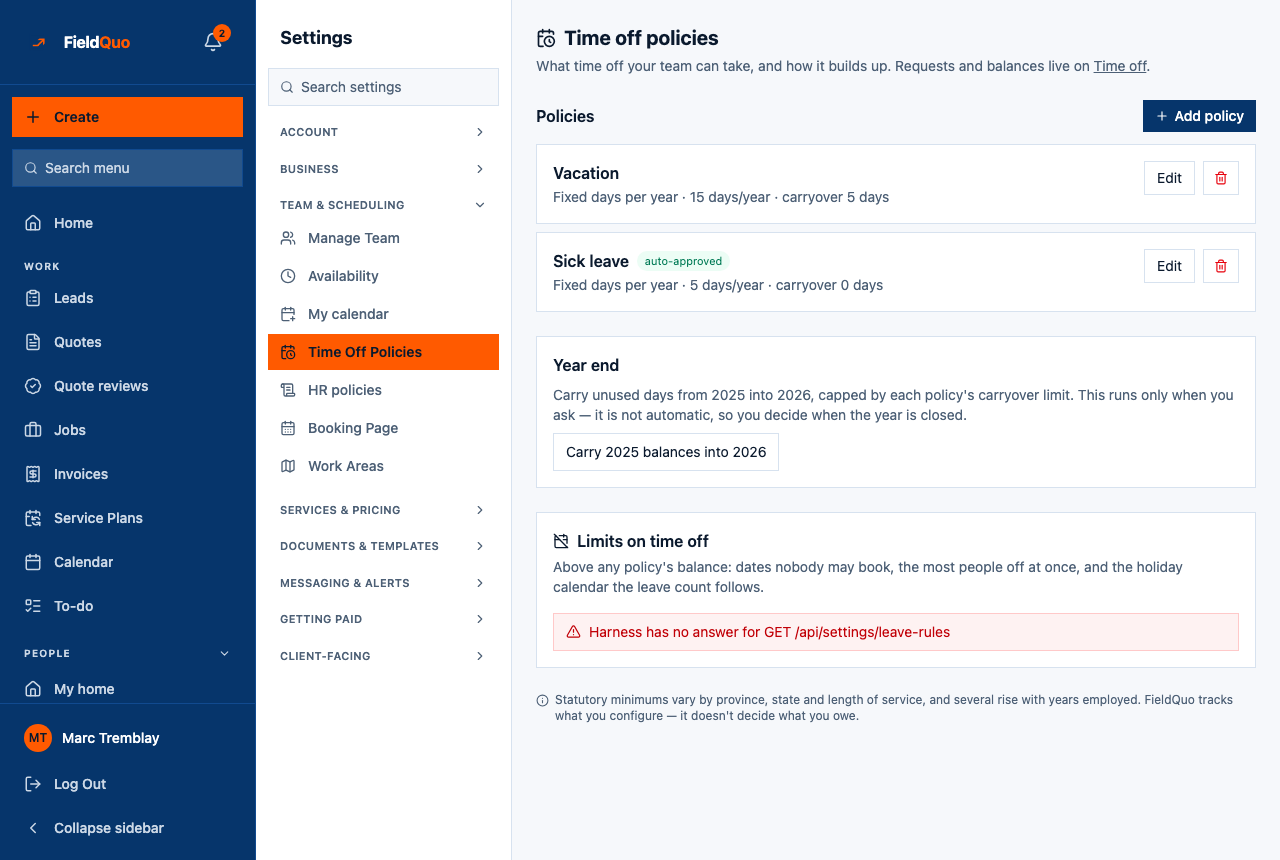
Limits on time off
Below the policies, Limits on time off holds the rules that sit above any one policy's balance. Blackout dates: ranges nobody can request inside, each with a reason (Christmas installs) so the refusal says why. Most people off at once: a whole number, or blank for no limit; a request is refused when that many people are already approved off on any of its days, and the refusal names them. Statutory holidays: the calendar the leave count follows — Canada by province or territory, or the United States federal set — computed from each holiday's rule (the Monday before May 25, the first Monday in September, Easter minus two days) so next year is right without anyone editing a table. It follows your company address unless you pick a region, and Show the holidays lists this year's and next year's, with the observed day when a holiday falls on a weekend.
A company outside Canada and the United States has no holiday calendar here, and the screen says so. Every working day in a request is then counted, which is the honest answer — a Canadian calendar applied to Lyon would not be.
The rota bands a holiday or a blackout across the top of the day board, and the Team view of Time off shows the ranges and the limit on its Policies card.
Overview
The screen is headed Time off policies — “What time off your team can take, and how it builds up. Requests and balances live on Time off.” With no policies yet, a starter card is offered first; once you have at least one, the card disappears and the Year end section appears instead.
Three accrual methods exist and they are genuinely different. Fixed days per year makes the whole allowance available now. Accrues each pay period spreads the days over the pay periods elapsed so far, using the frequency on Payroll settings — lower in January, full by December. Vacation pay (% of gross) accrues money, not days, from the gross on approved pay runs; time off under it is not limited by a day balance.
What is on the screen
- Start from the Canada set (or United States, United Kingdom) — one card per starter set with its policy count and “figures as of 2024”. The set matching the country on your company profile is offered first, with a line saying where that country was read from; the others sit under “Hiring in another country? These are here too.” Nothing is seeded until you press.
- Policies with Add policy — one card per active policy: its name, badges for unpaid and auto-approved, then the method, the entitlement (“15 days/year” or “4% of gross”) and the carryover (“carryover 5 days” or “unlimited”), with Edit and a remove button.
- Retired — policies that were removed after being used. They keep their past requests and are marked not bookable.
- Year end — “Carry unused days from 2025 into 2026, capped by each policy's carryover limit.” One button, pressed by you, never automatic.
How to add a policy
- Open Settings → Time Off Policies.
- Either press a starter set to seed its policies in one go, or press Add policy for a blank form.
- Give it a name and pick the Kind — Vacation, Sick, Personal, Unpaid or Other.
- Choose How it builds up, then fill in Days per year (or Percent of gross for the money method).
- Set the Carryover cap (days) — “Blank means unlimited. 0 means use it or lose it.” Tick or untick Paid and Needs a manager's approval.
- Press Add policy. Balances for every active worker are recalculated straight away.
The Canada set is four policies: Vacation pay (4%), Vacation days (10 days, carryover 5), Paid sick leave (10 days, auto-approved, use it or lose it) and Unpaid leave. Seed it, then edit the numbers to match your province and your people — a policy already present by name is skipped, never overwritten.
What each setting changes
| Setting | What it changes |
|---|---|
| Kind | A label on the balance card and on requests. It does not change the arithmetic. |
| Fixed days per year | The full Days per year is available from the first day. Someone with a hire date this year gets a pro-rated share; with no hire date on record they get the whole amount. |
| Accrues each pay period | Days per year divided over the year's pay periods, granted as each period passes. |
| Vacation pay (% of gross) | Accrues an amount equal to the percentage of gross on approved and paid pay runs this year. Requests under it are not checked against a day balance. |
| Carryover cap (days) | How many unused days the Year end button may carry into the next year. Blank is unlimited; 0 is none. |
| Paid | Unticked, the policy shows an unpaid badge and approved days under it are not added to a payslip. Ticked, approved leave in a pay period becomes an earning line on the payslip. |
| Needs a manager's approval | Ticked, a request waits as pending until a manager approves it. Unticked, the request is approved the moment it is made and the balance is consumed immediately — the card shows auto-approved. |
| Remove | Never used: deleted outright. Used at least once: retired instead, so past requests keep their history and nobody can book it again. |
Year end
Balances are per calendar year. Unused days do not roll over on their own — you close the year when you decide it is closed.
- Open Settings → Time Off Policies in the new year.
- In Year end, press Carry 2025 balances into 2026 (the years on the button follow the calendar).
- Read the notice: “Carried unused days into 2026 for 12 balance(s).” or “Nothing was eligible to carry over.” Each balance is capped by its policy's carryover limit.
The carry-over is recorded in the Activity Log with who pressed it and how many balances moved.
Who can see it
Owners and administrators only. The row is hidden from every other level and the server answers “Only an owner or admin can manage leave policies.” to anyone else. A Manager approves requests on the Time Off screen but does not set the policies behind them.
ਅਕਸਰ ਪੁੱਛੇ ਜਾਂਦੇ ਸਵਾਲ
Does a sick-day policy have to be approved?
Only if you tick Needs a manager's approval. The starter sets leave it unticked for sick leave, so a request is approved on the spot and the manager still sees it in the list.
Where do people see their balance?
On the Time Off screen — a card per policy with accrued and taken, and a Team tab for managers. Balances are recalculated whenever a policy is added or edited.
Can I edit the numbers a starter set gave me?
Yes. Once seeded they are your policies; press Edit on any card. FieldQuo never changes them afterwards.
ਕੀ ਇਹ ਮਦਦਗਾਰ ਸੀ?