

The two texts your clients get
The On my way text and the appointment reminder — when each is sent, the fields you can use, how the wording follows the client's language, and what FieldQuo does not text.
Sa ngayon, available ang artikulong ito sa Ingles, Pranses at Espanyol. Binabasa mo ang bersyong Ingles. Français · Español
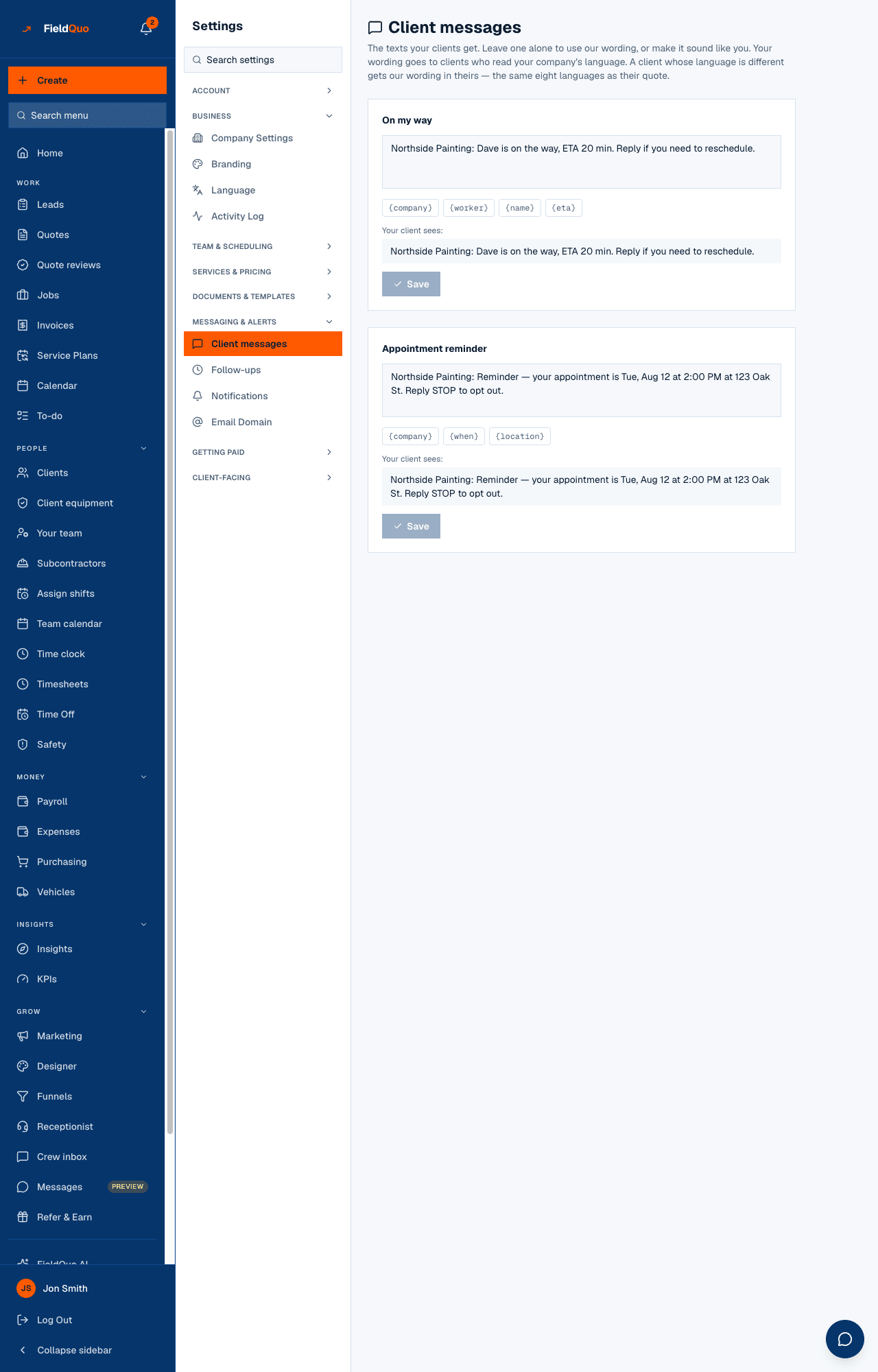
FieldQuo texts a client on exactly two occasions: when a crew member presses On my way on a visit, and, if you switch it on, a reminder 2, 24 or 48 hours before an appointment or a job visit. Settings → Client messages is where you change the wording of both, with a live Your client sees: preview so nobody ever texts a customer a raw {price}.
There is no third text. The page says so — Two kinds of text and no more — and it cannot grow an editor for a message that never goes out, because the list comes from the messages that actually send.
Overview
Both texts leave from FieldQuo's shared texting number and begin with your company name — Northside Painting: Dave is on the way, ETA 20 min. — so the client knows who it is from. Every reminder ends with Reply STOP to opt out, and a client who replies STOP is never texted again by either message — the reply comes back to the shared line, so it opts that phone out of every company holding it on a client record; the same opt-out check runs before the On my way text. Reminders go by text message only: there is no email reminder.
The two texts
| Text | When it is sent | Fields |
|---|---|---|
| On my way | The moment a visit's status is moved to On my way on the job page — by the assigned crew member, anyone on an unassigned visit, or someone who can edit everyone's schedule. The button names the number it will text, or says plainly that the client has no phone on file and nothing will be sent. | {company}, {worker}, {name}, {eta}, {phone} |
| Appointment reminder | Once per appointment or job visit, within the hour of the lead time chosen under Settings → Notifications → Appointment reminders (Off, 2 hours before, 24 hours before, 48 hours before). Off by default; a company that never chose a lead time sends none. | {company}, {when}, {location} |
The default wording, as the client receives it: Northside Painting: Dave is on the way, ETA 20 min. To reschedule, call 555-0100. and Northside Painting: Reminder — your appointment is Tue, Aug 12 at 2:00 PM at 123 Oak St. Reply STOP to opt out. The ETA is worked out from the crew member's position at the tap; the phone is yours from Company Settings. A field with no value simply disappears — no ETA, no “ETA ,”, and no “call” sentence when there is no phone.
How to change the wording
- Open Settings → Client messages (under Messaging & alerts).
- Type in the On my way or Appointment reminder box. Tap a chip — {company}, {worker}, {name}, {eta}, {phone} — to insert a field at the end.
- Watch Your client sees: fill in with sample values. An unknown field is flagged — Unknown field: {price}. Only the fields above work. — and Save stays disabled until it is gone. The server checks the same thing.
- Press Save. The card gains a Customised tag and a Use default button, which puts the built-in wording back.
Past 160 characters a text splits into segments and costs more; the reminder's opt-out sentence is part of the count. Keep it to one screen.
Which language the client gets
The text follows the client the way their quote does. Your wording goes to clients who read your company's language. A client whose language is different gets our wording in theirs — the same eight languages as their quote. So a Quebec shop that customises the French text sends it to French-speaking clients, and an English-speaking client gets FieldQuo's English wording — never a machine translation of yours. The appointment time is written in the client's locale and your company's time zone. See A client's language.
What FieldQuo does not text
- No booking confirmation text. A visit booked from your booking page is confirmed by email, not by SMS.
- No “your quote is ready”, “your invoice is overdue” or “job complete” texts. Those go by email.
- No two-way texting with clients from the inbox. A client who replies to a reminder is not texting your team; only STOP is listened for.
- The reminder's wording is editable here, but the lead time lives on Notifications, and reminders never go by email.
The full list, with what each channel does carry, is in Texting clients: what is automated and what is not.
Who can see it
Settings → Client messages is for the owner, administrators, Managers and Dispatchers. The reminder lead time on Settings → Notifications is owner and administrator only. Pressing On my way on a visit follows the schedule rule: the assigned crew member, anyone on an unassigned visit, or someone who can edit everyone's schedule.
Mga madalas itanong
Why did the reminder go out in English to a French client?
Your customised wording only goes to clients who read your company's language. A client in another language gets FieldQuo's built-in wording in theirs — check the client's language on their record.
Can I add a link to the quote in a text?
No. Only the fields on the chips work, and the server refuses any other.
The status changed to On the way but no text arrived.
The client has no phone number on file, replied STOP at some point, or the number could not be read as a North American number. The status still saves; the button says beforehand whether a text will go.
Nakatulong ba ito?