

The Team Schedule
One page for the whole team: a card per person with their bookable hours Monday to Sunday and what is booked on them in the next two weeks, with an Edit hours button for managers.
Поки що ця стаття доступна англійською, французькою та іспанською. Ви читаєте англійську версію. Français · Español
Team calendar in the sidebar opens Team Schedule — the owner's answer to “who is bookable when”. Everyone is on one page, so a manager fixes anyone's hours from here instead of asking each person to.
It is a read-only overview. Hours are edited on each person's Availability; visits, appointments and shifts are made elsewhere.
What is on the screen
The heading Team Schedule and the line “Everyone's weekly availability and what's booked in the next two weeks. People can set their own hours under Settings → Availability, and you can set anyone's from here.” Then a card per person: initials, name and tier (Owner, Administrator, Manager or Worker — in English on every screen), a seven-day strip showing hours such as 08:00–17:00 and — on days off, No availability set where nothing has been entered, and Edit hours or Set hours. Under the strip, Next 2 weeks lists what they are booked on, by date, time and client.
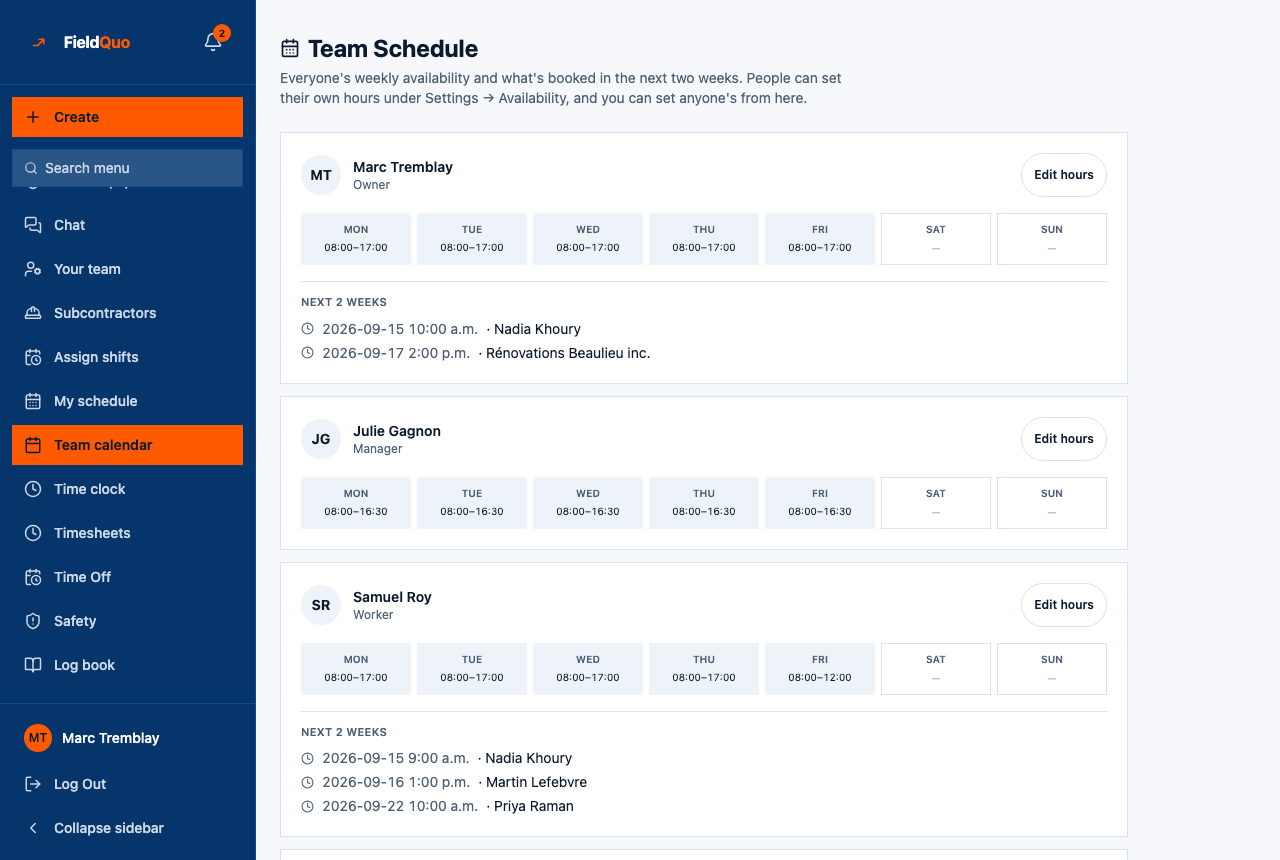
People with hours set come first, then the rest by name. The week starts on the day set in your company preferences.
What the strip and the list actually show
- The strip is bookable hours — the window in which clients may book that person, from Settings → Availability → Bookable hours. It is not their working hours, and not their shifts.
- Next 2 weeks lists appointments assigned to that person and bookings made through the booking page, for the next 14 days. Job visits and published shifts are not in this list.
An estimator who works 8–4 but takes consultations 2–4 shows 14:00–16:00 here. That is correct: the page answers when clients can book them. See Working hours and bookable hours.
How to set someone's hours from here
- Press Edit hours (or Set hours) on their card.
- Their Availability page opens with that person selected. Change Working hours and Bookable hours and save.
- Come back: the strip reflects the new bookable hours.
Who can see it
The Team calendar row shows for owners, administrators and the Dispatcher and Manager presets — the people who may see the whole roster. Edit hours appears for the same people. Crew and Estimators do not have the row; they set their own hours under Settings → Availability.
Часті запитання
Why is a visit I scheduled not under Next 2 weeks?
The list shows appointments and booking-page bookings. Job visits are on the job and on the Calendar.
Someone shows No availability set — can clients book them?
No. Bookable hours are what the booking page offers; with none, that person is not offered. Press Set hours.
Чи була ця стаття корисною?