

The kitchen design link
The page a client opens to move cabinets and try finishes on the kitchen you quoted — no prices, their version saved beside yours, and an email to you when they save.
本文目前提供英语、法语和西班牙语版本。您正在阅读英语版本。 Français · Español
For a cabinet job you drew in the kitchen designer, the client can be handed a link to their own copy of the drawing. They see your name and logo, the quote number and their name, a plan they can drag pieces around on, and a Colours & finishes panel. They cannot see a rate, and nothing they do changes a number on its own.
When they press Save my version, their layout is stored beside yours — never over it — and the quote's creator plus your owners and administrators get an email saying so. You open the designer, compare, and decide.
Overview
The link is the quote's share token — the same credential as the approval page — so it exists once the quote has been sent. On the quote's Kitchen designer screen the Client link button copies it; before sending, the screen reads “Send the quote to get a client design link”.
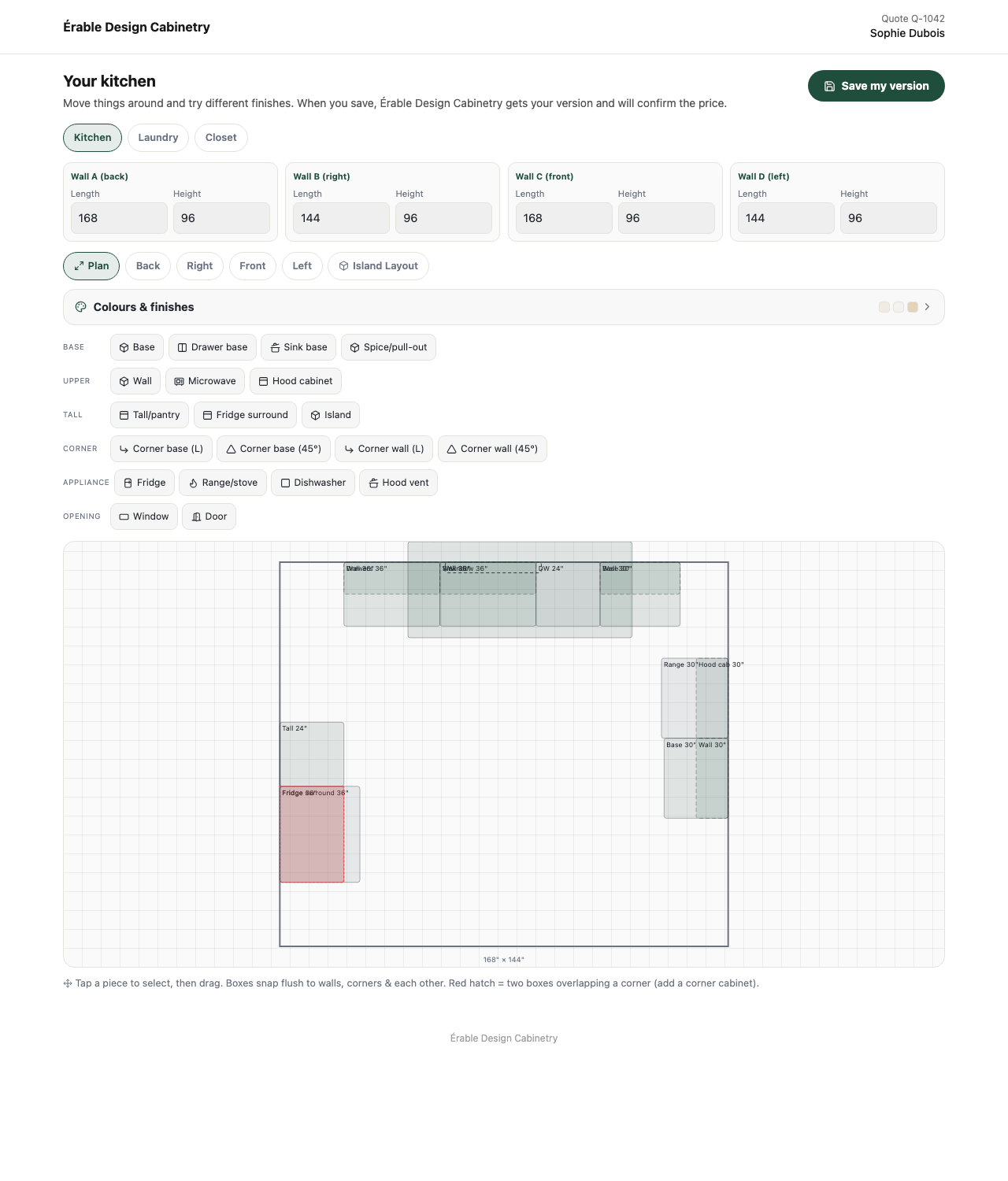
What the client sees
- A header with your logo (or name) on the left and Quote [number] with their name on the right. The footer is your company name. Nothing on the page says FieldQuo.
- Your kitchen — “Move things around and try different finishes. When you save, [Your company] gets your version and will confirm the price.”
- The room tabs (Kitchen, Laundry, Closet), each wall's length and height, the views (Plan, Back, Right, Front, Left, Island Layout) and Colours & finishes.
- The piece palette — base, upper, tall, corner, appliance and opening pieces — and the plan itself: “Tap a piece to select, then drag. Boxes snap flush to walls, corners & each other.”
- A Save my version button in your colour. After saving: “Saved. [Your company] has been told, and will get back to you with an updated price if anything changed.”
The page is always light, like the quote itself, and it is English-only today — a client holding a French quote gets an English designer. It is not indexed by search engines.
What they cannot do
- See a price. The pricing panel you use is hidden, and the data the page loads has every rate and appliance price stripped out — rebuilt field by field, not filtered.
- Change a price. Whatever comes back is merged over your drawing: the room, appliance pricing and your rate card are re-attached from your copy, and any number the browser sent is discarded.
- Overwrite your drawing. Their version is stored in its own field, with the date. Your layout is untouched until you choose Load their version.
- Edit a closed quote. Once the quote is accepted or declined the page reads “This is the layout on your quote” and the button is gone.
On your side
- Open the quote and press Kitchen designer. Draw the room, then send the quote — the Client link button becomes active.
- Press Client link to copy it and paste it into a message to the client.
- When they save, the email Client design saved — [quote number] reaches the quote's creator and every owner and administrator, with a link to the designer.
- On the designer, the banner Your client saved their own version of this layout on [date] offers Load their version. Load it, then Save & reprice quote — the server reprices from your rates.
A sent quote's design is read-only on your side — the screen says so. Duplicate the quote to change it; a sent quote is a commitment, and repricing one underneath the client leaves you both looking at different numbers.
Who can see it
The client page is public to anyone holding the link. The Kitchen designer button appears on a quote when your company has the Kitchen Designer on under Services — by itself for Kitchen Design & New Installs, Remodeling, Renovation, General Contracting, New Construction and Cabinet Refacing, or by the company's own switch there — or when the quote already carries a design; opening it needs edit access to quotes. A separate public designer — Design your kitchen on Share your links — lets a stranger draw a kitchen and send it as a lead; see The kitchen designer.
常见问题
Does the client's save change my quote total?
No. Their layout is stored separately. The total changes only when you load their version and press Save & reprice quote.
Can the client see what each cabinet costs?
No. The page never receives a rate; they already have their total on the quote itself.
The client says the link isn't working.
The link is tied to the sent quote. If the quote was accepted or declined it is read-only; if it was deleted the page says so and asks them to reply to the email their quote came in.
这篇文章有帮助吗?