

The lead form on your website
The Request a quote form: what it asks a homeowner, where to get the link and the embed code, and what lands on your Leads board when they press Send.
Per ora questo articolo è disponibile in inglese, francese e spagnolo. Stai leggendo la versione inglese. Français · Español
Request a quote is the public form for someone still comparing prices. They pick a service, answer a few questions about the job, say what they expect to spend and when, attach photos, and leave their details. What comes back is a scored lead on your board — not an email in an inbox, and never a price.
You share it as a plain link or paste it into your own website. Both come from Settings → Share your links.
Overview
The form produces a lead, not a quote. It shows no rates and the endpoint behind it returns none: a self-serve figure you have never seen is one you might have to honour, and a published rate card is a gift to every competitor in town. What the form does instead is arrive at the callback with the size of the job already known.
It is a page of your own: your logo and name at the top, your brand colour on the rule, the confirmation laid out like your quote. In the embedded version the logo strip is dropped, because the form already sits under your site's own header.
What is on the settings screen
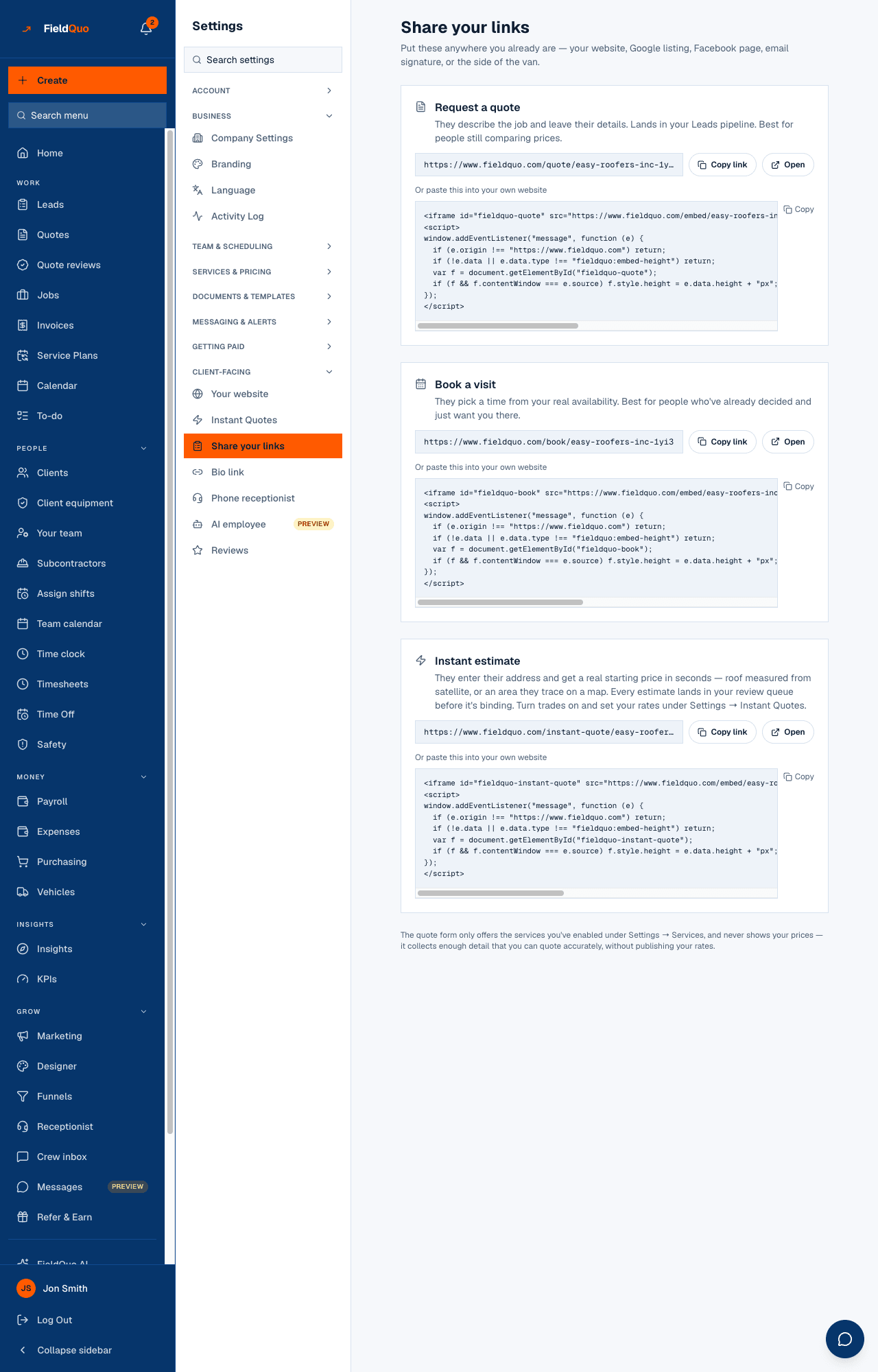
Settings → Share your links reads Put these anywhere you already are — your website, Google listing, Facebook page, email signature, or the side of the van. The Request a quote card is the first one:
- They describe the job and leave their details. Lands in your Leads pipeline. Best for people still comparing prices.
- The link itself, with Copy link and Open.
- Or paste this into your own website — the embed snippet, with Copy.
- The footer of the screen says it plainly: The quote form only offers the services you've enabled under Settings → Services, and never shows your prices.
How to put it on your site
- Open Settings → Share your links.
- On the Request a quote card, press Copy link to share the page on its own — in an ad, on Google, in a text message.
- To embed it, press Copy under Or paste this into your own website and paste the snippet where you want the form to appear.
- The snippet includes a small script that lets the form report its height, so it grows with the page instead of scrolling inside a box. If your website builder strips scripts, the form still shows at a fixed 640 pixels.
- Press Open to try it as a homeowner would.
The same screen carries Book a visit, Instant estimate and every published funnel. Embedding is covered in full in Embed booking and quote forms on any site.
What the form asks
Three steps, in the order a stranger will tolerate — the service first, the contact details last:
- A language picker, offering the languages your company sends in. The lead and later the quote are created in the language the person picks.
- Step 1 — the service, from the quote types you have turned on under Settings → Services & Pricing.
- Step 2 — the intake questions for that service (doors, square feet, storeys — whatever the type asks), then the two universal questions: budget band (Not sure, Under $1k, $1k–$5k, $5k–$15k, $15k+) and timeline (ASAP, Within 2 weeks, 1–3 months, Exploring), a description, and photos, a short video or a PDF plan.
- Step 3 — name, email, phone and the job address, with address autocomplete that also stores the city, province and country so tax is right when you quote.
- An email or a phone is required, not both. An email address that cannot receive mail is refused while the person is still on the form.
- The confirmation page and, if they gave an email, a confirmation email carrying your branding. It says what they asked for, never a price.
Turning a quote type off under Settings → Services & Pricing removes it from this form immediately. If the form shows a service you no longer offer, that is where to fix it.
What arrives on your side
The submission becomes a lead with the source self_quote:
- Scored on arrival — a Hot / Warm / Cold band and the reasons — and notified to whoever your notification rules name.
- Every answer kept twice: as readable text under Their message, and as structured answers under What they told us, which is what the quote builder reads when you convert.
- If they left a phone number, their consent to be called is recorded, and the receptionist rings them back if you have quote callbacks turned on. See Quote callbacks.
- Convert to quote creates the client (or matches an existing one by email, then by phone) and a draft quote with the service, the answers, the photos and their language already on it.
Who can see it
The Share your links settings row is shown to members who can manage users — Dispatcher, Manager, Administrator and the owner. An Estimator or Crew member does not see it in Settings. The public form itself needs no login at all.
Domande frequenti
Can I change the questions?
Per service, yes: a custom quote type carries the fields you pick when you create it under Settings → Services & Pricing, and a built-in type asks its own set. The budget and timeline questions are on every submission and cannot be removed.
Why does the form not show a price?
By design. Public endpoints never return your rates. If you want a homeowner to see a starting figure, that is the Instant estimate, which lands in Quote reviews for you to confirm before anyone can send it.
What does the homeowner receive?
A confirmation page and, with an email address, a confirmation email — both in your branding and in the language they chose. No amount is in either.
Is the plain lead form the same thing?
No. There is also a lighter form — name, email or phone, category, message — built for embedding in your own code. It creates a lead the same way but asks no intake questions.
È stato utile?