

Expense Tracking
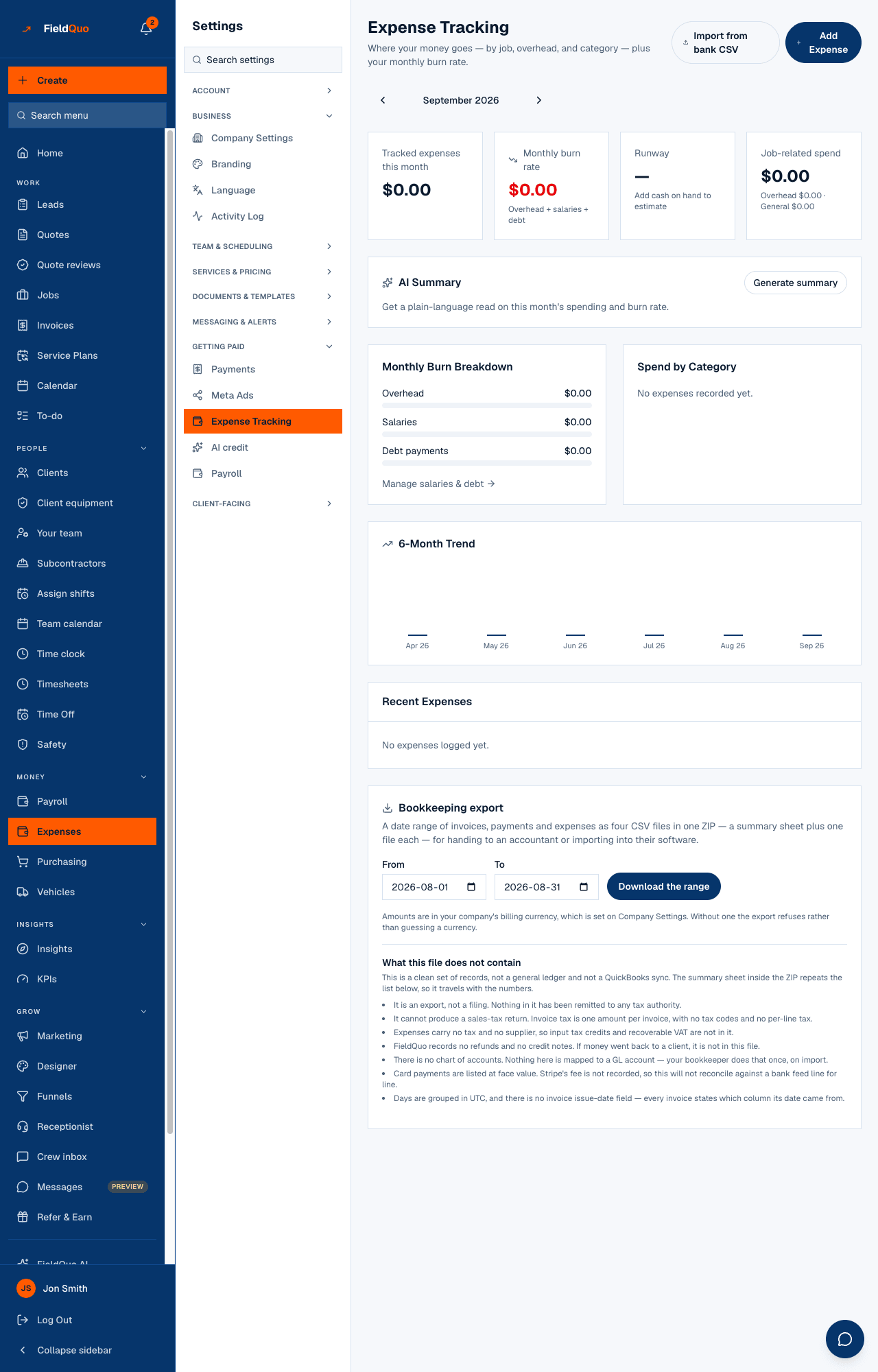
The same Expense Tracking screen as Expenses in the main sidebar — the month's cards, the burn breakdown, the trend and recent receipts — reached from Settings.
Per ora questo articolo è disponibile in inglese, francese e spagnolo. Stai leggendo la versione inglese. Français · Español
Settings → Expense Tracking opens the very same page as Expenses in the main sidebar. It is listed under Settings because the burn-rate numbers on it — salaries, overhead, debt — are company settings as much as they are a report. Everything about the page itself is in Expense tracking and your burn rate; this article only says what is on it and who sees it.
Overview
Expense Tracking — Where your money goes — by job, overhead, and category — plus your monthly burn rate. The page is one month at a time, with Receipts, Scan receipt, Import from bank CSV and Add Expense at the top, four cards, an AI summary of the month, the breakdown and trend, and the recent receipts.
What is on the screen
- Four cards: Tracked expenses this month, Monthly burn rate (overhead + salaries + debt), Runway, and Job-related spend split into overhead and general.
- AI Summary — a written read of the month you generate on demand.
- Monthly Burn Breakdown with Manage salaries & debt, Spend by Category, and the 6-Month Trend.
- Recent Expenses — each receipt with its date, category, amount, the job it is linked to, and delete.
- Import from bank CSV — bring a bank statement in as expenses. See Import expenses from a bank CSV. Nothing on the screen exports; for what an accountant can have, see What to hand your accountant.
Who can see it
The row appears for anyone whose access grid gives expenses the level that covers everyone's expenses — the Manager level and above, and any Custom access set that way. A person who can only record their own receipts does not see this row; recording their own expense still works from the expense screens the main sidebar shows them.
Salaries and debt feed the burn rate but are edited on their own screens — press Manage salaries & debt rather than looking for them here.
Domande frequenti
Is this different from Expenses in the main sidebar?
No. Same page, two doors. Both menus apply the same access rule, so if you see one you see the other.
Why do I see an expense form but not this row?
Recording your own receipt needs only your own expenses. This row rolls up the whole company's spending, which needs the higher expenses level.
È stato utile?