

Cost and margin on a quote
What the job costs you — labour, materials, overhead — and what is left, worked out beside the price while you quote. Internal, and never shown to the client.
ਇਹ ਲੇਖ ਫ਼ਿਲਹਾਲ ਅੰਗਰੇਜ਼ੀ, ਫ਼ਰਾਂਸੀਸੀ ਅਤੇ ਸਪੈਨਿਸ਼ ਵਿੱਚ ਉਪਲਬਧ ਹੈ। ਤੁਸੀਂ ਅੰਗਰੇਜ਼ੀ ਸੰਸਕਰਣ ਪੜ੍ਹ ਰਹੇ ਹੋ। Français · Español
A quote screen shows a price. The Cost & margin panel shows what that price costs you to deliver and what is left over, and it says in its own heading what it is: “internal — never shown to the client”. It is the difference between quoting a job and knowing whether you want it.
Materials come from recipes — what a litre of primer costs you and how much of it a 24-door kitchen eats — labour from hours at the rate you pay, overhead from what you told FieldQuo you spend each month. The margin badge is the point: green, amber or red before you press Send.
Overview
The panel sits in the quote builder under the services, and again on the quote page as Cost & margin with Cost it now and Change the costing. It is measured against a 30% margin target. What you enter is saved with the quote, so reopening it later shows the margin you actually quoted at rather than a fresh guess.
It only ever appears to people with the Job costing switch on their access level. Turn a laptop round to show a client the price and this panel is not on the page they see; it is not on the PDF, the email or the approval page either.
What is on the panel
- Crew — hours are shared between them. Add people by name or from your team; each has a cost per hour and, optionally, their own hours. Left blank, the hours a recipe predicts are shared evenly. A worker with no rate on file joins at $0 and the badge says “labour not costed”.
- Overhead — either % of price (the 10% starting figure, labelled “estimated”) or this job's share, once Settings → Overhead knows your monthly costs and your jobs per week.
- Extra labour hours — hours beyond what the recipe predicts, charged at the crew's rate.
- Extra material cost — what you are buying in for this job: a supplier quote, a slab, a rental.
- Materials, Labour, Overhead, Estimated cost, Quote price (pre-tax) and Estimated profit with the margin percentage. Material lines from a recipe show their quantity and unit price, both editable for this job.
- A note on where the overhead figure came from, and a note when some of the quote's services have no recipe — then their cost is not in the figure and the panel says so.
What the badge means
| Badge | Meaning |
|---|---|
| Green — “32% margin” | Profit is at or above the 30% target, with every crew member costed. |
| Amber — “below 30% target”, “labour not costed”, “some labour not costed” | Profit is positive but under target, or a cost is missing — a crew member without a rate, or no crew at all — so the real margin is lower than the number. |
| Red — “losing money” | The estimated cost is above the price. |
Your own material costs
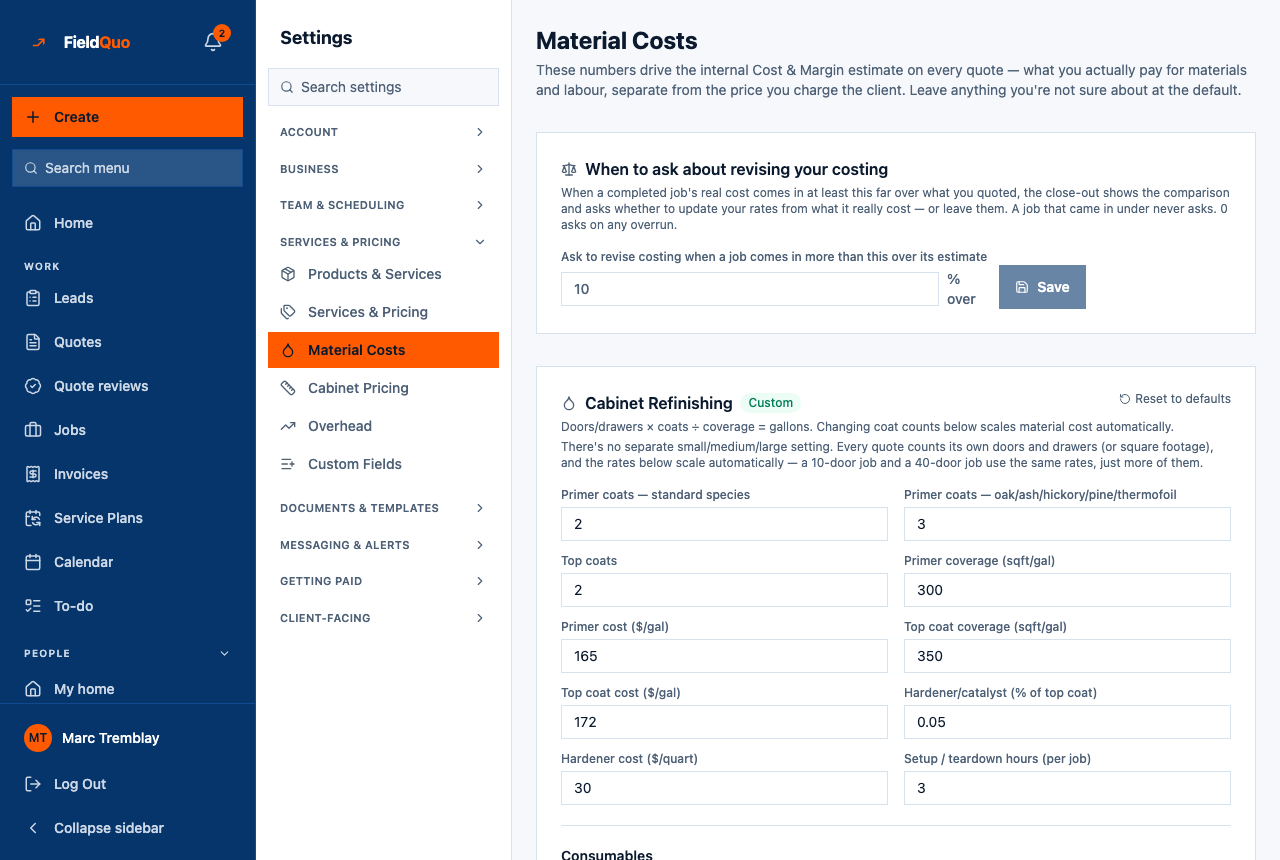
Recipes start from FieldQuo's numbers and are meant to be replaced with yours. Settings → Material Costs holds one card per recipe trade — Cabinet Refinishing and Exterior Painting today — with coats, coverage, price per gallon, hardener, setup hours and consumables. A card marked Custom carries your figures; Reset to defaults throws them away, and asks first.
- Open Settings → Material Costs. The screen only shows a trade you have switched on in Settings → Services & Pricing; otherwise it says so.
- Change the numbers you know — your primer price, your top-coat coverage, your setup hours — and leave the rest at the default.
- Press Save. Every quote costed from then on uses your figures; quotes already costed keep the figures they were saved with.
- Set When to ask about revising your costing — the percentage over estimate at which a completed job's close-out asks whether to update these rates from what it really cost. A job that came in under never asks.
A material line with no price makes the margin an understatement, and the panel says so. Type the price beside the line for this job, or set it on the rate card in Settings → Services & Pricing to keep it.
Who can see it
The panel, the quote page's cost section, Settings → Material Costs and Settings → Overhead are all gated on the Job costing switch. Among the presets only Manager, administrators and the owner have it; an Estimator or Dispatcher quotes without ever seeing a cost. The owner can grant the switch to anyone in the Custom access editor.
ਅਕਸਰ ਪੁੱਛੇ ਜਾਂਦੇ ਸਵਾਲ
Why does the margin look too good?
Usually because a cost is missing. Nobody on the crew means labour costs nothing; a material line with no price is counted at zero; a service with no recipe is left out entirely. The panel names each case in words — read the amber badge and the notes under the table.
Where does the overhead number come from?
Until you fill in Settings → Overhead and your jobs per week, it is a flat 10% of the price and is labelled estimated. After that, it is your real monthly fixed costs divided by your monthly job capacity.
Does the client ever see any of this?
No. Not on the approval page, not on the PDF, not in the email. The heading says so, and the API that builds those documents never reads the costing.
ਕੀ ਇਹ ਮਦਦਗਾਰ ਸੀ?