

ਸਿਰਫ਼ FieldQuo ਵਿੱਚ
The break-even price
The lowest price a job can go out at and still cover the business — your real monthly overhead divided by how many jobs you can take on — and where that figure shows up on a quote.
ਇਹ ਲੇਖ ਫ਼ਿਲਹਾਲ ਅੰਗਰੇਜ਼ੀ, ਫ਼ਰਾਂਸੀਸੀ ਅਤੇ ਸਪੈਨਿਸ਼ ਵਿੱਚ ਉਪਲਬਧ ਹੈ। ਤੁਸੀਂ ਅੰਗਰੇਜ਼ੀ ਸੰਸਕਰਣ ਪੜ੍ਹ ਰਹੇ ਹੋ। Français · Español
Every contractor has a number they have never been able to work out: below what price does a job lose me money before a single hour is worked? FieldQuo works it out from your own fixed costs, salaries, debt and equipment, and shows it on Settings → Overhead as Your minimum price.
It is not a rule of thumb and it is not an industry average. It is your rent, your truck and your office wage, divided by the jobs you said you can do in a week.
Overview
Settings → Overhead is two things: the registers where your monthly costs live, and the card at the top that turns them into a price floor. The floor refuses to exist until you tell it how many jobs a week you can take on — “Without it there's nothing to divide your overhead by” — because a floor built on an invented capacity is an invented number.
The same cost per job feeds the Cost & margin panel on every quote, replacing the flat 10% guess with your real overhead share.
What is on the screen
- Your minimum price — the Jobs per week and Target margin % boxes, Save, then four tiles: Monthly fixed costs, Jobs / month, Cost per job and Minimum price, with a line saying what the total includes and the target margin it assumes.
- Paid hours that never reached a job — the week you guarantee people against the hours they actually logged on jobs, last 30 days. Reported, and deliberately not counted in the price above; the box says so.
- Fixed costs — rent, insurance, phone, subscriptions: anything that arrives whether or not you win a job, monthly or yearly.
- Salaries — business overhead only: your own draw, an office wage. Not the crew, whose hours are already charged to each job as labour.
- Debt — loans and finance agreements with a principal, a monthly payment and an interest rate.
- Assets & depreciation — the truck, the trailer, the spray rig: what it cost, what it is worth at trade-in, how many months it will last, and which loan paid for it.
- Bills due — outstanding, due this month and overdue, with Mark paid.
How to get your number
- Open Settings → Overhead and fill the registers: fixed costs, salaries, any debt, any asset worth more than a few hundred dollars.
- Link an asset to the loan that paid for it. The loan then counts as interest only and the asset's depreciation carries its cost — otherwise the same truck is charged twice, and the screen warns you when it sees that pattern.
- Type Jobs per week — a normal week for your crew — and, if 20% is not your figure, Target margin %; then press Save.
- Read Minimum price. Anything quoted below it does not cover the shop before materials and labour are even counted.
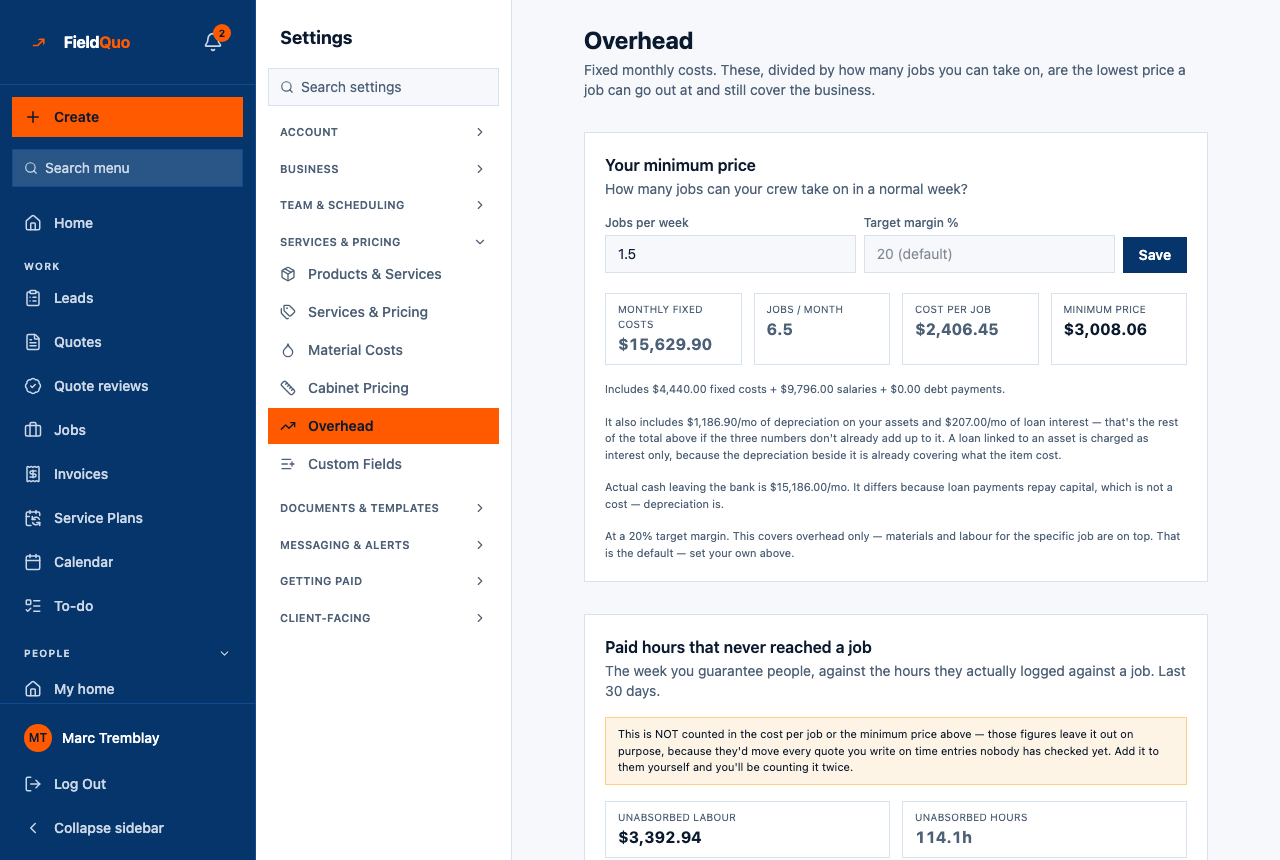
The tiles read Cost per job as the overhead a job has to carry, and Minimum price as that cost at your Target margin % — 20% until you set one, and the note under the tiles says when it is still the default. Materials and labour for the specific job are on top — the note says that too.
The arithmetic
| Figure | How it is worked out |
|---|---|
| Monthly fixed costs | Fixed costs + salaries + debt, plus depreciation on your assets and interest on their loans. A loan linked to an asset counts as interest only. |
| Jobs / month | Jobs per week × 4.33. |
| Cost per job | Monthly fixed costs ÷ jobs per month. |
| Minimum price | Cost per job ÷ (1 − target margin) — 20% unless you set your own. |
Where it shows up
- On every quote's Cost & margin panel as Overhead (this job's share), with a note: “Overhead is $15,629.90/month of fixed costs spread across 6.5 jobs a month.”
- On Settings → Expense Tracking, where Monthly burn rate is the cash version of the same registers — cash and cost differ when a loan repays capital, and the Overhead screen says so when they do.
The hourly floor, for work billed by the hour
Work you bill by the hour — an electrician's or plumber's labour, a cleaning crew — is judged per hour, not per job. Type Billable hours a month beside Jobs per week on Settings → Overhead: the hours the business can actually invoice in a month, across everyone (drive time and quoting are not billable). The screen then shows Your hourly floor: your monthly costs ÷ those hours.
In the quote builder, beside Cost & margin, any quote with lines billed by the hour is checked: their average rate against the floor. Below it, an amber warning says what the hourly lines average, the floor, how much the quote is short, and where every number came from. It never blocks the save and never changes a price.
No profit is included in the hourly floor — that is FieldQuo's default, so the floor is your break-even, not your target. Billable hours are never guessed: with none set, the builder says where to set them and checks nothing.
Who can see it
Settings → Overhead needs the Job costing switch and the ability to manage the team: Manager, administrators and the owner by default. The figures are also refused to anyone without that switch when a quote asks for them, so an Estimator's builder simply keeps the 10% estimate.
Only in FieldQuo
A price floor worked out from your own overhead is not listed on the pricing page of Jobber, ServiceTitan or QuoteIQ at any tier. Housecall Pro's “Flat-rate pricing” and Projul's “Construction Financials, Job Costing & Budgeting” are counted as covering it, generously; neither describes a per-job overhead floor.
ਅਕਸਰ ਪੁੱਛੇ ਜਾਂਦੇ ਸਵਾਲ
Why is the minimum price blank?
Jobs per week is not set. The screen refuses to divide your overhead by a number it invented. Type a normal week's capacity and press Save.
Should my crew's wages go under Salaries?
No. Crew hours are charged to each job as labour in the Cost & margin panel; putting them here as well counts them twice. Salaries is for fixed overhead pay — your own draw, an office wage, a bookkeeper's hours.
Is the 20% margin adjustable?
Yes — Target margin % sits beside Jobs per week and takes 0 to 95. Leave it blank and the floor uses 20% and says under the tiles that it is the default. The Cost & margin panel on a quote measures against a separate 30% target.
ਕੀ ਇਹ ਮਦਦਗਾਰ ਸੀ?