

Managing a booked visit
The page behind Change or cancel this visit in the confirmation email: what the client sees, how they move or cancel a visit within your notice, what happens to a visit fee, and what you are told.
ਇਹ ਲੇਖ ਫ਼ਿਲਹਾਲ ਅੰਗਰੇਜ਼ੀ, ਫ਼ਰਾਂਸੀਸੀ ਅਤੇ ਸਪੈਨਿਸ਼ ਵਿੱਚ ਉਪਲਬਧ ਹੈ। ਤੁਸੀਂ ਅੰਗਰੇਜ਼ੀ ਸੰਸਕਰਣ ਪੜ੍ਹ ਰਹੇ ਹੋ। Français · Español
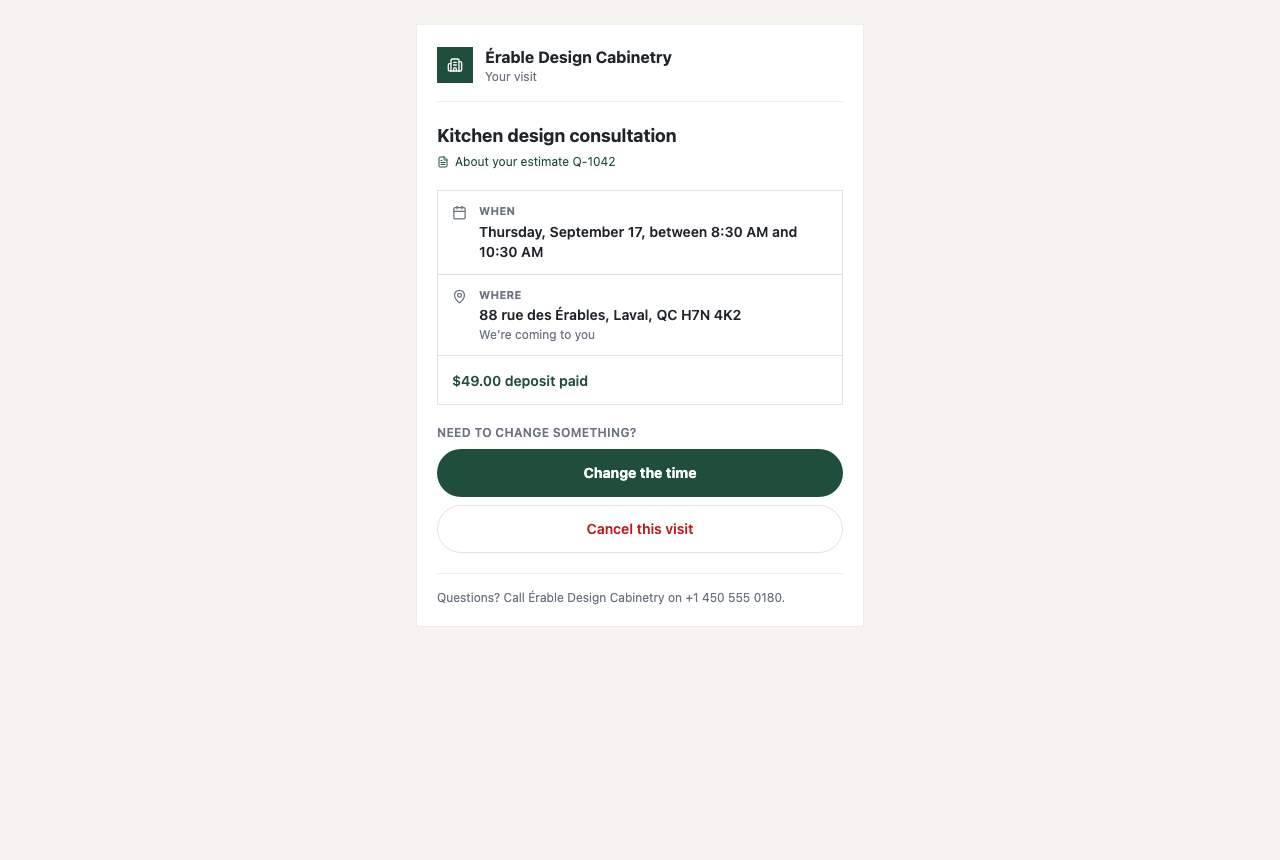
Every booking confirmation email carries one button, Change or cancel this visit. It opens a page on your letterhead with the visit's details and two choices — Change the time and Cancel this visit — for as long as your notice period allows. Inside that window the page says so, in words that name your policy, and gives them your phone number instead.
Money follows your rules, not the client's. A fee they paid carries over when they move the visit, and on a cancellation it is returned only if you switched that on and they cancelled in time.
Overview
The link is a long random token minted when the booking was confirmed; it is in the confirmation email and in the email sent after a move, and in no text message. The page is written in the language of the quote the visit is about, else your company default.
What is on the page
- Your logo and name, Your visit, the event type, and About your estimate Q-1042 when the visit is tied to a quote.
- When — the arrival window you promise (“between 8:30 AM and 10:30 AM”) or the exact time, in your company's time zone.
- Where — the address with “We're coming to you”, or “Phone call — we'll ring you”, or “Video call — we'll email a link”.
- $49.00 deposit paid when a visit fee was taken.
- Need to change something? with Change the time and Cancel this visit — or, when the visit can no longer be changed here, the reason and “Call [Your company] on [phone] — they can still move it for you.”
- “Questions? Call [Your company] on [phone].”
Changing the time
- They press Change the time. Pick a new time shows the same calendar as the booking page, offering only slots that are free and at least your notice period away.
- They pick a day and a time and press Move my visit here (or Keep my current time to back out).
- The page reads Your visit has been moved — “[Your company] has been told, and a new confirmation is on its way to you.” A fee already paid carries over; nothing is charged or refunded.
If the slot went to someone else in the meantime: “That time has just been taken. Pick another one.” If it is too close: “That time doesn't give them enough notice. Pick a later one.”
Cancelling, and what happens to the fee
Cancel this visit asks “Cancel this visit?” — “[Your company] will be told straight away, and your time goes back on their calendar.” — with Keep my visit and Yes, cancel it. Under the question, when a fee was paid, one of three sentences states what your policy will do with it:
| What the page says | When |
|---|---|
| “Your $49.00 deposit will be returned to the card you paid with.” | Return the visit fee when they cancel in time is on, and they are cancelling with at least the refund notice. |
| “Your $49.00 deposit is not automatically returned — get in touch with them about it.” | The refund switch is off (the default), or they are inside the refund notice. |
| “Your $49.00 deposit has already been returned.” | You refunded it by hand before they cancelled. |
After Yes, cancel it the page reads Visit cancelled — “[Your company] has been told. If this was a mistake, get in touch and they'll find you another time.” — and, when a refund applies, “Your $49.00 deposit is on its way back. It can take a few days to show on your statement.” The refund is the amount actually paid, returned to the same card; the card processing fee is not returned to you. If Stripe cannot make the refund, nothing is cancelled and the page says so.
When the page refuses
- “[Your company] asks for at least 24 hours' notice, so this visit can't be changed here any more.” — inside your notice period. The number is yours.
- “This visit has already taken place.” / “This visit has already been cancelled.”
- “This visit isn't confirmed yet — the payment hasn't come through.” — a fee still being paid.
- An unknown or replaced link is a plain “This link isn't valid” page.
What you see on your side
- The appointment moves or is marked cancelled on Appointments; the old slot is bookable again at once.
- Your company email address gets a letter: “A booking moved” — “[Client] moved their Kitchen design consultation using the link in their confirmation email.” — or “A booking was cancelled”, with “The $49.00 visit fee was refunded automatically, per your cancellation policy.” or “The $49.00 visit fee was NOT refunded.”
- The client gets the mirror: Your visit has moved with the new time, or Your visit is cancelled with the fee sentence.
The office letter goes to the company email address under Settings → Company Settings. There is no in-app notification for a client's move or cancellation.
What you control
| Setting under Settings → Booking Page → Changes & cancellations | What it does |
|---|---|
| Notice you need to change or cancel (hours) | How close to the visit the page still offers Change the time and Cancel this visit; 24 hours if you never set it. A new time must also be at least this far away. |
| Return the visit fee when they cancel in time | Off unless you turn it on. Off, a cancellation goes through and the fee stays with you. |
| Notice needed to get the fee back (hours) | Only with the switch on. Blank means the same notice as above; longer means a window where they can still cancel but the fee stays. |
| What do you promise the client? | Whether When shows an exact time or an arrival window. |
The preview lines under the fields say the policy back to you in the client's words — “Clients can cancel or move a visit up to 24 hours before it starts. Inside that, they have to call you.” — so the sentence on the client's page and your setting cannot disagree.
Who can change it
The client's page is open to whoever holds the link. The policy under Settings → Booking Page needs the Manager level or above — an owner, an administrator, a Manager or a Dispatcher.
ਅਕਸਰ ਪੁੱਛੇ ਜਾਂਦੇ ਸਵਾਲ
Can the client move a visit to tomorrow at 8 tonight?
Only if your notice allows it. With 24 hours' notice, both the visit they are moving and the new time must be at least a day away; otherwise the page tells them to ring you.
The client cancelled and the fee was not refunded. Why?
The refund switch is off by default — a visit fee is your money the moment it is taken. Turn on Return the visit fee when they cancel in time, or refund it by hand from the payment.
Does moving a visit charge anything?
No. A fee already paid carries over to the new time; the client's page and both emails say so.
ਕੀ ਇਹ ਮਦਦਗਾਰ ਸੀ?