

Company settings basics
The first screen after signup: your details, opening hours, taxes, payment terms and regional preferences, and what each one changes on your documents.
Поки що ця стаття доступна англійською, французькою та іспанською. Ви читаєте англійську версію. Français · Español
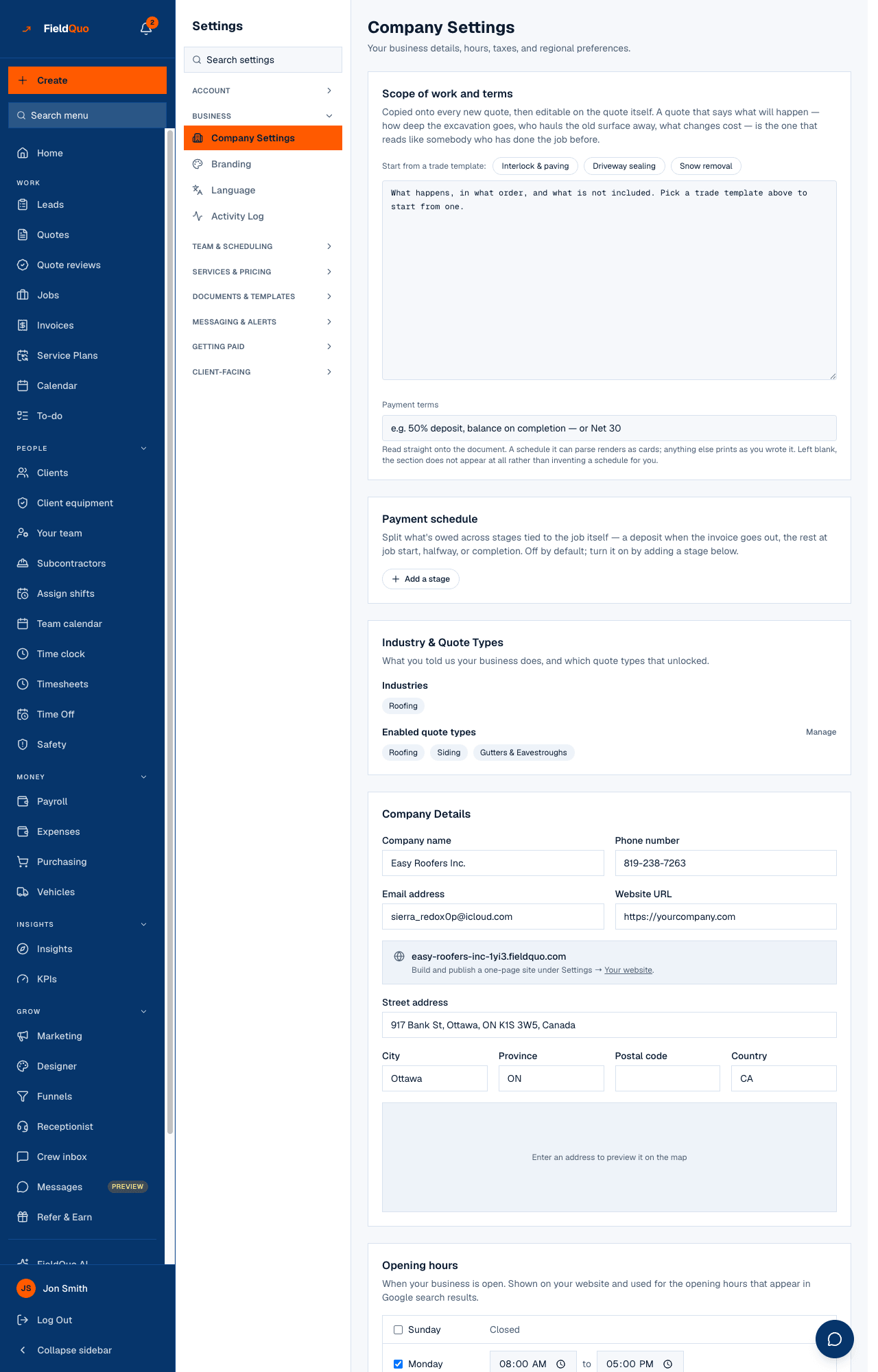
Company Settings — Your business details, hours, taxes, and regional preferences. It is where the Settings row lands, and it holds everything the signup form did not ask: the address as it prints on a quote, the tax number at its foot, the hours your website shows, and the terms every new quote starts with.
Overview
The page is a column of cards. Most of them save together with the Update Settings button at the bottom; three — the payment schedule, the opening hours and the booking availability — have their own save, because each writes a different thing.
What is on the screen
| Card | What it holds |
|---|---|
| Scope of work and terms | The Default scope of work copied onto every new quote, with trade templates to start from, and the Payment terms line. |
| Payment schedule | Stages tied to the job — a deposit when the invoice goes out, a share at job start, halfway, or completion. Off until you add a stage. |
| Industry & Quote Types | The trades you said you work in and the quote types that unlocked, with Manage to change them on Services & Pricing. |
| Company Details | Company name, phone number, email address, website URL, your subdomain, street address, postal code and country. |
| Opening hours | When the business is open — shown on your website and used for the hours in Google search results. |
| Booking availability | Which times can be booked online, per day. Separate from opening hours on purpose. |
| Tax Settings | Tax ID name and number, Tax Rates with a default, and whether to apply the client's local rate automatically. |
| Industry benchmark | A switch to share your anonymised figures and unlock the comparison on Insights. |
| Regional Settings | Billing currency, time zone, date format and first day of the week. |
How to fill it in
- Type the details, terms, taxes and regional preferences, then press Update Settings at the bottom. Saved appears beside the button.
- In Opening hours, set each day or mark it Closed, use Apply {day}'s times to every open day to copy one day, and press Save opening hours — this card saves on its own.
- In Booking availability, press Edit to set the bookable hours; the card shows each day's window or Closed.
- In Payment schedule, press Add a stage, name it, pick when it falls due and its percent; the stages must total exactly 100% before Save schedule works.
What each setting changes
- Country is filled in automatically from the address, and it sets the Billing currency and the tax jurisdiction a quote falls back to. Tick I serve clients outside my country to bill in other currencies.
- Tax ID name and number print at the foot of every quote and invoice. FieldQuo prints what you enter; it does not register you or file anything.
- Automatically apply the local tax rate of the client matches the client's province against your rates; with no match, your default rate is used and the quote says so.
- Date format applies to your own screens only — client documents follow the client's language. First day of the week changes how calendars and hour grids start.
- A saved Payment schedule generates the payment terms text, so the document always matches what actually bills; Turn off — go back to free text clears every stage.
- Opening hours are a company-level fact; Booking availability is per person. The office can be open on a day nobody is free to visit.
- The Industry benchmark switch pools your numbers with other companies, never shown individually, and can be turned off any time.
Every day is marked closed means no hours appear on your website or in search results. A partial week is published as a partial week — FieldQuo never invents a Monday-to-Friday for you.
Who can edit it
Owners, administrators, dispatchers and managers can change every card. Estimators and crew open the same page read-only, headed These are your company's details as clients see them. See Company Settings for the full reference, and Opening hours and Tax settings for the two cards with the most consequences.
Часті запитання
I changed the address. Why did the currency not change?
The currency follows the country, and the country is read from the address. If the country changed, the currency changed with it; if only the street did, nothing about money moves.
Where do I set my own working hours?
Under Settings → Availability, per person. Company Settings holds the opening hours the public sees.
Why does the payment terms box refuse to let me type?
A payment schedule is on, and the terms are generated from it. Turn the schedule off to write free text again.
Чи була ця стаття корисною?