

Лише у FieldQuo
The break-even price
The lowest price a job can go out at and still cover the business — your real monthly overhead divided by how many jobs you can take on — and where that figure shows up on a quote.
Поки що ця стаття доступна англійською, французькою та іспанською. Ви читаєте англійську версію. Français · Español
Every contractor has a number they have never been able to work out: below what price does a job lose me money before a single hour is worked? FieldQuo works it out from your own fixed costs, salaries, debt and equipment, and shows it on Settings → Overhead as Your minimum price.
It is not a rule of thumb and it is not an industry average. It is your rent, your truck and your office wage, divided by the jobs you said you can do in a week.
Overview
Settings → Overhead is two things: the registers where your monthly costs live, and the card at the top that turns them into a price floor. The floor refuses to exist until you tell it how many jobs a week you can take on — “Without it there's nothing to divide your overhead by” — because a floor built on an invented capacity is an invented number.
The same cost per job feeds the Cost & margin panel on every quote, replacing the flat 10% guess with your real overhead share.
What is on the screen
- Your minimum price — the Jobs per week and Target margin % boxes, Save, then four tiles: Monthly fixed costs, Jobs / month, Cost per job and Minimum price, with a line saying what the total includes and the target margin it assumes.
- Paid hours that never reached a job — the week you guarantee people against the hours they actually logged on jobs, last 30 days. Reported, and deliberately not counted in the price above; the box says so.
- Fixed costs — rent, insurance, phone, subscriptions: anything that arrives whether or not you win a job, monthly or yearly.
- Salaries — business overhead only: your own draw, an office wage. Not the crew, whose hours are already charged to each job as labour.
- Debt — loans and finance agreements with a principal, a monthly payment and an interest rate.
- Assets & depreciation — the truck, the trailer, the spray rig: what it cost, what it is worth at trade-in, how many months it will last, and which loan paid for it.
- Bills due — outstanding, due this month and overdue, with Mark paid.
How to get your number
- Open Settings → Overhead and fill the registers: fixed costs, salaries, any debt, any asset worth more than a few hundred dollars.
- Link an asset to the loan that paid for it. The loan then counts as interest only and the asset's depreciation carries its cost — otherwise the same truck is charged twice, and the screen warns you when it sees that pattern.
- Type Jobs per week — a normal week for your crew — and, if 20% is not your figure, Target margin %; then press Save.
- Read Minimum price. Anything quoted below it does not cover the shop before materials and labour are even counted.
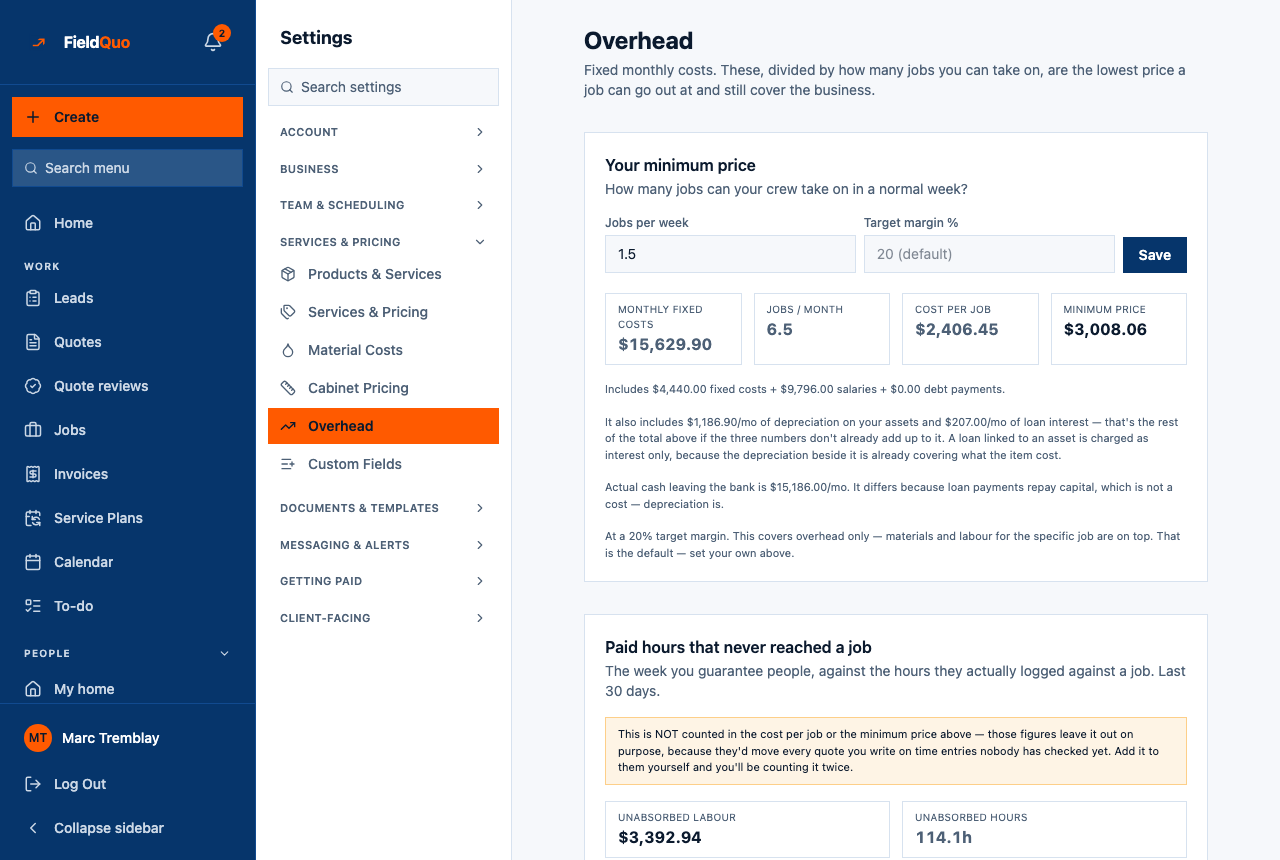
The tiles read Cost per job as the overhead a job has to carry, and Minimum price as that cost at your Target margin % — 20% until you set one, and the note under the tiles says when it is still the default. Materials and labour for the specific job are on top — the note says that too.
The arithmetic
| Figure | How it is worked out |
|---|---|
| Monthly fixed costs | Fixed costs + salaries + debt, plus depreciation on your assets and interest on their loans. A loan linked to an asset counts as interest only. |
| Jobs / month | Jobs per week × 4.33. |
| Cost per job | Monthly fixed costs ÷ jobs per month. |
| Minimum price | Cost per job ÷ (1 − target margin) — 20% unless you set your own. |
Where it shows up
- On every quote's Cost & margin panel as Overhead (this job's share), with a note: “Overhead is $15,629.90/month of fixed costs spread across 6.5 jobs a month.”
- On Settings → Expense Tracking, where Monthly burn rate is the cash version of the same registers — cash and cost differ when a loan repays capital, and the Overhead screen says so when they do.
Who can see it
Settings → Overhead needs the Job costing switch and the ability to manage the team: Manager, administrators and the owner by default. The figures are also refused to anyone without that switch when a quote asks for them, so an Estimator's builder simply keeps the 10% estimate.
Only in FieldQuo
A price floor worked out from your own overhead is not listed on the pricing page of Jobber, ServiceTitan or QuoteIQ at any tier. Housecall Pro's “Flat-rate pricing” and Projul's “Construction Financials, Job Costing & Budgeting” are counted as covering it, generously; neither describes a per-job overhead floor.
Часті запитання
Why is the minimum price blank?
Jobs per week is not set. The screen refuses to divide your overhead by a number it invented. Type a normal week's capacity and press Save.
Should my crew's wages go under Salaries?
No. Crew hours are charged to each job as labour in the Cost & margin panel; putting them here as well counts them twice. Salaries is for fixed overhead pay — your own draw, an office wage, a bookkeeper's hours.
Is the 20% margin adjustable?
Yes — Target margin % sits beside Jobs per week and takes 0 to 95. Leave it blank and the floor uses 20% and says under the tiles that it is the default. The Cost & margin panel on a quote measures against a separate 30% target.
Чи була ця стаття корисною?