

Stripe
How Stripe is used twice — once so your clients can pay you, once so FieldQuo can bill you — what you connect, what Stripe sees, and what Disconnect really does.
本文目前提供英语、法语和西班牙语版本。您正在阅读英语版本。 Français · Español
Stripe does two different jobs in FieldQuo, and they are never the same account. Stripe Connect is yours: an Express account created in your company's name when you press Connect with Stripe, into which every online payment from a client is deposited. Stripe Billing is FieldQuo's: the card you add when you choose a plan, charged for that plan, your phone credit and the migration service. This article is about the first one, and says where the second one lives so the two are never confused.
The short version: connect once on Settings → Payments, finish what Stripe asks for on Stripe's own page, and from then on every invoice, deposit and instalment carries a Pay button. FieldQuo never holds the money and never sees your bank details.
Overview
A client paying online is a Stripe charge created in your company's name — your name is what appears on their card statement — and paid out to your bank by Stripe on its standard schedule, about 2 business days for a Canadian or US account. A processing fee comes off each payment before it reaches you: 3% + $0.30 on a card, 1% + $0.40 capped at $5.00 on a Canadian bank debit, 0.8% capped at $5.00 on a US one. Nothing is billed separately and there is no monthly fee for taking payments. The full arithmetic is in Payment processing fees and payouts.
Your subscription is the other Stripe. It is charged to the card on Account & Billing, and Manage billing & payment method there opens Stripe's billing portal for that card — not your payout account. The two never touch: a client's payment can never be applied to your FieldQuo bill, and your FieldQuo bill is never taken from your payouts.
FieldQuo sends Stripe the invoice number and the amount. The client types their card or bank details on Stripe's page, never on a FieldQuo page, and the line at the bottom of Settings → Payments is literally true: FieldQuo never sees or stores your bank account details.
What is on Settings → Payments
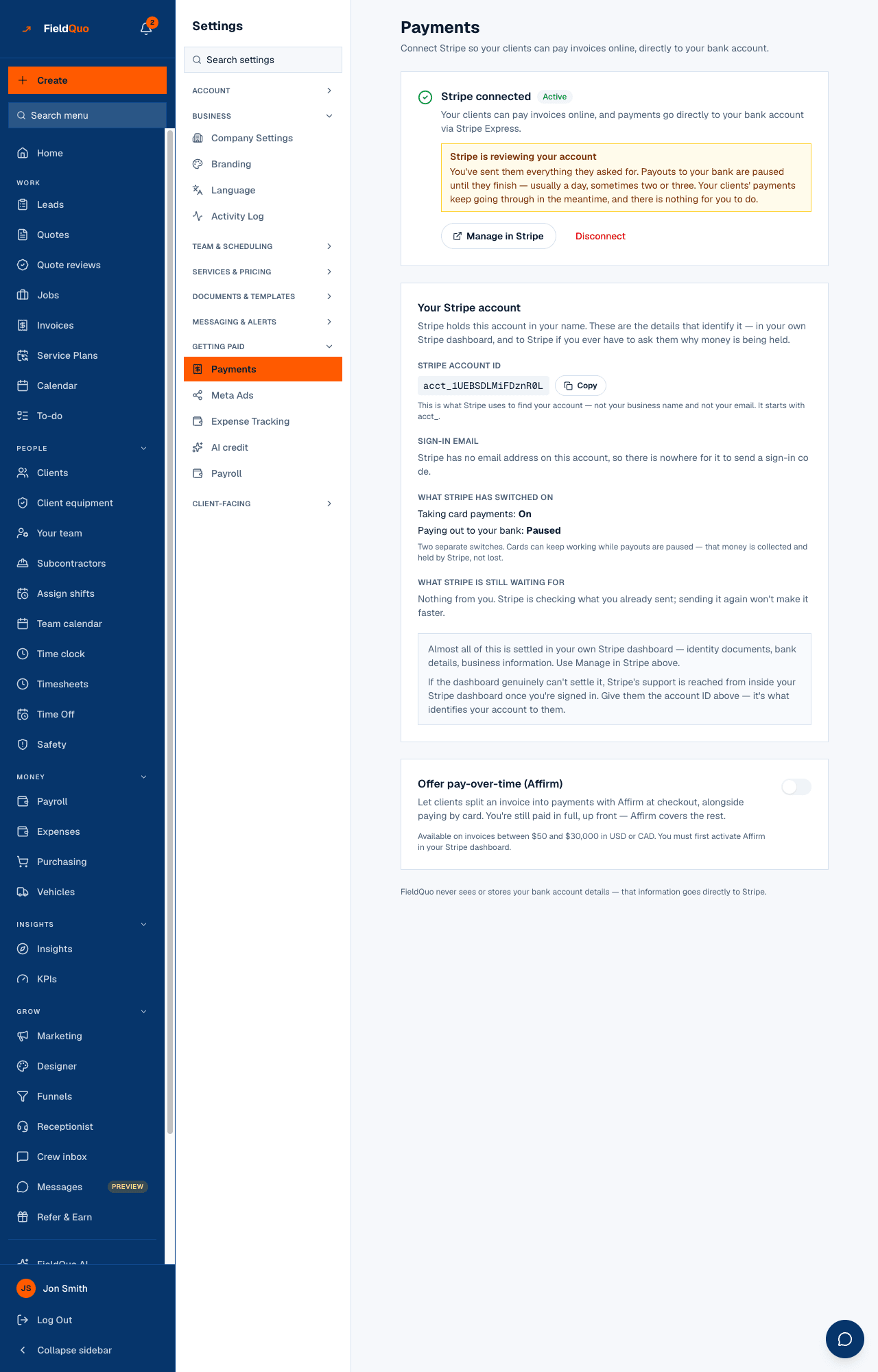
The page reads, top to bottom: the Stripe connection card, Processing fees, Instant payout, Payment methods you accept, Your Stripe account (owner only), and — once the connection is active — Offer pay-over-time (Affirm). The connection card is in one of four states, and each says what to do next.
| The card reads | What it means | What to press |
|---|---|---|
| Not connected yet | No Stripe account exists for this company yet. | Connect with Stripe — you leave for Stripe's hosted setup and come back here. |
| Stripe still needs a few things | Stripe has not enabled payments; the outstanding items are listed under the heading. | Finish Setup to go back to Stripe, or I've already done this to make FieldQuo ask Stripe again. |
| Stripe is reviewing your details | Everything is submitted; Stripe is verifying it. Minutes usually, occasionally a day or two. | Check again. Sending the same document twice does not speed it up. |
| Stripe connected · Active | Charges are enabled. Every invoice your clients receive now carries a Pay button. | Manage in Stripe opens your Express dashboard in a new tab; Disconnect unlinks it. |
The page asks Stripe directly every time it loads rather than trusting what it last heard, so the badge is Stripe's answer, not a stale column. That matters when you come back from Stripe's page: the account was updated seconds ago and the page checks before it draws.
How to connect
- Open Settings → Payments and press Connect with Stripe.
- On Stripe's page, enter what it asks for — business details, a director's identity, a bank account. What Stripe asks for and why walks through it.
- You land back on Settings → Payments. If the card reads Stripe connected · Active, you are done; if it lists things Stripe still needs, press Finish Setup.
- Send an invoice. Its email and the client portal now carry Pay by card, and — once Stripe has activated bank debit on your account — Pay … from bank account beside it.
Bank debit is not a setting. FieldQuo requests the capability for your country when you connect, Stripe activates it on its own schedule, and the Processing fees card tells you which state you are in: Clients can pay invoices by card or from a bank account (pre-authorized debit, Canada) — or ACH for a US company — or that bank payments will be offered once Stripe activates them. Nothing to do on your side. Bank debit is then offered on invoices, deposits and payment-schedule instalments from the client portal, and on service plans with automatic collection; see Bank debit in Canada.
Under Your Stripe account, two switches are shown separately: Taking card payments and Paying out to your bank. Cards can keep working while payouts are paused — the money is collected and held by Stripe, not lost. When that happens the connection card says Stripe is holding your money or Stripe is reviewing your account, and Payouts held or under review says what each needs.
What each control changes
- Manage in Stripe — opens a sign-in link to your Stripe Express dashboard in a new tab. Payouts, identity documents, your bank account and Stripe's own support all live there.
- Disconnect — unlinks the account from FieldQuo. Clients cannot pay online until you reconnect. It does not close or delete your Stripe account, and nothing about your payout history changes — but pressing Connect with Stripe afterwards creates a brand-new Express account from scratch, with Stripe's setup to do again. Disconnect is for leaving, not for fixing a problem.
- Payment methods you accept — tick Cash, E-transfer and Cheque. What you tick appears as an Accepted: line on the invoice email, in the client portal and on the invoice PDF; untick everything and the line is left out. These are recorded by hand and carry no fee.
- Offer pay-over-time (Affirm) — lets a client split an invoice between $50 and $30,000, in USD or CAD, with Affirm at checkout, alongside paying by card. You are still paid in full, up front. Switching it on asks Stripe to enable Affirm on your account — there is nothing to set up in Stripe — and the line under the switch shows Stripe's answer (active, pending review, or not available in your country). Affirm's fee on those payments is passed through the same way as the card fee.
- Instant payout — sends your available balance to a debit card in about 30 minutes for 1% of the amount; see Instant payouts.
- Refund on a payment row of the invoice — the only way to refund a client. Your Express dashboard cannot refund a charge FieldQuo created; the button in FieldQuo does, in full or in part, with a reason, and the processing fee is not returned. See Refunds.
Who can see it
Settings → Payments is for the owner and administrators. A Manager or Dispatcher does not see the row, and the routes behind Connect, Disconnect and Manage in Stripe refuse anyone else on the server, so a person who types the address gets a refusal rather than the page. The Your Stripe account card — the acct_ id, the sign-in email, what Stripe is waiting for — is shown to the owner only.
What is not integrated
- No card reader or in-person terminal. A client paying you in the driveway pays from the invoice email on their phone, or by cash, e-transfer or cheque recorded by hand.
- No tipping, and no lending or capital product. A client pays exactly the invoice.
- Disputes are answered in your Stripe dashboard with your evidence, not in FieldQuo; FieldQuo records the $15 fee and the held amount on the invoice. See Disputes and chargebacks.
- Stripe's own account fees — a small monthly fee in months you take payments, and 0.25% + 25¢ per payout — are passed through at cost as their own line on your next payment, never hidden in the processing fee.
常见问题
Is the Stripe account mine or FieldQuo's?
Yours. It is an Express account in your company's name, with its own acct_ id shown on Settings → Payments. FieldQuo holds only the id that points at it.
I already have a Stripe account. Can I use it?
No. Connect with Stripe creates a new Express account for FieldQuo to pay into; an existing standard Stripe account cannot be linked. Both can exist side by side.
Does my client need a Stripe account?
No. They press Pay, type a card or bank details on Stripe's page, and are done. They never see the word Stripe in FieldQuo's emails.
Why does Account & Billing open a different Stripe page?
Because that is Stripe Billing — the card FieldQuo charges you on. Your payout account is under Settings → Payments → Manage in Stripe.
这篇文章有帮助吗?