

The AI material list
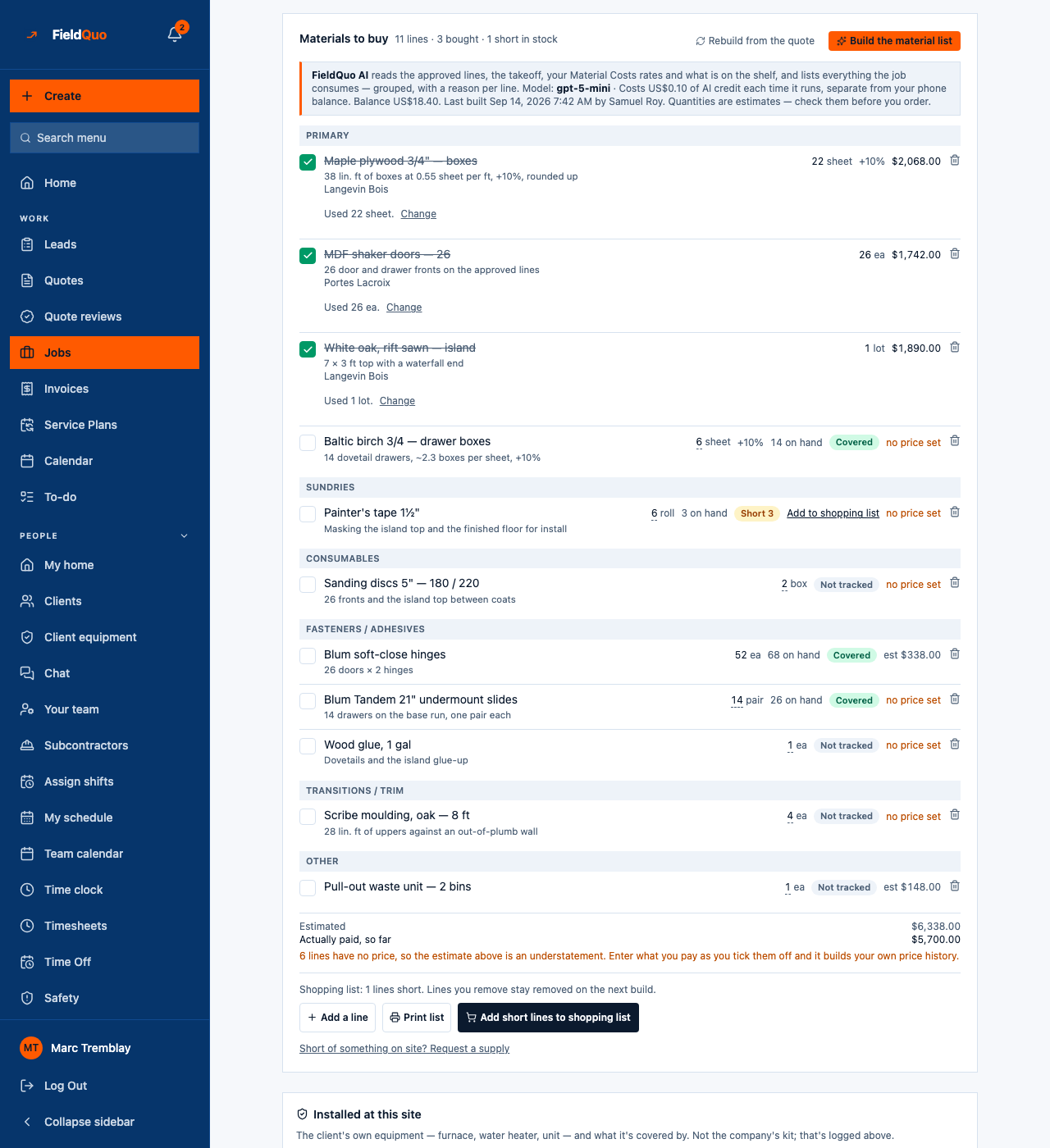
Build the material list reads a job's approved quote, its takeoff, your Material Costs rates and your stock, and writes everything the job consumes — grouped, with a reason per line — for a few cents of AI credit.
本文目前提供英语、法语和西班牙语版本。您正在阅读英语版本。 Français · Español
Rebuild from the quote writes the takeoff's own lines: the paint, the sheets, the bundles your rates predict. It does not think of the tape, the plastic, the caulk, the sanding discs or the hinges nobody priced. Build the material list does: FieldQuo AI reads the job and writes the complete list, grouped, each line with the reason it is there and what you already have on the shelf.
It is a paid build — a few cents of AI credit each time it runs, from the same credit that pays for the deep photo read — and the free Rebuild from the quote stays free.
Overview
The button sits in the job page's Materials to buy panel, beside Rebuild from the quote. Under the heading, a banner says what the build reads, which model ran it, what it costs, your credit balance, and when it last ran and who ran it. It ends with the sentence that matters most: Quantities are estimates — check them before you order.
How to build the list
- Open the job. It needs a quote behind it; without one the build answers This job has no quote to build a material list from.
- In Materials to buy, press Build the material list. It says Building… while it works.
- Read the result line: Built: 12 lines added, 2 quantities kept at the takeoff's figure, 0 rows refused.
- Check the quantities, change any AI line's quantity with Change how many are needed, and remove what you do not need.
A line you remove stays removed the next time you build, and so does anything already ticked as bought or added by hand. Everything else on the list is replaced by the new build.
What it reads, and what it never sees
- The approved quote's lines and the takeoff's own derived lines. Where the AI proposes a line the takeoff already predicts, the takeoff's quantity wins — those are the ones counted as kept at the takeoff's figure.
- Your Material Costs rates, for coverage and quantities — the same rates Rebuild from the quote uses.
- Your stock, summed from purchasing movements, so each line can say 3 on hand and Covered, Short 3 or Not tracked.
- No price. The facts sent to the model carry no rate, no cost and no total, and the build refuses to run if one slips through. A reason that quotes money is refused too.
What it costs
Each build takes the price on the banner — US$0.10 today — from the company's AI credit, not from the plan's included AI allowance and not from the phone balance. The credit is reserved before the model runs and put back if it returns nothing usable: Couldn't build the list just now. Nothing was charged.
| When | What you see |
|---|---|
| The balance is lower than the price | Building the list costs $0.10 of AI credit. Your balance is $0.04 — add at least $0.06 first. An owner or administrator is offered the top-up right there. |
| The monthly AI allowance is used up | The build is refused until the allowance resets, like every other FieldQuo AI feature. |
| FieldQuo has not turned the feature on for your account | The AI material list isn't available on your account yet. |
Short lines and purchasing
A line marked Short has an Add to shopping list link, and Add short lines to shopping list under the list takes all of them at once. They go onto a draft purchase order — the page names it — which you price and send from Purchasing. Ticking lines off as bought, the receipt, and the quantity actually used work exactly as described in Materials on a job.
Who can use it
Building needs Jobs at view, create and edit — the same level as rebuilding, adding or removing a line — and the job must be one you can open. The banner, the price and the balance are shown only to people with that level. Adding short lines to a purchase order also needs access to purchasing.
常见问题
Is the list the same every time I build it?
Not necessarily. It is an AI reading of the job, which is why the banner tells you to check the quantities. The takeoff's own quantities never move: where the AI and the takeoff disagree, the takeoff wins.
Does building the list change the quote or the invoice?
No. The list is internal to the job. Nothing on it reaches the client.
Why not just use Rebuild from the quote?
Use it whenever the takeoff's lines are enough — it is free. The paid build is for the sundries and consumables a takeoff does not predict.
这篇文章有帮助吗?