

Report a safety incident
File an injury, a near-miss or property damage from the phone in under a minute: what the form asks, what Work stopped means, and who sees the report.
本文目前提供英语、法语和西班牙语版本。您正在阅读英语版本。 Français · Español
Safety is where an injury, a near-miss or damage gets written down while it is fresh. Every access level can file one — the person standing on the ladder is the one who has to be able to report what happened on it — and a near-miss is worth reporting exactly like an injury, as the screen itself says.
The report is a record, not an alarm. Filing it writes it to the company's incident list and activity log; it does not text or email anybody. Tell your supervisor as well.
Overview
The screen lists incidents — filtered All, Open, Reviewed or Closed — as cards with the kind, a Work stopped badge when the work was halted, where, who reported it and its status, and a Report button. Managers get a Follow up panel on each card to set the status and record what was done; a crew member sees the reports they filed.
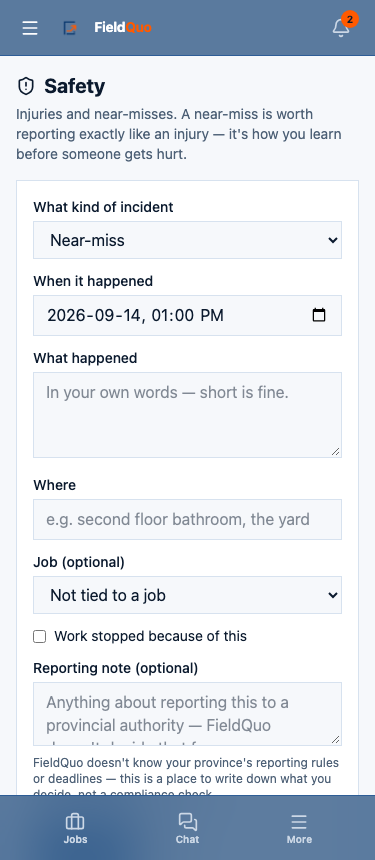
How to file a report
- Open More → Safety and tap Report.
- Pick What kind of incident: Near-miss, Injury, Property damage or Other.
- Set When it happened — it defaults to now.
- Describe What happened in your own words. Short is fine; this is the one field that is required.
- Say Where and, under Job (optional), pick the job or leave Not tied to a job. The list holds the jobs you are on.
- Tick Work stopped because of this if it did, and add a Reporting note (optional) about telling a provincial authority.
- Tap File report. The confirmation invites you to add a photo of the scene — optional — then Done.
What each field is for
| Field | What it does |
|---|---|
| What kind of incident | Sets the card's label. An injury is recorded in the activity log as an injury; a near-miss as a near-miss. |
| When it happened | The incident's time, not the filing time. |
| What happened | Required. The only free text the card shows in full. |
| Where | A room, a yard, a floor — free text. |
| Job (optional) | Links the report to a job so the office can find it from there. |
| Work stopped because of this | Shows a red Work stopped badge on the card. It changes nothing else — the schedule is not touched. |
| Reporting note (optional) | Your note about regulatory reporting. FieldQuo does not know your province's rules or deadlines and does not decide this for you. |
After you file
The report is Open. A manager reviews it in the Follow up panel — status to Reviewed or Closed, and a note on what was done — and the card updates. Photos you added stay on the report. The reporter is always the person signed in; a report cannot be filed in somebody else's name.
Nobody is notified automatically. If somebody is hurt, call for help first and tell your supervisor; the report can be filed from the site afterwards, or the next morning with the real time set under When it happened.
Who can see it
The floor of the safety setting is Report incidents, and view their own — the Crew and Estimator levels — so you see what you filed, and only that. Seeing everyone's incidents is the next level, and following up is View everyone's incidents and follow up on them: the Dispatcher level and above. A report filed about you by somebody else is theirs to show you. The office's side is Safety incidents and near-misses.
常见问题
Should I report a near-miss that hurt nobody?
Yes. The screen says it in its own words: a near-miss is how you learn before someone gets hurt.
Does ticking Work stopped tell the office to stop the job?
No. It puts a badge on the report. Stopping the work is a conversation with your supervisor.
Can I edit a report after filing?
Not from the Crew level. A manager adds the follow-up and changes the status; the original stays as you wrote it.
这篇文章有帮助吗?