

FieldQuo 独有
Safety incidents and near-misses
A crew member reports an injury, a near-miss or property damage from the site in under a minute; a manager follows up, sets the status and records what was done.
本文目前提供英语、法语和西班牙语版本。您正在阅读英语版本。 Français · Español
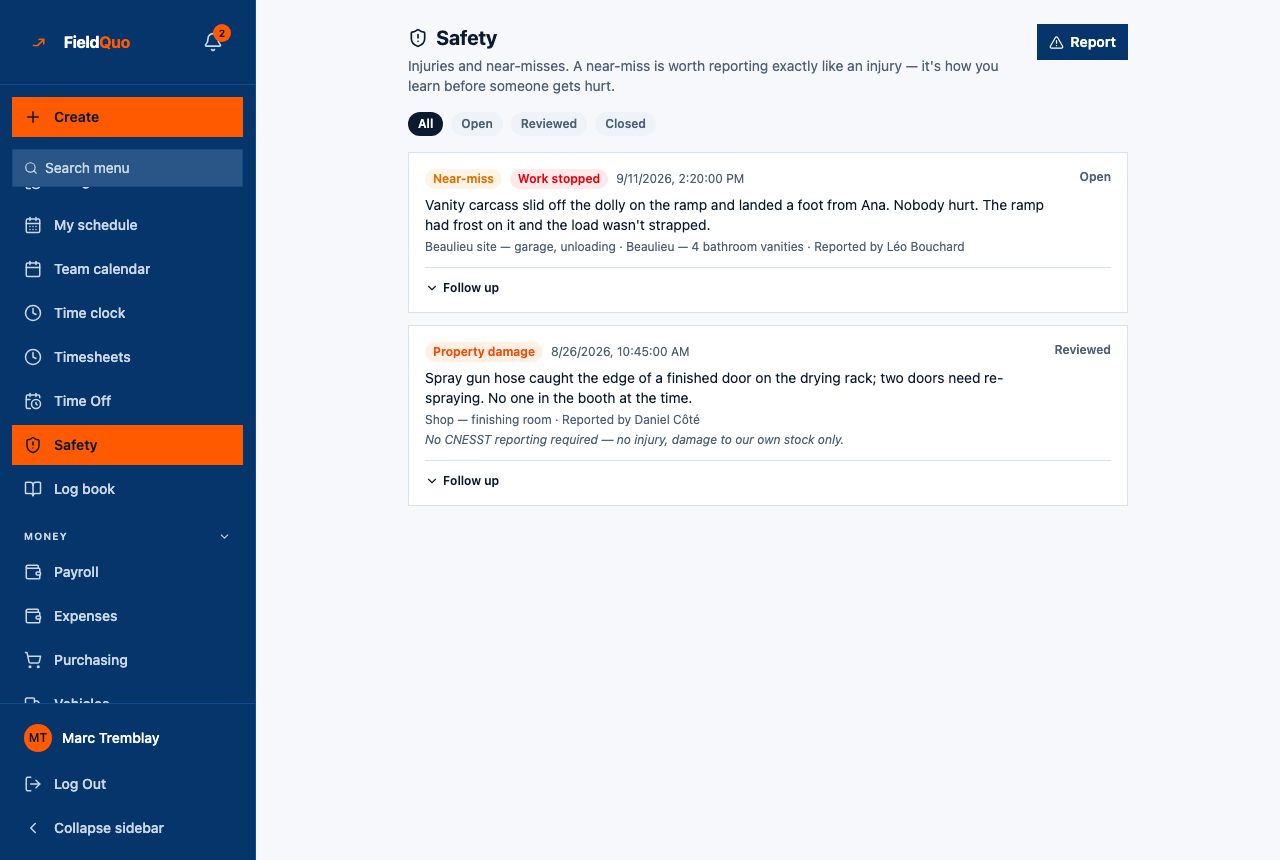
Safety is the place an incident gets written down while it is still fresh — by the person standing there, from their phone, without asking anyone's permission first. The heading says why: Injuries and near-misses. A near-miss is worth reporting exactly like an injury — it's how you learn before someone gets hurt.
Reporting is open to every access level. Reading everyone's reports and following up on them is a separate, higher grant, because a report naming an injured employee is sensitive.
Overview
The screen is a Report button, the filters All / Open / Reviewed / Closed, and one card per incident. Each card shows the kind — Near-miss, Injury, Property damage or Other — a red Work stopped badge when work stopped, when it happened, the description, where, which job, Reported by whom, the reporting note if there is one, up to six photos, and the status on the right. When nothing has been filed the list reads Nothing reported — That's a good thing.
How to report an incident
- Open Safety and press Report.
- Pick What kind of incident and When it happened (now is pre-filled).
- Write What happened — *In your own words — short is fine.* This is the only required text.
- Add Where, and choose the Job (optional) it belongs to, or leave it Not tied to a job.
- Tick Work stopped because of this if it did, and add a Reporting note (optional) for anything about reporting it to a provincial authority.
- Press File report. The screen then offers Add a photo of the scene if you have one — optional; add up to six and press Done.
If your job list could not be loaded, the form says so in amber and the report would be filed against no job. Reload before filing if it belongs to one — nobody goes back to fix that afterwards.
How a manager follows up
Each card has a Follow up disclosure for anyone with the follow-up level. Open it, set the status — Open, Reviewed or Closed — write What was done about it, and press Save. FieldQuo stamps who reviewed it and when. The status filters at the top read the same status.
The reporting note is deliberately a note, not a workflow. FieldQuo does not know your province's reporting rules or deadlines and does not file anything with an authority for you; the field is where you write down what you decided.
What FieldQuo does not do
- It sends nobody a message when a report is filed. The report appears on this screen and in the Activity Log; if you want a manager told right away, tell them.
- It does not stop the clock, cancel the visit or change the job's status when Work stopped is ticked. The badge records the fact; the schedule is yours to change.
- It does not name an injured person separately from the reporter. The report says who filed it; who was hurt goes in the description.
Only in FieldQuo
A safety log a crew member can file from a phone, with a manager's follow-up on the same card, is not listed on the pricing page of Jobber, Housecall Pro, ServiceTitan, QuoteIQ or Projul at any tier — which is the test FieldQuo's comparison pages use. Other tools put this in a separate safety app; here it sits beside the job and the clock the same crew already use.
Who can see it
| Safety Incidents level | What it allows | Who has it by default |
|---|---|---|
| Report incidents, and view their own | File a report; see the reports you filed. | Crew, Estimator |
| View everyone's incidents | See every report in the company and use the status filters. | Nobody by default — granted in the Custom access editor |
| View everyone's incidents and follow up on them | Everything above, plus Follow up. | Dispatcher, Manager, administrators, the owner |
The sidebar row disappears only for someone set explicitly to No access. The server checks the same level on every request, so hiding the row is not what protects a report.
常见问题
Can a crew member see a colleague's report?
Not at the default level. Report incidents, and view their own means the reports they filed, and nothing else — even one about an incident they were involved in but did not file.
Can a report be edited or deleted after filing?
Not deleted, and the description is never rewritten. A manager can change the status, the follow-up notes, the reporting note and the Work stopped mark; what happened stays as the reporter wrote it.
Does an incident show on the job?
The card names the job, and a job can be picked when filing. The job page itself does not list incidents.
这篇文章有帮助吗?