

Payments
Connect Stripe so clients pay online into your own bank account — the connection states, the fees card, instant payouts, bank debit, financing, the offline methods printed on invoices, and your Stripe account details.
本文目前提供英语、法语和西班牙语版本。您正在阅读英语版本。 Français · Español
Settings → Payments is where a company connects Stripe. The Stripe account is opened in your company's name; a client's card or bank payment is a charge on that account, and Stripe pays your bank directly. FieldQuo never sees or stores your bank details and never holds the money.
The screen shows what Stripe itself says about your account, not what FieldQuo last heard, so a badge is never stale. Around the connection sit the cards that matter once money moves: the processing fees, instant payouts, the payment methods you accept, financing, and the identifiers Stripe uses for your account.
Overview
Connecting takes you to Stripe's own hosted page to enter your bank details and identity; you come back here when it is done. From then on every invoice your clients receive carries a Pay button, and the payment is recorded against the invoice the moment Stripe confirms it. Fees, payouts, refunds and disputes are the same for every company and are explained in Payment processing fees and payouts.
What is on the screen
- The connection card — one of four states (below), with Connect with Stripe, Finish Setup, I've already done this, Check again, Manage in Stripe or Disconnect depending on the state.
- Processing fees — the published rates for every method Stripe prices in your currency, the two surcharges that apply only to some cards, and a worked example on a $2,260 card payment.
- Instant payout — what is available now, the fee, what you will receive, and Pay out … now; or the one reason it cannot run yet.
- Payment methods you accept — Cash, E-transfer, Cheque, and Save.
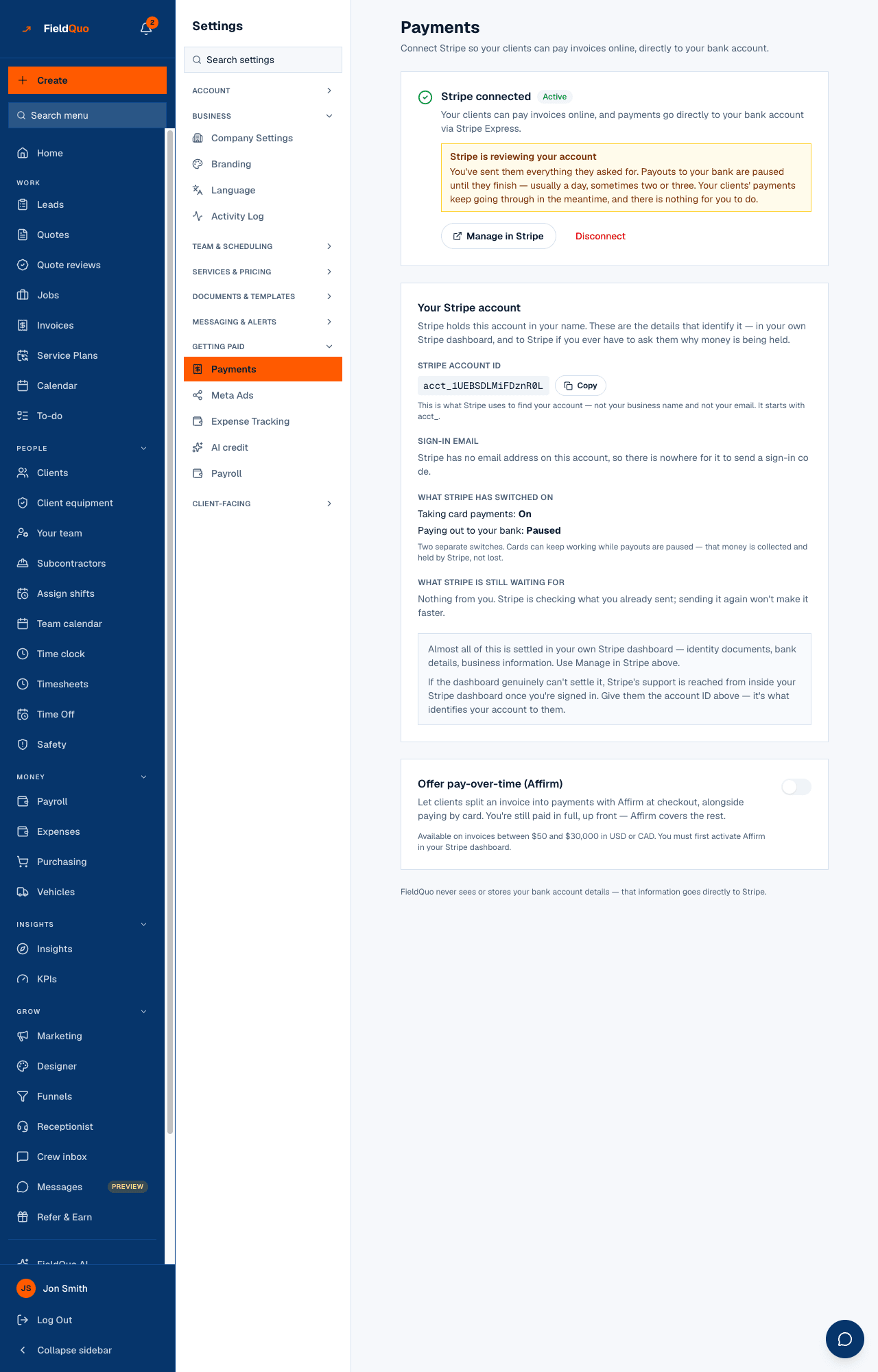
- Your Stripe account — owner only: the account ID with Copy, the sign-in email, what Stripe has switched on, and what it is still waiting for.
- Offer pay-over-time (Affirm) — a switch, shown once the connection is active — and the closing line that FieldQuo never sees your bank account details.
How to connect Stripe
- Open Settings → Payments and press Connect with Stripe. Stripe's page asks for your business details, your identity and the bank account to pay into.
- Come back to FieldQuo. If Stripe still needs something, the card lists exactly what under Stripe still needs a few things; press Finish Setup to return to Stripe's page.
- If you completed everything on Stripe's side and the page has not caught up, press I've already done this — it asks Stripe directly.
- When the card reads Stripe connected · Active, clients can pay. Nothing else needs turning on.
Disconnect only unlinks Stripe from FieldQuo. It does not delete or close your Stripe account, and nothing about past payouts changes — but clients cannot pay online until you reconnect. Full walk-through: Connecting Stripe and getting verified.
The four connection states
| The card says | What it means | What to do |
|---|---|---|
| Not connected yet | No Stripe account exists for your company. | Press Connect with Stripe. |
| Stripe still needs a few things | The account exists but charges are off; the outstanding items are listed, with Stripe's own reason when it gives one. | Finish Setup, or I've already done this if you did. |
| Stripe is reviewing your details | Everything was submitted and Stripe is verifying it — minutes, occasionally a day or two. | Nothing. Check again later. |
| Stripe connected · Active | Charges are on. If payouts are paused the card says so — Stripe is holding your money, or reviewing your account — with the reason. | Manage in Stripe if Stripe is waiting on something. |
How clients can pay, and what you accept
Cards work everywhere, at 3% + $0.30. Bank debit appears as a second button on the client portal — on an invoice, on a deposit request and on each instalment of a payment schedule — once Stripe has activated that capability on your account: pre-authorized debit for a company billing in Canadian dollars (1% + $0.40, capped at $5.00), ACH for one billing in US dollars. The Processing fees card says which applies right now: Clients can pay invoices by card or from a bank account (…), or that bank payments will be offered once Stripe activates the capability — nothing to do on your side.
- A bank debit takes 3 to 5 business days to clear. The invoice shows Bank payment pending with the date it was submitted and is marked paid only when the money arrives; if the bank returns it, the balance is still owing and the client can pay again by card.
- Payment methods you accept is for money that never touches Stripe: tick Cash, E-transfer and Cheque as you take them, press Save, and they print as an “Accepted:” line on the invoice email, in the client portal and on the invoice PDF. Untick everything and the line is left out.
- Offer pay-over-time (Affirm) lets a client split an invoice between $50 and $30,000, in USD or CAD, at checkout; you are still paid in full up front. There is nothing to activate in Stripe first: switching it on asks Stripe to enable Affirm on your account, and the line under the switch shows Stripe's answer — active, pending review, not enabled (with what Stripe is asking for), or not available in your country. The switch saves immediately, and rolls back if it cannot.
The card and bank-debit fees are not settings — nobody can change them, and they cannot be passed to the client as a surcharge line. Bank debit in Canada in full: Bank debit in Canada.
Instant payouts and your Stripe account
Instant payout moves your available balance to a debit card in about 30 minutes for 1% of the amount — Stripe's charge, passed through at cost. It needs an active account at least 30 days old with payouts enabled and a debit card on file; the card explains whichever of those is missing and offers Add a debit card in Stripe. Standard payouts stay free and arrive in about 2 business days. See Instant payouts.
Your Stripe account shows the owner the four things Stripe uses to identify the account: the Stripe account ID (it starts with acct_ — not your business name, not your email), the Sign-in email Stripe sends its sign-in code to, the two switches Taking card payments and Paying out to your bank (cards can keep working while payouts are paused — that money is held by Stripe, not lost), and What Stripe is still waiting for, with Stripe's deadline when it gave one. Almost everything is settled in your own Stripe dashboard via Manage in Stripe; if it genuinely cannot be, Stripe's support is reached from inside that dashboard, and the account ID is what identifies you to them.
Who can see it
Owners and administrators only — this is the company's payment processing, with live Manage in Stripe and Disconnect buttons, so it is hidden from every other level rather than shown read-only. The Your Stripe account card goes one step further and is shown to the owner alone.
常见问题
Does FieldQuo hold my money?
Never. The charge is created on your own Stripe account and Stripe pays your bank directly. FieldQuo never sees or stores your bank details.
Clients can pay by card — why not by bank account?
Stripe activates bank debit on its own schedule and may ask for more information. The Processing fees card says the moment it is on; until then only the card button shows, and there is nothing to configure on your side.
Payments say Paid but nothing has reached my bank.
The connection card, and the Your Stripe account card, say whether payouts are paused and why. Usually Stripe still needs a document or is reviewing one — see Payouts held or under review.
Where do I turn on cheques so the invoice says we accept them?
Under Payment methods you accept, on this screen. Tick Cheque and press Save; the invoice email, portal and PDF print it as an Accepted: line.
这篇文章有帮助吗?