

The Activity Log
The company's audit trail — who sent, edited, approved, paid or changed what, with their name, their access level and when — read-only, most recent first, owners and administrators only.
本文目前提供英语、法语和西班牙语版本。您正在阅读英语版本。 Français · Español
Activity Log is the answer to “who changed this?”. Every route that changes something a company would want to trace writes one line here after the change has committed — a quote sent, a payment recorded, hours approved, a member invited or deactivated, a pay rate changed, a leave year rolled — with the name of the person who did it, their access level and the time. It is a record to consult when something looks wrong, not a dashboard.
Overview
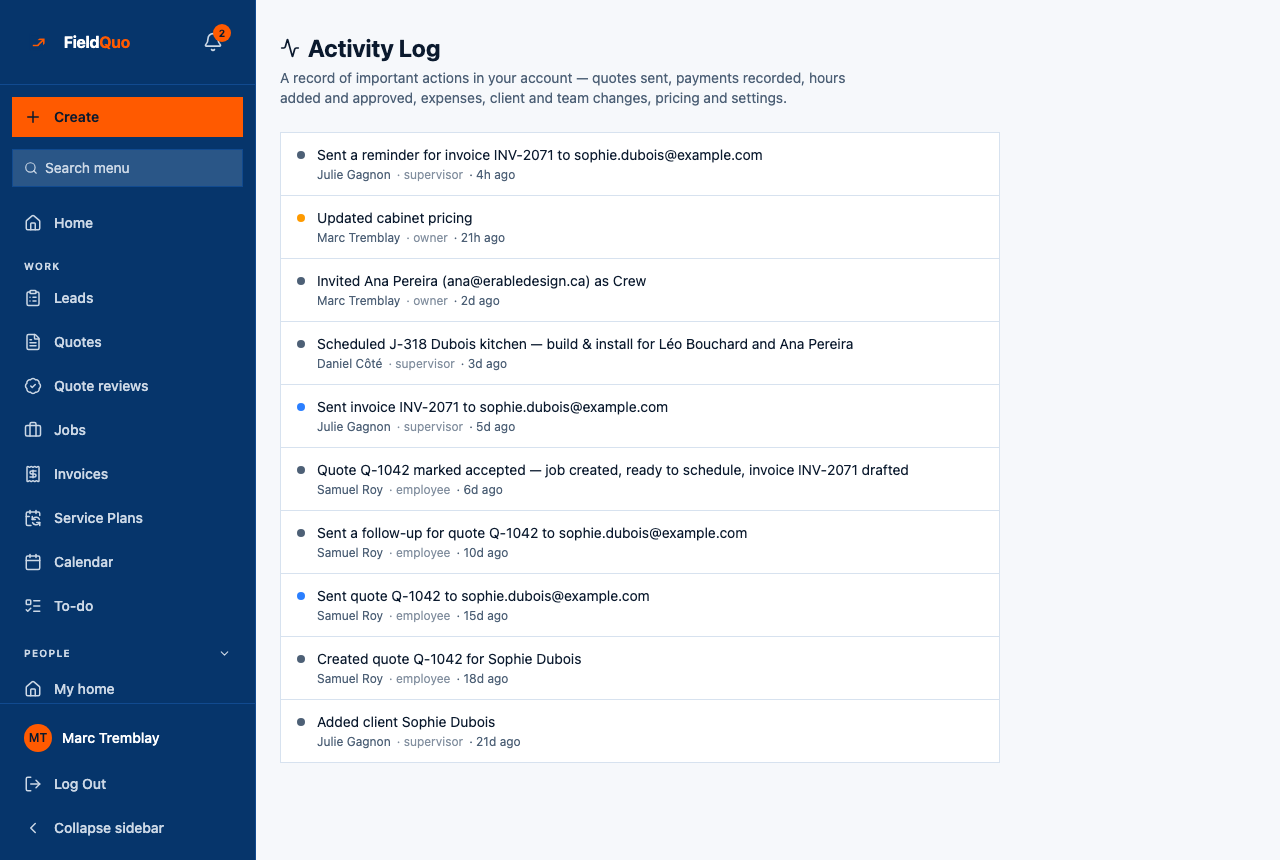
The screen is headed Activity Log — “A record of important actions in your account — quotes sent, payments recorded, hours added and approved, expenses, client and team changes, pricing and settings.” One list, newest first, showing the most recent 100 entries. There is no filter, search or export on this screen today, and nothing on it can be edited or deleted.
A line's sentence was written at the moment the action happened and is stored as written. Older lines stay in the English they were recorded in; lines written since the log learned to carry a translation key read in your language. A log that changed retroactively would not be a log.
What is on the screen
- A coloured dot per line — red for a deletion or a deactivation, amber for a settings change or someone approving their own hours, green for a payment, blue for something sent, grey for everything else.
- The sentence — “Sent invoice INV-2071 to sophie.dubois@example.com”, “Invited Ana Pereira as Crew”, “Updated cabinet pricing”, “Recorded the pay run for … as paid outside FieldQuo”.
- Who, their level, and when — “Julie Gagnon · supervisor · 4h ago”, relative for 30 days and then a date. An action taken by FieldQuo support during a read-only session is marked support session — which should never happen, and this is where it would surface.
How to read the log
- Open Settings → Activity Log (under Business).
- Scan the dots for what you are looking for: red for “who removed this”, green for “who recorded that payment”, amber for “who changed that setting”.
- Read the line's name and level. The name was stored at the time, so a renamed or departed employee still shows as who they were.
For a single quote, job or invoice, the record's own page is faster than scanning the whole log; the log is for the question “what has been happening in this account” and for tracing a change nobody owns up to.
What gets logged
- Quotes, invoices and jobs — created, sent, followed up, accepted, marked paid, scheduled.
- Money — payments recorded, expenses, a subcontractor payment, a pay run saved, approved, recorded as paid or cancelled, a payroll component added or removed.
- Hours — time entries added, edited and approved, including a person approving their own.
- Team — invitations, an access level changed, a member deactivated, working hours or leave policies changed, a leave year rolled.
- Clients — a client added or their contact details edited.
- Settings — pricing, branding, the pay cycle, suppliers retired, and the rest of the settings screens.
Who can see it
Owners and administrators only. The row is hidden from every other level and the server answers “Only an owner or admin can view the activity log.” to anyone else — the log names actions across every user, including payments, pay-rate changes and who deactivated whom, which are not a Manager's to read.
Logging never fails or rolls back the action it describes. If a write to the log itself failed, the action still happened and the line is missing — a deliberate trade, so that a customer's quote is never lost because an audit row could not be written.
常见问题
Can I export the log or search it?
Not on this screen today. It shows the most recent 100 entries, newest first. For a longer history, ask support.
Why is one line in English on my French account?
It was written before the log carried translation keys, and stored sentences are never rewritten. Lines written since read in your language.
Can a line be deleted?
No. Nothing on the log can be edited or removed, by you or by FieldQuo support — that is the point of it.
这篇文章有帮助吗?