

The T5018 year-end figures
Where to read what each subcontractor was paid in a calendar year, and in how many payments — the figures a T5018 or 1099-NEC is filled from, on screen rather than rebuilt from cheque stubs.
本文目前提供英语、法语和西班牙语版本。您正在阅读英语版本。 Français · Español
In Canada, a contractor who paid a construction subcontractor more than $500 in a year files a T5018 for them; in the United States it is a 1099-NEC over $600. Both are a list of company and amount. FieldQuo adds that amount up from the payments you recorded against each sub on each job, so the figure on the roster, the figure on the sub's page and the figure in Job costing are the same rows added up once.
Overview
The figures are on the Subcontractors screen. Pick the year under Paid in and every card reads, for example, “$6,840.00 paid in 2026 (3 payments)”. The same figure shows on each sub's own page as “Paid in 2026 — the year-end contractor form figure”.
FieldQuo shows these figures; it does not download them as a file. Read them off the screen for your accountant, or give your accountant a login that can see them — see What to hand your accountant.
How to read the figures for your accountant
- Open Subcontractors (under People).
- Choose the year under Paid in — this year or one of the two before it. The picker changes the total on every card.
- Read each card: the company, what it was paid that year and in how many payments, and No tax form where the sub is excluded from the year-end form.
- Give your accountant each company and its amount. They decide who gets a form.
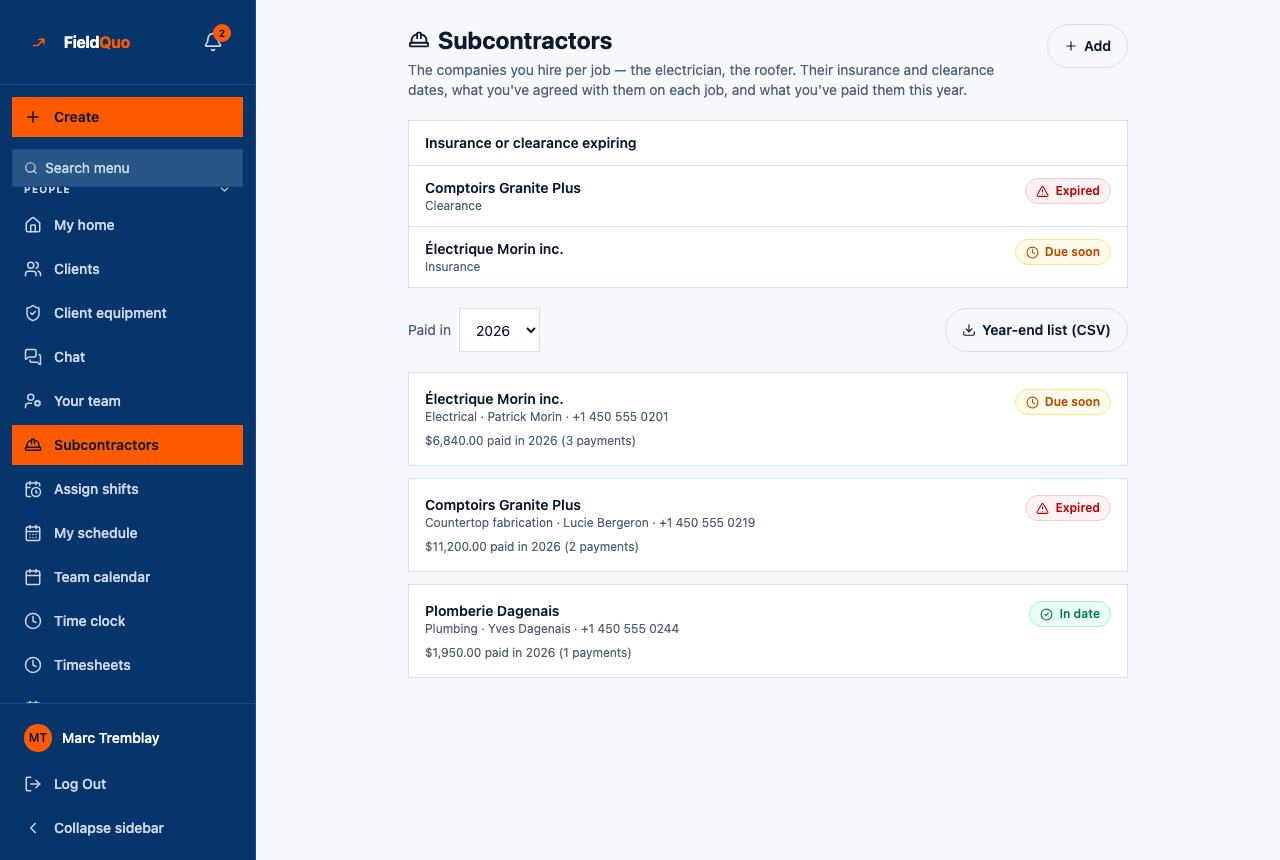
FieldQuo adds up the payments; it prepares and files nothing.
What each card shows
| On the card | What it means |
|---|---|
| The company name | Active subs first, then inactive ones, each group alphabetical. An inactive sub you paid earlier in the year is still listed, marked Inactive. |
| Trade, contact and phone | What is on their record, or No details yet. |
| “… paid in 2026” | The sum of payments dated inside that calendar year, to the cent. A sub you did not pay that year shows $0.00 rather than disappearing. |
| “(3 payments)” | How many payments make up that total. |
| No tax form | The Goes on the year-end contractor form (T5018 / 1099-NEC) checkbox is unticked on their record. |
What counts as paid
- A payment counts in the year of its Paid on date, not the year of the job or the agreed amount.
- Only payments recorded with Record a payment on a job count. An agreed amount that has not been paid is not in the total.
- The threshold is deliberately not applied: every sub is shown with their total, however small, because the accountant decides who files and FieldQuo does not know which jurisdiction's rule applies.
- No tax form on a sub does not hide them — the card still shows the total, with the flag beside it, so your accountant sees the decision rather than an absence.
Who can see it
The Paid in picker and every money figure need both the team-management permission and the Job costing switch — owners, administrators, and a Manager with job costing on. A Dispatcher sees the roster and the insurance badges but no totals.
常见问题
Does FieldQuo file the T5018 or the 1099-NEC?
No. It adds up what you paid each company; the form is prepared and filed by you or your accountant.
Why is a sub I paid last December in this year's total?
Because the payment's Paid on date falls in this year. Edit the date on the payment if it was recorded wrong; the total follows the date.
Can I download the list as a CSV?
No. FieldQuo imports lists but does not export them. The figures are on screen, for this year and the two before it.
这篇文章有帮助吗?