

ਸਿਰਫ਼ FieldQuo ਵਿੱਚ
Purchasing: orders, stock and suppliers
Who you buy from, what you have on order and what is on the shelf — purchase orders taken delivery of line by line, a stock level summed from movements, and a reorder alert for materials with a threshold.
ਇਹ ਲੇਖ ਫ਼ਿਲਹਾਲ ਅੰਗਰੇਜ਼ੀ, ਫ਼ਰਾਂਸੀਸੀ ਅਤੇ ਸਪੈਨਿਸ਼ ਵਿੱਚ ਉਪਲਬਧ ਹੈ। ਤੁਸੀਂ ਅੰਗਰੇਜ਼ੀ ਸੰਸਕਰਣ ਪੜ੍ਹ ਰਹੇ ਹੋ। Français · Español
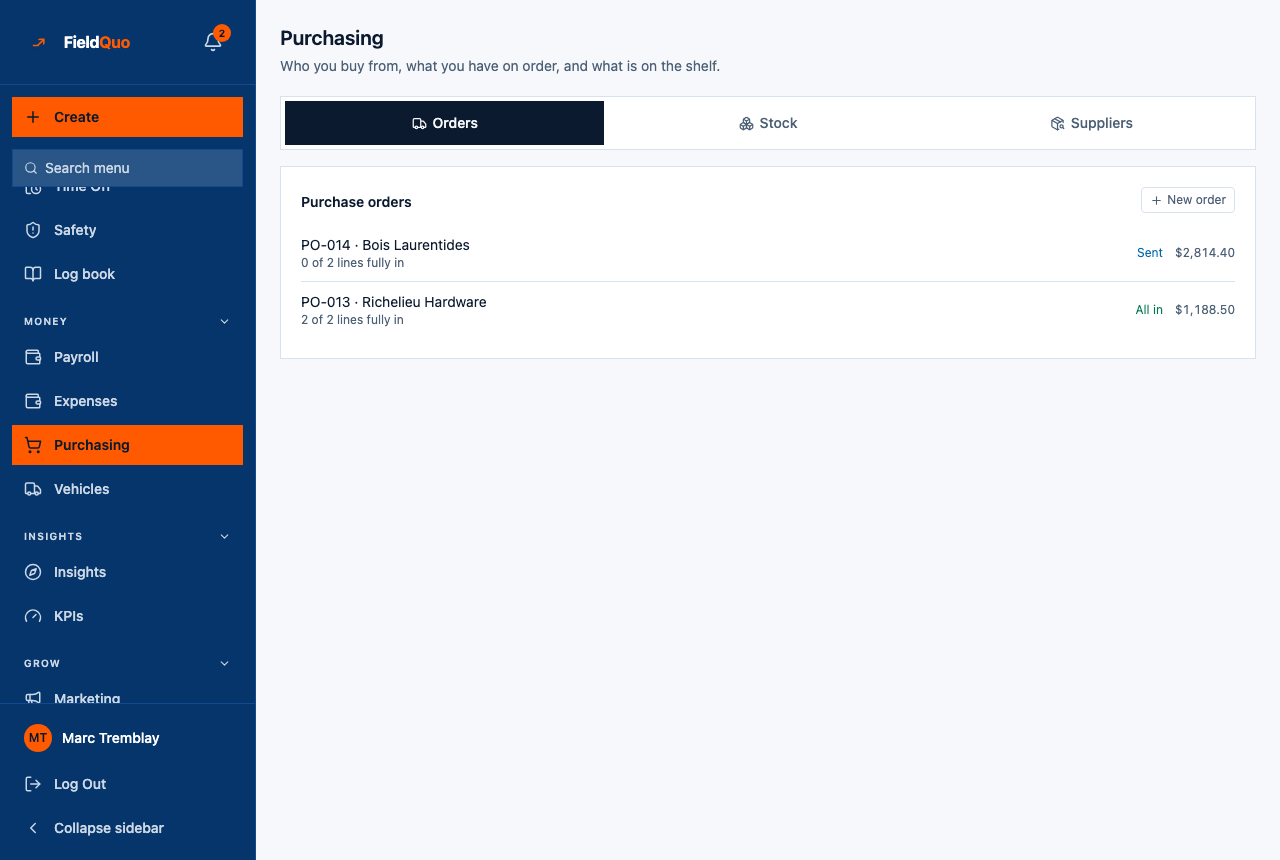
Purchasing is three views of one movement of goods: you raise an order with a supplier, take delivery of it, and the delivery is what changes the shelf. The screen is headed “Who you buy from, what you have on order, and what is on the shelf.” with three tabs — Orders, Stock, Suppliers.
It is built to be used standing at a tailgate. Everything stacks on a phone, and a delivery is recorded as what actually turned up — “12 of 40” — because half an order arriving on Tuesday and the rest on Thursday is the ordinary week at a trade counter.
Overview
A purchase order is numbered per company — PO-001, PO-002 — with a supplier, lines of what you are ordering with a quantity and a price each, and an expected total worked out on the server. Its status is derived from what has arrived, never set by hand; the two things you set by hand are that it was sent and that it was cancelled. Stock is a ledger of movements, never a stored count, so a correction after a stocktake is a movement too, and the count that was wrong stays on record.
Only in FieldQuo among the field-service tools: neither Jobber nor Housecall Pro lists purchase orders or stock on its pricing page at any tier. ServiceTitan's top tier is reported to add “advanced inventory”, and Projul's Pro tier lists purchase orders. FieldQuo includes purchasing in every plan.
What is on the screen
- Orders — Purchase orders with New order; one row per order: “PO-014 · Bois Laurentides”, “0 of 2 lines fully in”, a status (Draft, Sent, Part delivered, All in, Cancelled) and the expected total or unpriced. An open order offers Mark as sent, Record what turned up and Cancel the order.
- Stock — On the shelf: one row per material with its level and “Reorder at 10” or “No reorder level set”; Below the reorder level listing what is low; and Record a movement.
- Suppliers — Add a supplier (name, your account number there, who you deal with, phone) and the list, each with Retire or Bring back.
How to raise an order and take delivery
- Open Purchasing (under Money) and, on Suppliers, add the merchant once if they are not there yet.
- On Orders, press New order, pick the supplier, and add a line per item: what you are ordering, Qty, the unit, and the price Each. Leave a price blank if you do not know it — the order shows as unpriced rather than as costing nothing.
- Press Raise the order. It is numbered and saved as Draft.
- When you have placed it with the supplier, press Mark as sent. This records the date; FieldQuo does not email the order to the supplier.
- When goods arrive, press Record what turned up and enter, per line, how many came. The status becomes Part delivered or All in from the quantities.
- If more arrives than was ordered, it is accepted and flagged: “More turned up than was ordered … It has gone into stock — decide whether it gets paid for.”
An order line typed on this screen is free text. It is not tied to a material, so recording its delivery updates the order — not the shelf. To change a stock level, record a Received movement on the Stock tab against the material.
Order statuses
| Status | What it means |
|---|---|
| Draft | Raised, not yet placed. Can be marked sent or cancelled. |
| Sent | You pressed Mark as sent; the date is recorded and the Activity Log reads “PO-014: The order has gone to the supplier.” Waiting for delivery. |
| Part delivered | At least one line has something in and at least one is short. Derived from the quantities, never set by hand. |
| All in | Every line has received at least what was ordered. |
| Cancelled | You pressed Cancel the order; the Activity Log reads “The order will not be filled.” A cancelled order cannot be sent or received. |
Stock
The Stock tab lists the company's materials with a level summed from every movement recorded against them. Materials come into existence when a job's sourcing line is bought — see Materials on a job — and there is no screen here to create one or to set its reorder level; a material with none reads No reorder level set, and the low-stock list says how many it cannot speak about.
- Received — goods in; the level goes up.
- Returned to stock — brought back from a job; up.
- Used on a job — down.
- Wastage — down.
- Correction after a count — “A correction can be negative — type a minus sign if the count came up short. Nothing is edited or deleted; the correction is added to the ledger.”
Below the reorder level lists only materials that have a threshold and are under it. A material with no threshold is never called low, because absence of a threshold is not a statement about the shelf.
Suppliers
A supplier is a name, your account number there, who you deal with and a phone. There is no delete — Retire takes the merchant out of the order picker and keeps every order and payment against them, and Bring back restores them. The list of suppliers is what turns “who did we buy this from” into “what did we spend there this year”.
Who can see it
Purchasing is part of the Expenses area of the access grid: the row and every tab need View, record, and edit everyone's, because a purchase order or a stock level has no “my own”. Owners, administrators and the Manager preset hold it; Dispatchers, Estimators and Crew start at their own expenses only and see “Purchasing is part of the expenses permission. Ask an owner or admin to give you access to everyone's expenses.”
ਅਕਸਰ ਪੁੱਛੇ ਜਾਂਦੇ ਸਵਾਲ
Does Mark as sent send the order to the supplier?
No. It records that you placed it and stamps the date. Send the order the way you already do — the supplier's counter, phone, or their portal.
Why did my delivery not change the Stock tab?
Order lines raised on this screen are free text with no material behind them, so their delivery updates the order only. Record a Received movement on the Stock tab for the material.
Can I edit a stock level after a count?
Record a Correction after a count for the difference, negative if short. The ledger keeps both the wrong count and the correction, which is the only record that anything was ever off.
ਕੀ ਇਹ ਮਦਦਗਾਰ ਸੀ?