

Client messages
The two texts your clients receive — On my way and the appointment reminder — with the fields you can use, the live preview, and how language is decided.
Поки що ця стаття доступна англійською, французькою та іспанською. Ви читаєте англійську версію. Français · Español
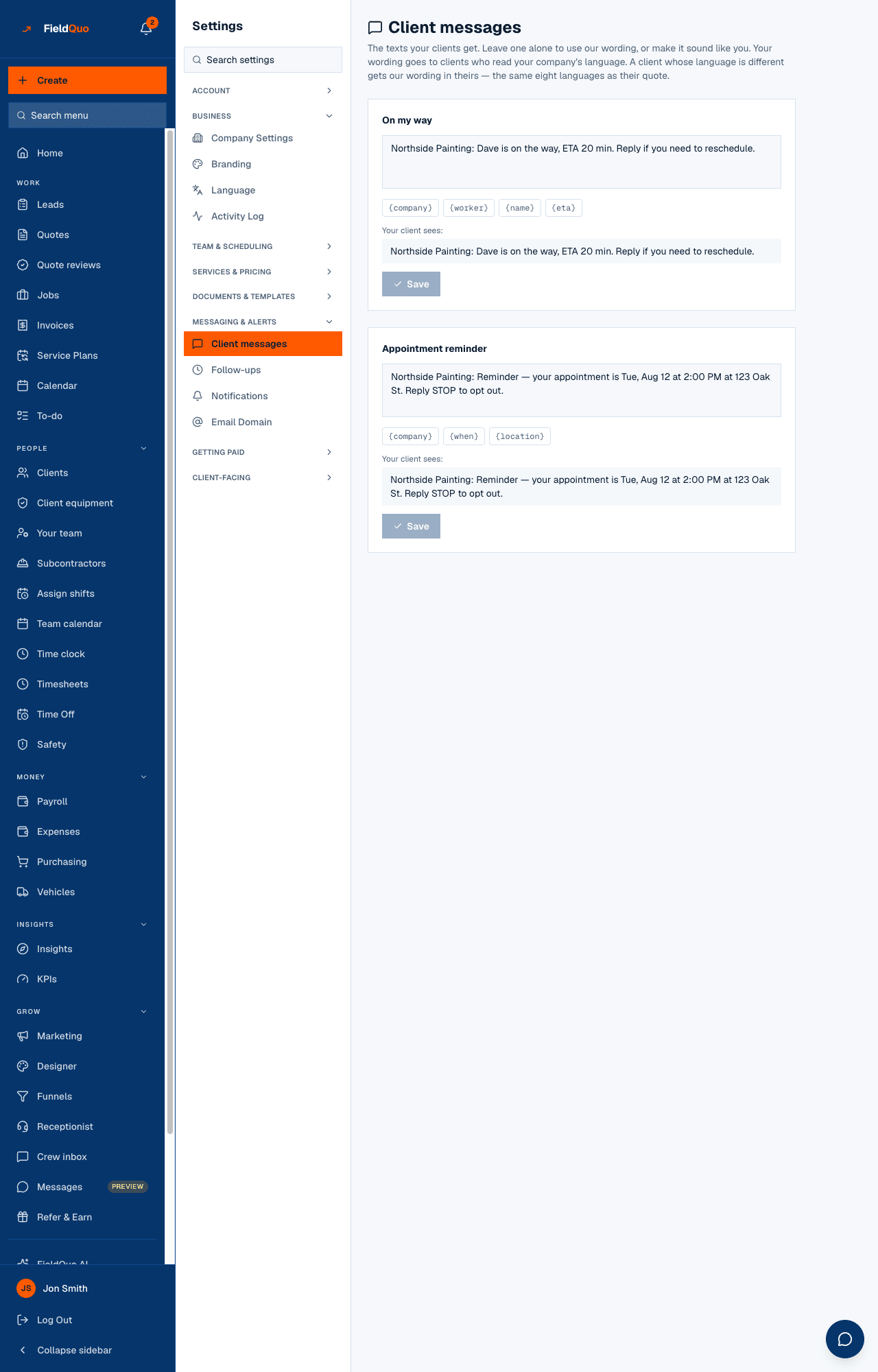
Settings → Client messages holds the wording of the text messages FieldQuo sends to your clients in your company's name. Only messages that actually send are listed, so today the screen has exactly two editors: On my way and Appointment reminder. Leave one alone and the client gets FieldQuo's built-in wording; edit it and they get yours, with a preview under the box showing exactly what will arrive.
Overview
Each editor is one card: the message name, a three-line box, the field chips you may use, a Your client sees: preview filled with sample values (your company name and phone stand in for the samples), Save, and Use default once you have customised it. A message with a field that does not exist cannot be saved — the screen refuses it, and the server refuses it again — so nobody ever texts a client a raw “{price}”.
Appointment reminders go by text message only; there is no email reminder. Whether reminders send at all, and how long before the visit, is set under Settings → Notifications — this screen only decides the words.
What is on the screen
- Client messages — The texts your clients get. The subtitle also states the language rule described below.
- On my way — the text sent when a crew member presses On my way on a visit. Fields: {company}, {worker}, {name}, {eta}, {phone}. A Customised label appears once you have saved your own wording.
- Appointment reminder — the text the reminder schedule sends before an appointment or job visit. Fields: {company}, {when}, {location}.
- Under each box: Your client sees: with the preview, then Save and, on a customised message, Use default.
How to change a text
- Open Settings → Client messages.
- Write the message in the box of the text you want to change. Tap a field chip to insert it where the cursor is.
- Read Your client sees: — that is the message with sample values in place of the fields.
- Press Save. The button stays disabled while the box contains an unknown field or matches what is already saved.
- To go back to FieldQuo's wording, press Use default. The saved wording is removed, not blanked.
A field with no value collapses cleanly. Write “ETA {eta}” and a visit with no known arrival time sends “ETA” without a stray blank — you do not need two versions.
The fields you can use
| Field | What it becomes | Message |
|---|---|---|
| {company} | your business name | both |
| {worker} | the assigned crew member | On my way |
| {name} | the client's first name | On my way |
| {eta} | estimated arrival, if known — worked out from the crew member's position when they press the button | On my way |
| {phone} | your business phone | On my way |
| {when} | the appointment time, in the client's language and your company's time zone | Appointment reminder |
| {location} | where the visit is | Appointment reminder |
Which language the client gets
Your wording goes to clients who read your company's default language. A client whose language is different gets FieldQuo's built-in wording in theirs — the same eight languages as their quote. Nothing you type is machine-translated at send time.
Replies to the On my way text are not read by anyone. The built-in wording points the client at your business phone for that reason; if you write your own, keep {phone} in it.
Who can see it
Owners, administrators, and the Dispatcher and Manager levels. Saving a message needs the same access; the row is hidden from everyone else rather than shown with buttons that would be refused.
Часті запитання
Can I edit the booking confirmation text?
Not from here. It exists and sends, but it is not editable yet, so the screen does not show an editor for it.
Does changing the wording change who gets the reminder?
No. This screen is words only. Turn reminders on or off, and pick 2, 24 or 48 hours, under Settings → Notifications.
Why did my client get the default text although I customised it?
Their language is not your company's default language. Custom wording is sent only to clients who read the language it was written in; everyone else receives the built-in text in their own language.
Чи була ця стаття корисною?