

Booking fees and visit deposits
Charge a visit fee when a client books online, hold the slot for 30 minutes, decide whether the fee comes back on a cancellation, and credit it against the invoice when the job goes ahead.
本文目前提供英语、法语和西班牙语版本。您正在阅读英语版本。 Français · Español
A visit fee is a price on a bookable event type — a $79 measurement visit, a paid design consultation. The client pays it by card on your booking page before the slot is theirs; if the job goes ahead, you credit the fee against the invoice with one button. It is not a quote deposit: those are requested from the quote's payment schedule and are covered in Deposits and payment schedules.
Overview
The fee is charged only when your company can actually collect it — Stripe connected and charges enabled. Without that, a paid event type quietly books as free rather than showing a price nobody can be charged. The booking page shows the price, the server decides it, and the browser never computes a fee.
What is on the screen
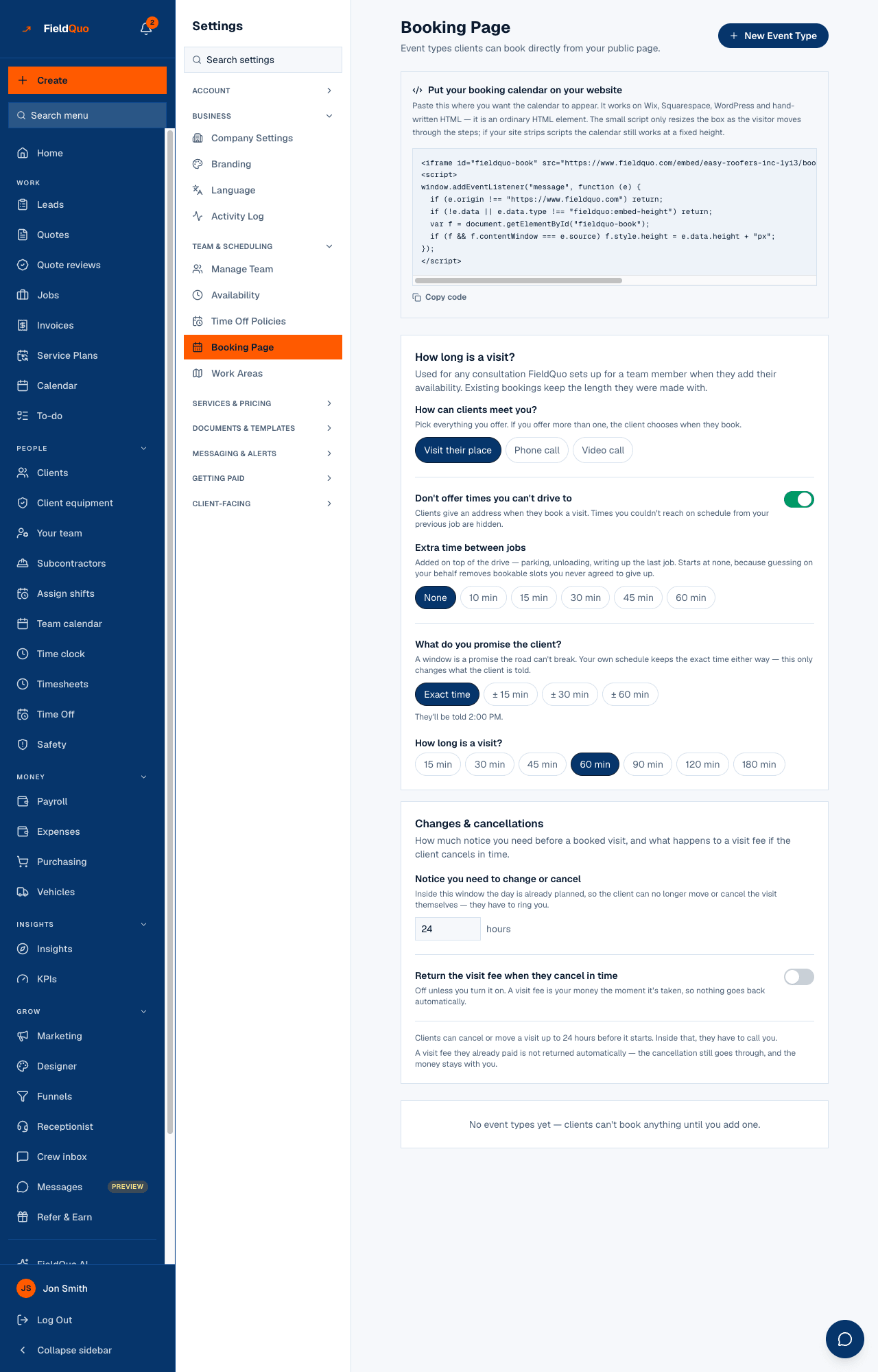
On Settings → Booking Page, each event type card carries a Visit fee (or Free), a Promo price and a Promo on switch. Above the cards, Changes & cancellations holds Notice you need to change or cancel, the switch Return the visit fee when they cancel in time, and Notice needed to get the fee back, with a preview sentence that states the policy exactly as the client will read it. A card whose fee cannot be collected says Connect Stripe to collect this fee — set it up in Payments.
How to charge for a visit
- Connect Stripe on Settings → Payments and wait for charges to be enabled — see Connecting Stripe and getting verified.
- Open Settings → Booking Page and, on the event type, enter a Visit fee. Leave it blank for a free visit.
- To run an offer, enter a Promo price and switch Promo on. The booking page shows the standard price struck through — $79 → $20 — and charges the promo.
- Under Changes & cancellations, set the notice and decide whether the fee is returned when a client cancels in time. It saves as you change it.
What happens when a client books
- The client picks a slot and is sent to a Stripe card page for the fee. The slot is held for 30 minutes; a hold nobody pays for lapses and the slot is free again.
- On payment the booking is confirmed, an appointment appears on your calendar, and the confirmation is sent. An hourly check re-reads Stripe for any booking still held, so a paid visit the webhook missed still becomes an appointment.
- The dashboard shows a booking still waiting for its fee as Waiting on $79, with a button to check the payment.
- The fee is a Stripe payment in your name: the card fee (3% + $0.30) comes off it and the net is paid out with everything else.
Crediting the fee against the invoice
When the job goes ahead, open the invoice. A Visit fee credit card reads “This client already paid a visit fee. Credit it toward this invoice.” Press Credit to invoice and the fee is recorded as a payment line, Visit fee credit, reducing the balance like any other payment; Remove credit takes it back. The fee is matched by the client's email address within your company, and one fee can be credited once, to one invoice.
Crediting is your call, not automatic — sometimes the consultation stands on its own. It needs the Payments switch.
Cancellations and refunds
| Setting | What it does |
|---|---|
| Notice you need to change or cancel | Inside this window the client can no longer move or cancel the visit themselves; the page tells them to call you. Unset, it is 24 hours. |
| Return the visit fee when they cancel in time — off | The cancellation still goes through and the fee stays with you. This is the default. |
| Return the visit fee when they cancel in time — on | A cancellation with enough notice refunds the fee through Stripe, and the client is told so before they confirm. |
| Notice needed to get the fee back | May be longer than the change notice: “move it up to a day before, but the fee only comes back with two days' notice”. Blank uses the change notice. |
A refund returns the client's money; Stripe keeps its processing fee on the original charge. See Refunds.
Who can change it
The Booking Page settings are for the owner, administrators, Managers and Dispatchers. Crediting a fee against an invoice needs Payments — by default a Manager, an administrator or the owner.
常见问题
Why does my paid visit show as free on the booking page?
Stripe is not connected, or charges are not enabled yet. The fee returns as soon as Stripe reports charges enabled.
Can the fee be paid by bank debit?
No. Booking fees are card only. Bank debit is available for service plans in CAD.
The client paid but I see no appointment.
Wait for the hourly check, or press the check-payment button on the dashboard's waiting card. A payment Stripe confirms always becomes an appointment.
这篇文章有帮助吗?