

The instant estimate as a lead magnet
Put a real price range on your website, your bio link and your share links, and every homeowner who uses it becomes a client, a draft quote in your review queue and a scored lead — without your rate card ever going public.
本文目前提供英语、法语和西班牙语版本。您正在阅读英语版本。 Français · Español
A homeowner comparing three contractors answers the one who gives a number. Settings → Client-facing → Instant Quotes lets them get one from you in seconds — roof measured from their address, or an area they trace on a map — and every estimate is a range they can request that lands in your Quote reviews before anything is binding. This article is about using it as marketing: where to put it, what each request gives you, and what you control.
The rate card behind it is never published. A visitor sees a range, or nothing until they submit — your choice — and the per-unit rates stay on this screen. How the pricing itself is set up is in Instant quotes on your website.
Overview
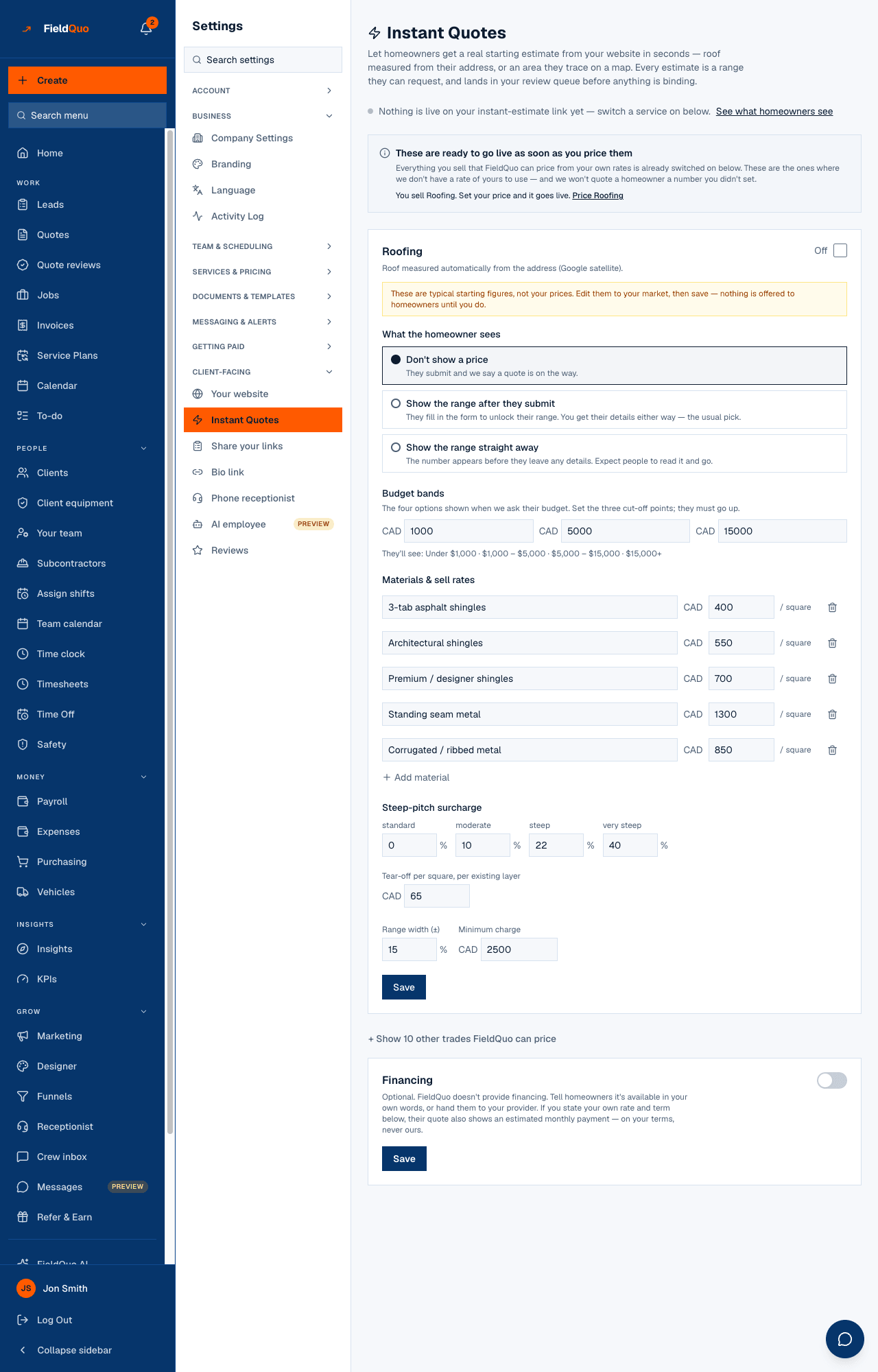
The screen tells you what is live: “2 live on your instant-estimate link.” with See what homeowners see, or “Nothing is live on your instant-estimate link yet — switch a service on below.” Once something is live, a Put the instant estimate on your website card offers the embed with Copy code. Then one card per trade: an On / Off switch, What the homeowner sees, the rates, Minimum charge, Range width (±), Budget bands and an optional Financing note.
Where to put it
- Its own page — every company has an instant-estimate link of its own, the one See what homeowners see opens. Your FieldQuo website's Get a quote page carries the self-quote form, which is a different thing; the instant estimate is shared by its link or embedded.
- Any other website — paste the code from Copy code where you want it. The note under it says why it is safe: an ordinary HTML element that works on Wix, Squarespace, WordPress and hand-written HTML; the small script only resizes the box, and without it the box works at a fixed height.
- Your bio link — when a trade is on, the instant estimate is the first link offered, ahead of book a visit and request a quote.
- Share your links — the Instant estimate card there has the link, Copy link and Open, for a text, an email signature or a flyer. See Share your links.
What each request gives you
- A client record with the name, contact details and address the homeowner entered.
- A draft quote, priced from your rates, marked Needs review on the Quotes list and waiting in Quote reviews — nothing can be sent until someone confirms the price. See Estimate Reviews: approve instant estimates.
- A lead on the Leads board, source instant estimate, scored like any other — with the budget band the homeowner picked and any photos they attached. See Lead scoring: Hot, Warm, Cold.
- An email to the homeowner confirming their estimate, in your branding.
What you control
| Setting | What it changes |
|---|---|
| On / Off | Whether the trade is offered at all. Saving with Save & enable is what makes it live; nothing is live off numbers nobody chose. |
| What the homeowner sees | Don't show a price — they submit and are told a quote is on the way. Show the range straight away — the number appears before they leave any details; expect people to read it and go. Show the range after they submit — they fill in the form to unlock their range; you get their details either way — the usual pick. |
| Range width (±) and Minimum charge | How wide the range is around the priced figure, and the floor it never goes under. |
| Budget bands | The four options shown when the homeowner is asked their budget; the band they pick scores the lead. |
| Financing | Optional, in your own words. FieldQuo does not provide financing; if you state your own rate and term the estimate also shows a monthly figure on those terms. |
The screen also flags a mismatch — a trade you quote instantly that is not on your Services screen, or a service with no instant price — and changes nothing on its own. Read it before you share the link.
Who can see it
Anyone whose access includes seeing prices — owners, administrators, managers, dispatchers and estimators. Crew do not see this screen, because it is a rate card.
常见问题
Will a competitor see my rates?
No. The public page never returns a rate; it returns a range for one specific job, or nothing until the homeowner submits, depending on What the homeowner sees.
Can the homeowner accept the estimate straight away?
No. It is a draft that waits in Quote reviews; you confirm the price, adjusting it if the property needs it, and then send the quote.
Does the instant estimate count as a lead in my marketing numbers?
Yes — it creates a lead on the board, and that lead counts in the blended cost per lead on Marketing spend.
这篇文章有帮助吗?