

The bio link
One branded page for the single link Instagram and TikTok allow — built from what your company already has, ordered and switched on or off by you, with a live phone preview.
本文目前提供英语、法语和西班牙语版本。您正在阅读英语版本。 Français · Español
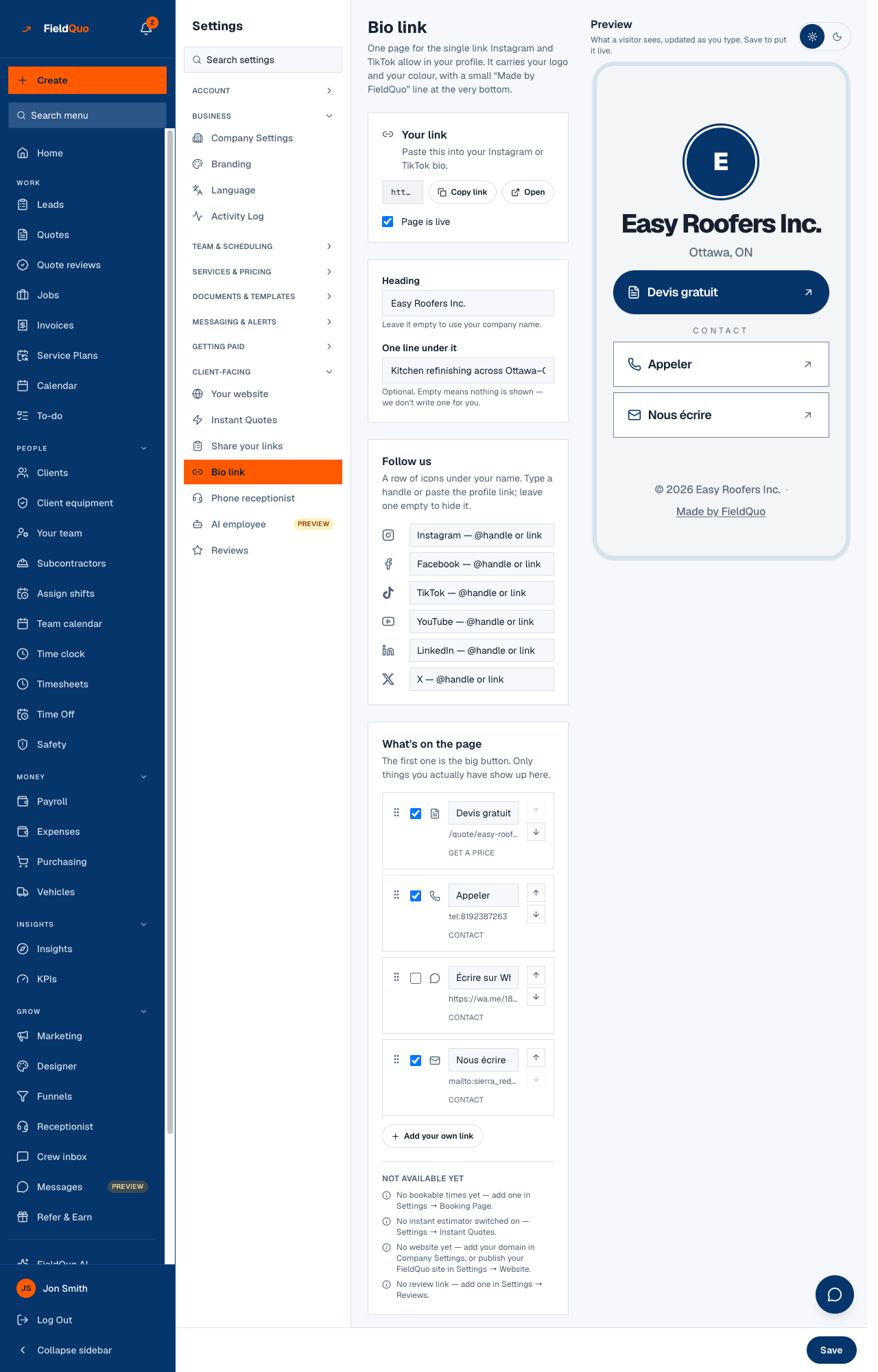
Instagram and TikTok give you one link in a profile. Settings → Bio link makes that link a page with your logo, your colour, a heading, one line under it, a row of social icons and the buttons that matter: get a price, book a visit, call, message, visit the website, leave a review. Only things you actually have appear on it, and nothing is a dead link.
Overview
The page is derived from your company record, not typed from scratch. A row appears because the thing behind it exists: the quote form is always there; Book a visit appears once you have an active event type; Get an instant price once an instant estimator is switched on; Design your kitchen once the Kitchen Designer is on under Services; each published funnel as its own button; your website once it is published or once you entered a domain in Company Settings; the review link once it is set under Reviews; your phone and email from Company Settings. A row you turn off stays off; a row nobody touched is on the first time the page loads — including a funnel you publish next month.
The page follows the visitor's phone between light and dark on its own; the light / dark switch on this screen only changes the preview frame. It carries a small Made by FieldQuo line at the very bottom on every plan — see The “Site by FieldQuo” footer.
What is on the screen
- Your link — the address, Copy link, Open, and the Page is live box. “Paste this into your Instagram or TikTok bio.”
- Heading (“Leave it empty to use your company name.”) and One line under it (“Optional. Empty means nothing is shown — we don't write one for you.”).
- Follow us — Instagram, Facebook, TikTok, YouTube, LinkedIn and X; type a handle or paste the profile link, leave one empty to hide it.
- What's on the page — every row with a Show on the page box, its Button text, a grip to drag, Move up / Move down, and its group (Get a price, Book, Contact, More). “The first one is the big button.”
- Add your own link — up to ten rows you write yourself, each with text, a URL and an icon.
- Not available yet — the rows you cannot have yet, and the screen that would create each one.
- Preview in a phone frame, updated as you type, with a light / dark toggle, and Save at the bottom.
How to set it up
- Open Settings → Bio link.
- Write the Heading or leave it as your company name, and the One line under it if you want one — nothing is invented for you.
- Under Follow us, type your handles. A field that does not look like a handle or a profile link is not saved, and the screen says so.
- Under What's on the page, tick the rows you want, rename a button if the default wording is not yours, and drag or use the arrows to put the most important one first — it becomes the big button.
- Press Add your own link for anything else (a Google listing, a gallery elsewhere). Your own links need both text and a URL.
- Press Save, then Copy link and paste it into your Instagram or TikTok profile.
Nothing here is saved until you press Save. Reorder, rename and switch off is a multi-step edit of one public page, and saving each keystroke would put half-finished states in front of whoever taps the link in between.
What can go on the page
| Row | Appears when | On by default |
|---|---|---|
| Get an instant price | An instant estimator is switched on under Settings → Instant Quotes | Yes |
| Get a free quote (the quote form) | Always — every company has it | Yes |
| Design your kitchen | The Kitchen Designer is on under Settings → Services | Yes |
| Book a visit | At least one active event type under Settings → Booking Page | Yes |
| Each published funnel, by its name | The funnel is published | Yes |
| Visit our website | A domain in Company Settings, or a published FieldQuo site | Yes |
| Call | A phone number in Company Settings | Yes |
| Message on WhatsApp | A phone number in Company Settings | No — having a number is not a statement that WhatsApp is on it |
| Email us | An email in Company Settings | Yes |
| Leave a review | A review link under Settings → Reviews | Yes |
| Your own links | You added them | Yes |
Button wording comes from your company's language, not the language you are reading the settings in — a French company's page says Devis gratuit and Appeler.
What each control changes
- Page is live — untick it and save, and the address shows a not-found page until you tick it again. The page is on from the start.
- Show on the page — hides or shows one row. A hidden row keeps its place and wording for when you bring it back.
- Button text — replaces the default wording for that row only. Empty means the default, never a blank button.
- Order — the first row is the large button; sections are ordered by where each group's first row falls, so putting your website first puts More first.
- Light / dark — the preview frame only. Visitors get whichever their phone asks for.
Who can see it
Owners, administrators, Dispatchers and Managers can open and save this screen. The public page itself needs nothing — no account, no app.
常见问题
Why is “Book a visit” greyed out?
You have no active event type. The Not available yet list says which screen creates it — Settings → Booking Page.
Can a link point to a phone number or WhatsApp?
Call and Message on WhatsApp are built in and read your company phone number. WhatsApp is off until you switch it on, because a wa.me link to a number that is not on WhatsApp opens a chat with nobody.
Is there a QR code for the link?
Not on this screen today. The address is short enough to say out loud; any QR generator will turn it into a square for the van.
这篇文章有帮助吗?