

The quote email
What lands in the client's inbox when you press Send on a quote: the From line, the subject, the total and the approve button, the scope and the steps, the optional references and before-and-after photos, and the PDF attached.
本文目前提供英语、法语和西班牙语版本。您正在阅读英语版本。 Français · Español
Pressing Send on a quote emails one message to the client's address, from your company, in the quote's language, with the quote PDF attached. It is not a bare link. The email carries the substance of the quote — what it costs, what is included, how the work runs — because a homeowner reads three quotes side by side, and the one that is only a link reads as the company that could not be bothered.
The approve button sits directly under the total, above every word of detail, and again at the very bottom. There is exactly one call to action and it appears twice.
Overview
The email is built when you press Send (or Send again, or Follow up) on the quote page, and only after the message has actually been accepted for delivery is the quote marked Sent. A send that fails leaves the quote a draft, keeps the Send button, and puts a line in your notifications — the quote never quietly claims to have gone out.
The link in the email opens the quote approval page. If the quote had no client link yet, one is created at send time, so an email can never carry a dead link. See The quote approval page for what the client does there.
What the client receives, top to bottom
- From: your company's name. Subject: “Your quote from [Your company] — Q-1042”. A follow-up reads “Following up: quote Q-1042 from [Your company]”.
- The brand band in your colour: your logo on a white plate on the left, the word QUOTE and the number on the right.
- “Hi [first name],” then one opening line: “Thanks for the opportunity to quote on your project. Everything we discussed is set out at the link below.”
- TOTAL with the amount, and “Valid until [date]” when the quote has an expiry.
- The button View & approve your quote, with “Or paste this into your browser:” and the link under it for a mail app that eats buttons.
- The scope, service by service, with the priced lines; What's included in each service; What could change this price for the trades that declare one; and How the work runs, step by step, with any published timelines.
- Speak to past clients — the references you listed, name and phone number exactly as typed — when that section is on for this quote.
- Before & after — up to four photo pairs with their captions — when that section is on.
- The button again, then the footer: “Questions? Reply to this email or call [phone].”, your company's name, and your email, phone, website and tax registration number, whichever you have filled in.
The quote PDF is attached as Quote-Q-1042.pdf, rendered by the same engine as Download PDF and in the same language, so the attachment and the page say the same thing. If the PDF cannot be rendered the email still goes — a quote without an attachment beats one that never arrives — and support is told.
No financing block is in the email. Pay-over-time terms, when you have entered them, appear on the approval page under the total, not in the message.
Which language it is written in
The email is in the quote's language — the one it was created in — so the covering note matches the document it carries. A French quote gets a French email and a French PDF whichever language you work in. Where a quote has no language of its own, the client's language on their record is used, then your company default. The currency is always yours: language changes the formatting, never the money. See A quote keeps its language.
What you control
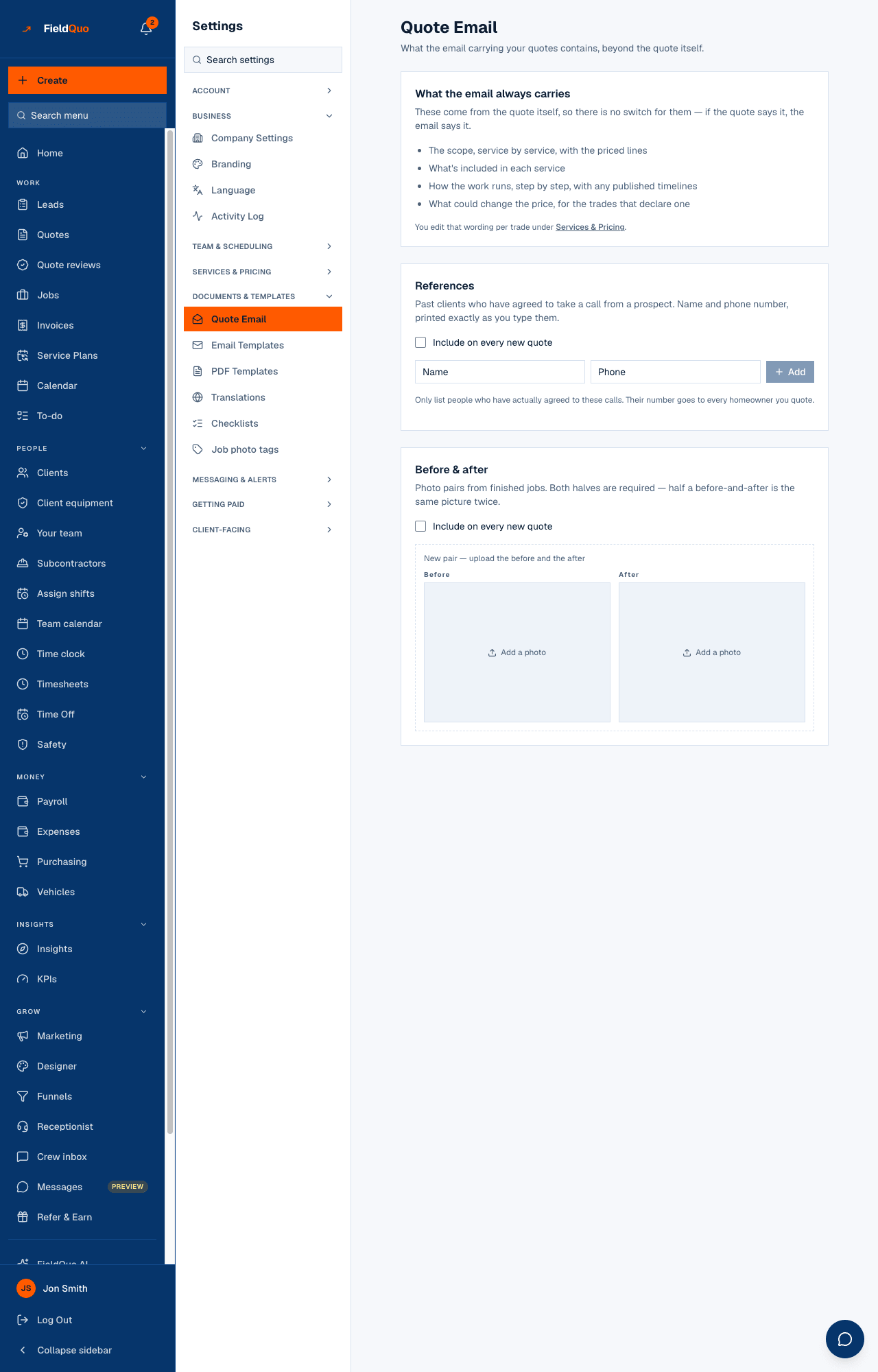
Settings → Quote Email shows what the email always carries — “These come from the quote itself, so there is no switch for them — if the quote says it, the email says it.” The scope, what's included, the steps and what could change the price are edited per trade under Settings → Services & Pricing. The two optional sections are yours to fill and switch:
| Section | What it is | The switch |
|---|---|---|
| References | Past clients who have agreed to take a call, with Name and Phone, printed exactly as you type them. At most six are sent. | Include on every new quote sets the default; each quote's Email sections panel can set it On or Off for that quote alone. |
| Before & after | Photo pairs from finished jobs, both halves required, with an optional Caption. At most four pairs are sent. | Same: a company default, and a per-quote override on the quote page. |
A section switched On with nothing in it blocks the send. The quote page says “This is switched on with nothing to show, so the quote can't be sent yet.” and offers Add content or Leave it out of this quote, then Send now. An empty section is never dropped silently and never sent as a heading over blank space.
The consent line on the settings page is a rule, not decoration: “Only list people who have actually agreed to these calls. Their number goes to every homeowner you quote.”
When a quote cannot be sent
- The client has no email address on their record — add one, then send.
- The quote is an instant estimate still marked Needs review — confirm the price in Estimate Reviews first.
- The quote says tax applies but no rate could be resolved for the client's address — the send stops rather than promise a total that is missing the tax. Fix the address in the dialog and retry.
- An optional email section is on and empty, as above.
- The company has not finished checkout — a trial that never added a card can build quotes but not send them.
Who can send it
Sending needs the same access as editing a quote: Quotes at view, create & edit or above — an owner, an administrator, a Manager, an Estimator, or a Custom access with that level. Settings → Quote Email itself needs the Manager level or above (an owner, an administrator, a Manager or a Dispatcher).
常见问题
Can I change the wording of the email?
The fixed sentences — the greeting, the opening line, the button — are FieldQuo's and cannot be edited. What you control is the content: the scope wording per trade, the references and the photos. Automated follow-ups use your own email templates instead.
Does the client get a copy of the PDF?
Yes, attached to the email as Quote-[number].pdf, in the same language as the email and the page.
The client says they never received it.
Open the quote: if it still reads Draft and the Send button is there, the send failed and your notifications say why. If it reads Sent, ask them to check promotions and spam, or open Get approved and copy the client link to them directly.
Why is the email in French when I work in English?
Because the quote was created in French. The email follows the document, not your screen. See A quote keeps its language.
这篇文章有帮助吗?