

The “On my way” text
The text a client gets when the crew taps On my way on a visit: how it is sent, what it says, how to change the wording, and who can.
本文目前提供英语、法语和西班牙语版本。您正在阅读英语版本。 Français · Español
The moment a crew member sets off, the client's phone buzzes: “Northside Painting: Dave is on the way, ETA 20 min. To reschedule, call 555-0100.” It is sent by one tap on the visit, it carries your company's name, and it is the one automated text a job visit sends.
Together with the appointment reminder it is one of the two texts your clients receive from FieldQuo, and both are edited on the same screen.
Overview
The text is a side effect of a status change. On the job page, each visit has an On my way button; pressing it moves the visit to On the way, records where the phone was, and texts the client if they have a mobile number and have not opted out. The status saves whether or not the text can be delivered — a texting outage never blocks the crew.
How to send it
- Open the job on your phone and find today's visit in the Visits card.
- Read the line under the buttons. It says Texts your “on my way” wording to 514-555-0123, or that the client's number is hidden by your access level (it still sends), or No mobile on file for this client, so nothing will be sent — the visit just moves.
- Press On my way. Your phone may ask for your location once; refusing it does not stop the tap.
- The visit's badge reads On the way and the text goes out in the background. Press Mark complete when you are done.
The button says what it does because a stranger's phone buzzes when you press it. A visit in On the way offers Mark complete and Cancel visit, not a second On my way — one text per departure.
The wording
Settings → Client messages — “The texts your clients get. Leave one alone to use our wording, or make it sound like you.” — has one editor per text that actually sends: On my way and Appointment reminder. Nothing else is offered, because no other automated text goes out.
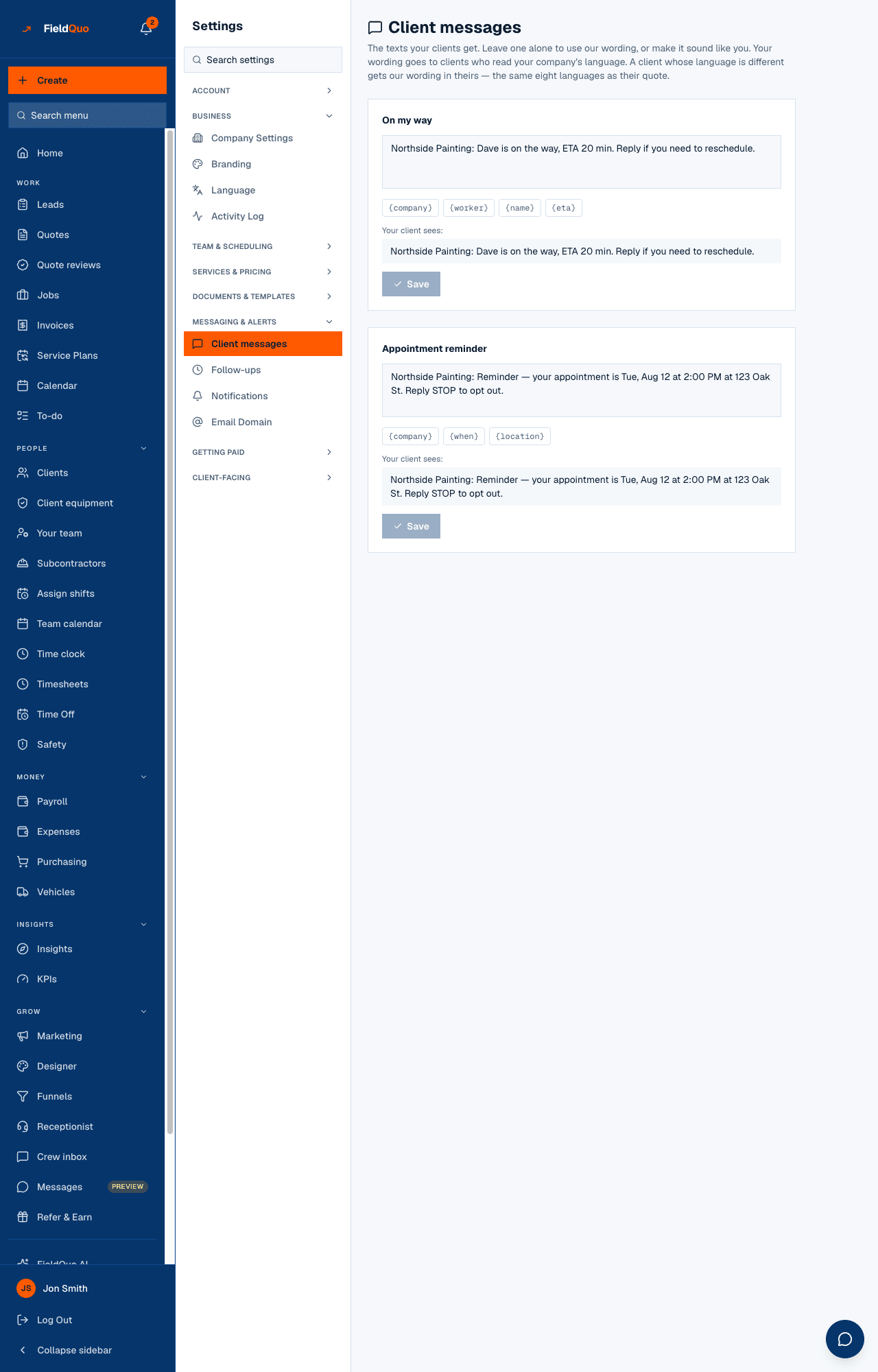
- Open Settings → Client messages and find On my way.
- Write your message in the box, or press a field chip to add it at the end. The Your client sees: preview fills the fields with sample values as you type.
- Press Save. A message with a field FieldQuo does not know — “Unknown field: {price}. Only the fields above work.” — cannot be saved.
- To go back to the built-in wording, press Use default.
| Field | What it becomes |
|---|---|
| {company} | Your business name. |
| {worker} | The assigned crew member's name — “Your technician” when the visit is unassigned. |
| {name} | The client's first name. |
| {eta} | Estimated arrival, worked out from where your phone was at the tap to the job's address, with the same travel estimate the booking page uses. No location, or a job that was never placed on the map, and the field comes out empty with the spaces around it tidied. |
| {phone} | Your business phone from Company Settings — the number the built-in wording tells the client to call, since a reply is never read. Empty, and that sentence is dropped. |
Which language the client gets
The text follows the client's language, like their quote did: the client's own language, or your company's default. Your custom wording goes to clients who read your company's language; a client whose language is different gets FieldQuo's built-in wording in theirs — the same eight languages as their documents. Nothing is machine-translated.
Who can send it, who can change it
- On my way appears for the person the visit is assigned to, for anyone on an unassigned visit, and for people whose Schedule access is Edit everyone's schedule. A crew member on someone else's visit sees the badge and no buttons.
- The client's number is hidden from Crew on the job page, but the text still goes to it — the line under the button says so.
- Client messages is edited by owners, administrators and supervisors — the Dispatcher and Manager presets.
常见问题
Can the client reply?
Not usefully: FieldQuo has no client texting inbox, and only STOP is read. That is why the built-in wording says to call your business phone rather than inviting a reply — keep {phone} in your own wording too.
Is it sent from my own number?
It goes out from the number FieldQuo texts from and begins with your company name, so the client knows who is coming.
Why did the client get English when we work in French?
The client's record says English, or has no language and your company's default is English. Set the language on the client's record; your French wording applies only to clients who read French.
这篇文章有帮助吗?