

KPIs: Customer
The Customer section of the KPI dashboard: one satisfaction score out of 5, where the answers come from, the floor before a number is shown, and who can see it.
本文目前提供英语、法语和西班牙语版本。您正在阅读英语版本。 Français · Español
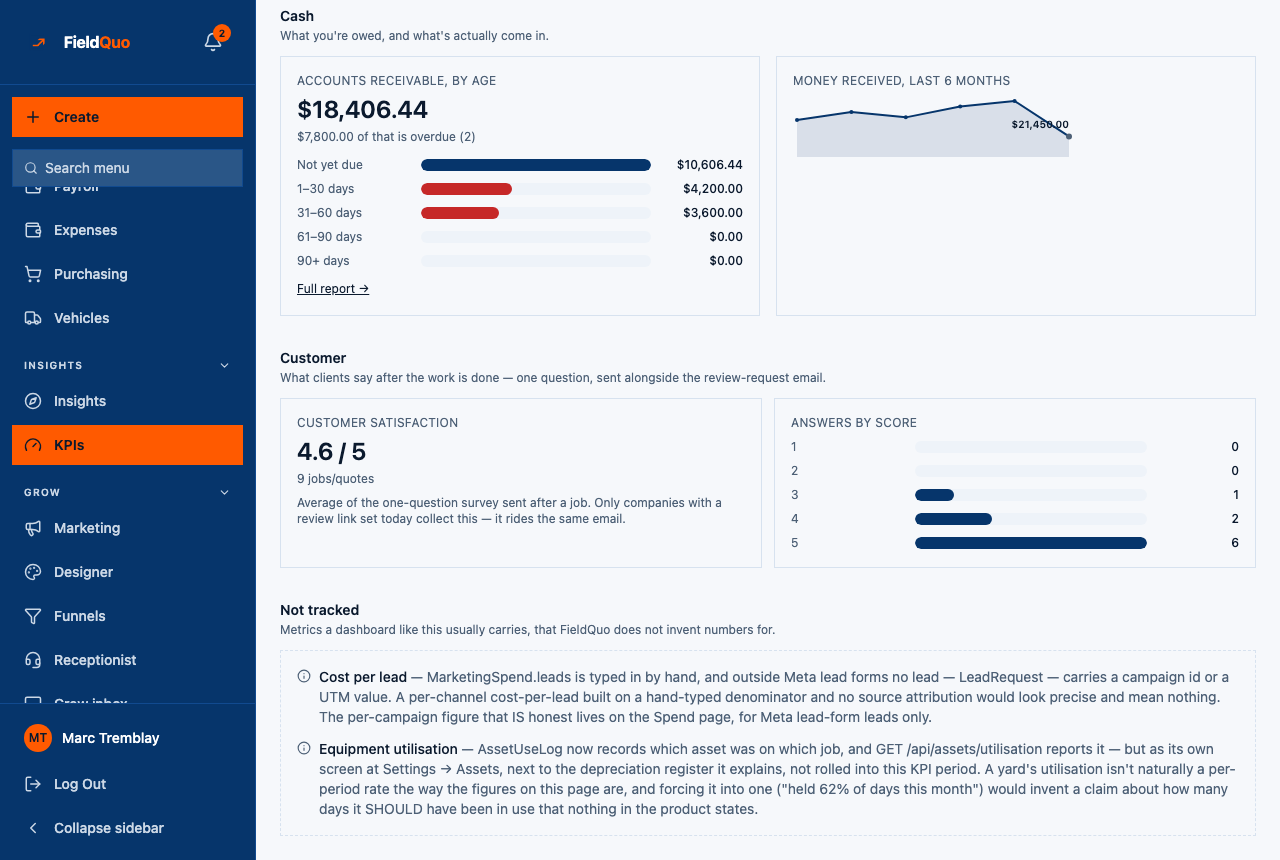
The Customer section sits near the bottom of KPIs, just above Not tracked. It carries one figure — Customer satisfaction, an average out of 5 — and a small bar chart of how the answers split by score. Every answer behind it came from a client who tapped a number in the review-request email after a job was finished.
This article says exactly what the card averages, why it can show a dash instead of a number, and how a client's answer gets there in the first place.
Overview
FieldQuo asks a client one question after a completed job — How did we do?, on a scale of 1 to 5 — and this card is the average of the answers for jobs completed in the period you picked at the top of the page. It is not a review score, not a Google rating, and not a guess: a client who was sent the survey and never answered is not counted at all.
The section's own subtitle says where the answers come from: “What clients say after the work is done — one question, sent alongside the review-request email.” The survey rides the same email as the review request, so a company that has not set up review requests collects no satisfaction data either.
What is on the screen
- Customer satisfaction — the average, printed as 4.6 / 5, with the number of answers under it (“9 jobs/quotes”). The hint reads: “Average of the one-question survey sent after a job. Only companies with a review link set today collect this — it rides the same email.”
- Answers by score — five bars, one per score from 1 to 5, with the count of answers beside each. It appears only once the average itself is shown.
- “{count} of these rated 1 or 2 — worth a follow-up call.” — an amber line under the bars whenever at least one answer was a 1 or a 2. That sentence is all FieldQuo does with a low score: no task, no text, no alert.
How a client's answer gets here
- Open Settings → Reviews. Paste Your review link, switch on Ask automatically, and pick a delay under When to ask — from 2 hours later to A week later. Without a review link nothing is sent, and so nothing is collected.
- Mark the job completed. Once the delay has passed, the client with an email address on file gets one review-request email from your company — never more than one per job, and never for a job that finished more than 30 days ago.
- The email carries a row of five numbered buttons. Tapping one opens a short page in your company's colours: How did we do?, the five scores, an optional comment, and Send. The page is in the language the email was sent in.
- Pressing Send records the score once. The link cannot be used to answer twice, and an email scanner opening it records nothing — only the Send press counts.
The email and the survey page carry your logo and brand colour, not FieldQuo's. A client who has unsubscribed from your review requests is skipped, and so is never asked the question. Full detail on the email itself: Review requests after a job.
What the number means, exactly
| Question | Answer |
|---|---|
| What is averaged | Every score from 1 to 5 recorded for a job completed inside the selected period. Rounded to one decimal. |
| What counts as a sample | Answers only. A survey that was sent and never answered is not in the count and does not drag the average down. |
| The floor | 5 answers. Below that the card shows a dash and “{n} of 5 so far — {remaining} more and this becomes reliable.” |
| No answers at all | “No client has answered the satisfaction survey yet. Once 5 have, this shows here.” |
| Low scores | A 1 or a 2. Counted and named under the bar chart; nothing else is triggered. |
The five-answer floor is the same one the dashboard uses for average job value and the margin figures: the average is the claim, and an average of three taps is an anecdote. The win-rate cards use a floor of ten because a percentage moves further on one flip; see The KPI dashboard for the two floors.
Who can see it
The whole KPI page is all-or-nothing: it needs the Job costing toggle, See prices, and view access to quotes, jobs (company-wide), invoices and requests. Of the shipped access levels that means Manager, administrators and the owner. Crew, Estimator and Dispatcher do not see the KPIs row, and typing the address gives a refusal, not a page with one card missing. The satisfaction card adds no gate of its own.
常见问题
We have dozens of Google reviews. Why is the card empty?
Reviews pasted into Settings → Reviews are testimonials for your website, not survey answers. This card only counts the 1-to-5 taps from the email FieldQuo sends after a job, and it needs five of them before it prints a number.
Can a client change their answer?
Before pressing Send, yes — the page has a Change your answer link. After Send the score is recorded once and the link is spent; opening it again says the answer was already received.
Does a bad score tell anyone?
No. The card prints how many answers were a 1 or a 2 and suggests a call. There is no notification, task or automatic message behind it.
Which period does a score belong to?
The period the job was completed in, not the day the client answered. Switching from This quarter to Last month changes which jobs are in the count.
这篇文章有帮助吗?