

Booking Page
Everything behind the public booking calendar: the embed code, how clients can meet you, the drive-time check and buffer, the arrival window, the default visit length, the change-and-cancellation policy, and the event types with their fees.
Per ora questo articolo è disponibile in inglese, francese e spagnolo. Stai leggendo la versione inglese. Français · Español
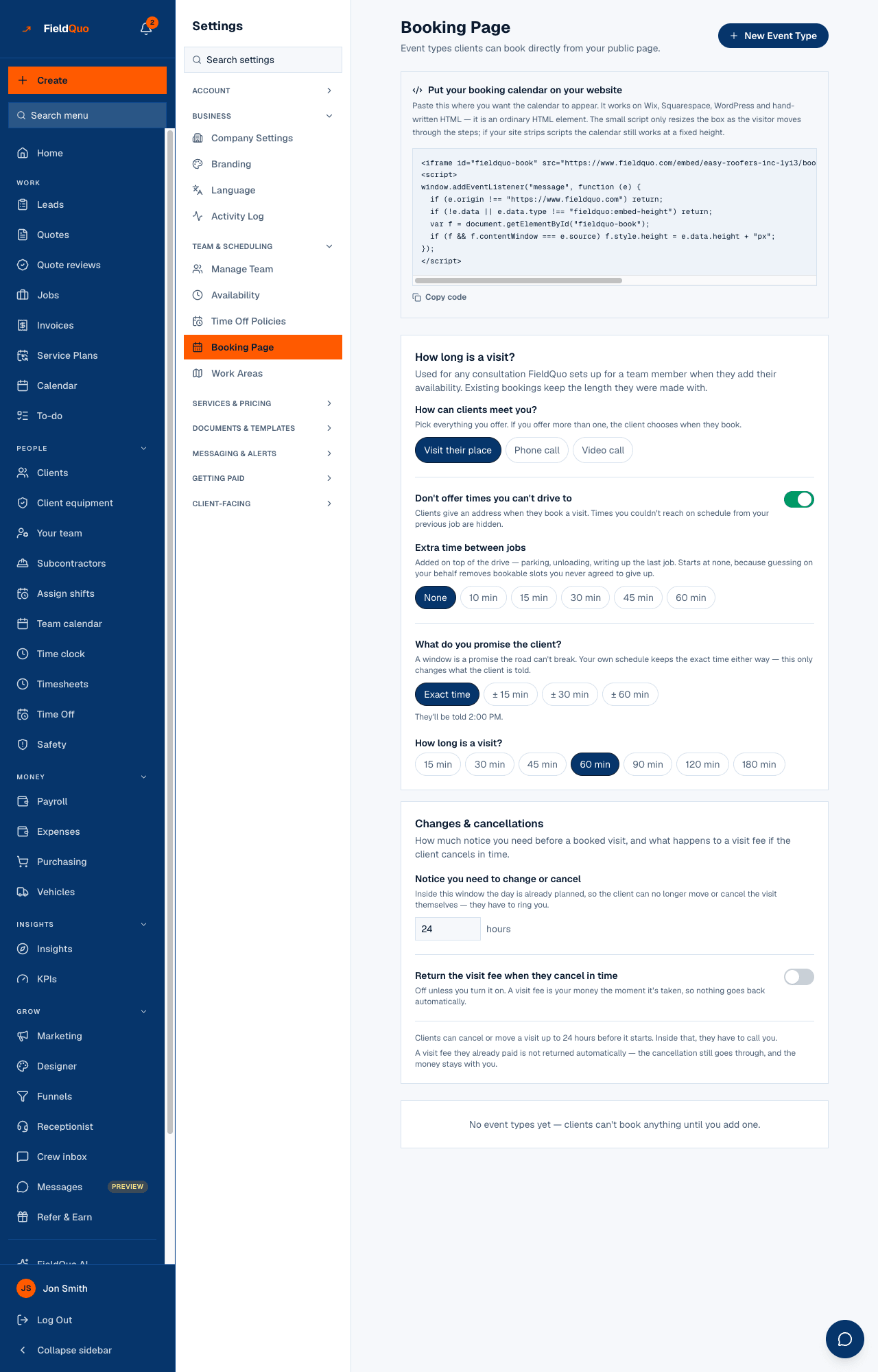
Booking Page configures what a homeowner sees when they book a visit from your website, your bio link or the booking address itself. The subtitle reads Event types clients can book directly from your public page., and the page runs from the code that puts the calendar on your site down to one card per event type.
Two rules shape it. The times on offer come from each person's bookable hours, not from here; this page decides how those times are filtered, described and charged. And every control saves the moment you change it — there is no page-wide save button.
Overview
The page loads only when the company record answers; if it cannot, it refuses rather than showing invented defaults, because the last card prints your cancellation terms as a sentence and a wrong sentence about your own policy is worse than none. What clients see on the other side is described in The booking page.
What is on the screen
Top to bottom, with New Event Type at the top right:
| Card | What it holds |
|---|---|
| Put your booking calendar on your website | The embed snippet and Copy code. An ordinary HTML element that works on Wix, Squarespace, WordPress and hand-written pages — see Embed booking and quote forms. |
| How long is a visit? | How can clients meet you? (Visit their place · Phone call · Video call), Don't offer times you can't drive to with Extra time between jobs (None to 60 min), What do you promise the client? (Exact time, ± 15, ± 30, ± 60 min) with a preview line, and the default length from 15 to 180 min. |
| Changes & cancellations | Notice you need to change or cancel in hours, Return the visit fee when they cancel in time (off by default), Notice needed to get the fee back, and two sentences stating the policy as a client will read it. |
| One card per event type | Name and location, Length, an Active box, Visit fee (blank is Free), and for a fee Promo price with Promo on. A fee without Stripe connected shows Connect Stripe to collect this fee — set it up in Payments. |
| New Event Type form | Name (e.g. In-home consult), Minutes, Buffer before, Buffer after, Location (optional), Create. |
How to add an event type
- Open Settings → Booking Page and press New Event Type.
- Type a Name the client will understand — “In-home consult”, “Measurement visit” — the length in Minutes, any Buffer before and Buffer after in minutes, and an optional Location. Press Create.
- On the new card, set a Visit fee if holding the slot should cost something; leave it blank for Free. The amount is in your billing currency and saves when you leave the box.
- For a fee, optionally enter a Promo price and tick Promo on to offer it at the lower price for now.
- Keep Active ticked. Untick it to take the type off the public page without deleting it.
With no event types, the page says No event types yet — clients can't book anything until you add one. — and the public calendar has nothing to offer. Visit fees are charged through your own Stripe account; see Booking fees and visit deposits.
What each control changes
- How can clients meet you? — pick everything you offer. With one mode the client is not asked; with two or more they choose when they book. Only a visit asks for an address and gets an arrival window.
- Don't offer times you can't drive to — on, the client's address is geocoded and slots you could not reach on schedule from the previous job are hidden. Off, every bookable slot is offered regardless of distance.
- Extra time between jobs — minutes added on top of the drive for parking, unloading and writing up. Starts at None because guessing on your behalf removes slots you never agreed to give up.
- What do you promise the client? — Exact time, or a window of ± 15, 30 or 60 minutes. Your own schedule keeps the exact time either way; only what the client is told changes, and the preview line shows it (“between 1:30 and 2:30 PM”). See Arrival windows and travel buffer.
- How long is a visit? — the length of any consultation FieldQuo creates automatically when someone adds their availability, and the default in the new-type form. Existing bookings keep the length they were made with.
- Notice you need to change or cancel — inside this many hours the client can no longer move or cancel the visit themselves and must ring you. Blank reads as 24, never 0.
- Return the visit fee when they cancel in time — off, a paid fee stays with you whatever happens; on, it is returned for a cancellation made with enough notice. Notice needed to get the fee back may be longer than the change notice, and blank means the same notice.
- Length, Active, Visit fee, Promo price, Promo on on each event type — change the type from now on; bookings already made keep their length and the price they were made at.
A refund notice shorter than the change notice means every cancellation a client can still make themselves also returns the fee; the page says so in amber. Set the refund notice equal or longer if you want a window where they can cancel but the fee stays.
Who can see it
The row needs the user-management capability: the owner, administrators, Managers and Dispatchers. Everyone else gets a no-access panel rather than a form, because nothing here is information a crew member needs — their own bookable hours are on Availability, which stays visible to them. Every write is refused on the server for the same people.
Domande frequenti
Where do the times a client can pick come from?
From each team member's Bookable hours on Availability, filtered by this page's drive-time check, buffer and the event type's length. No bookable hours, no slots.
Can I charge a visit fee without Stripe?
No. The fee is collected through your connected Stripe account; until charges are enabled the card shows Connect Stripe to collect this fee and the fee is not taken.
Does the arrival window move my appointment?
No. Your schedule keeps the exact time. The window only changes what the client is told — “between 1:30 and 2:30 PM” instead of 2:00 PM.
What happens to a visit fee when a client cancels?
Nothing, unless you turned on Return the visit fee when they cancel in time — then it is returned when the cancellation meets the refund notice. The cancellation itself goes through either way.
È stato utile?