

Team
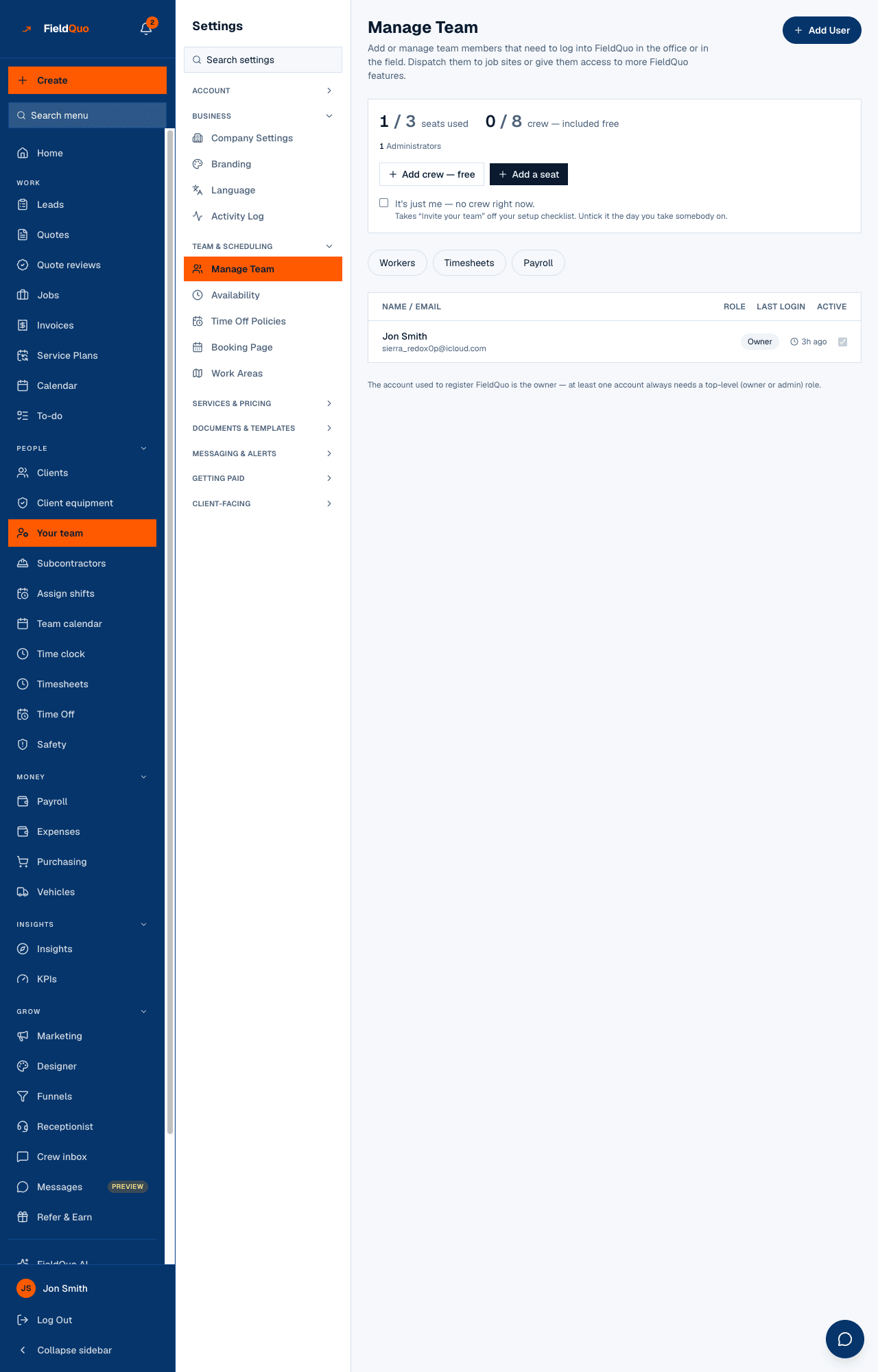
The Manage Team row in Settings is the same screen as Your team in the main sidebar — the seat panel, the roster with each person's access level, Add User and the pending invitations.
ਇਹ ਲੇਖ ਫ਼ਿਲਹਾਲ ਅੰਗਰੇਜ਼ੀ, ਫ਼ਰਾਂਸੀਸੀ ਅਤੇ ਸਪੈਨਿਸ਼ ਵਿੱਚ ਉਪਲਬਧ ਹੈ। ਤੁਸੀਂ ਅੰਗਰੇਜ਼ੀ ਸੰਸਕਰਣ ਪੜ੍ਹ ਰਹੇ ਹੋ। Français · Español
Manage Team under Team & scheduling opens the same page as Your team in the main sidebar. This short entry says what is on it and where the full guide lives: Manage Team.
Overview
The heading reads Manage Team — Add or manage team members that need to log into FieldQuo in the office or in the field. Everything about people and access starts here: inviting, choosing an access level, resending or cancelling an invitation, and deactivating someone. Access levels themselves are explained in Access levels: who sees what.
What is on the screen
- Add User at the top right, and under the seat panel Add crew — free and Add a seat — the free crew login and the paid seat, each greyed with a reason when the plan's cap is reached.
- The seat panel — how many seats used against the plan, and a count per level: Administrators, Managers, Dispatchers, Workers, Crew, Custom.
- Tabs — Workers and Payroll for the owner and administrators, Timesheets for anyone who may open the page.
- The roster — Name / Email, Role as a dropdown you can change for people you outrank, Last Login, and an active switch.
- Pending invitations — each with Invited, how long the link has left, Resend invite and Cancel invite.
Who can see it
The row needs the user-management capability: the owner, administrators, Managers and Dispatchers. A Manager or Dispatcher can invite at the Worker tier — Crew or Estimator — with no dial above their own; changing an existing person's access, making an administrator and revoking access are owner-and-administrator only. Full detail: Invite a team member and Deactivate a team member.
ਅਕਸਰ ਪੁੱਛੇ ਜਾਂਦੇ ਸਵਾਲ
Is this a different page from Your team?
No — same page, two doors. The Settings menu lists it beside the other team rows; the main sidebar lists it under People.
Why is Workers missing from my tabs?
It holds pay rates, so it is drawn only for the owner and administrators; a Manager does not see it. See Payroll settings.
ਕੀ ਇਹ ਮਦਦਗਾਰ ਸੀ?